Free Lessons
Courses
Seminars
TechHelp
Fast Tips
Templates
Topic Index
Forum
ABCD
 
Home   Courses   TechHelp   Help   Contact   Merch   Join   Order   Logon   Forums   
 
Back to Access Developers    Comments List
Upload Images   @Reply   Bookmark    Link   Email   Next Unseen 
SQL Server
Thomas Gonder 
      
2 years ago
Can an application in Access be built that will run in both ACE and SQL Server with the same queries and VBA code?
Alex Hedley  @Reply  
           
2 years ago
Do you have a use case?
Kevin Yip  @Reply  
     
2 years ago
If you only link tables from SQL Server, your Access queries and VBA code can be unchanged, since Access sees linked tables as the same as its native tables.  

What usually requires changes is a migration from local to online connectivity, in which case your Access database has to be (re-) designed to minimize and optimize data retrievals, if such a design hasn't already been made (or, if it's been made, it needs to be improved).  This is because online speed is nowhere close to local speed, even with today's fast Internet.

An experienced developer would design an app with optimized data transfers in mind, always, whether it's for local or online usage, because that is just good practice in any circumstance.

In the 90s, even hard drive speeds were on the slow side, and I had to make data transfer speed a top consideration in design my forms, queries, etc.  Ironically, such a practice is needed once again in designing online apps.
Thomas Gonder OP  @Reply  
      
2 years ago
@ Alex I've been designing in a one file system (not split). With all the talk about using SQL Server, I'm just now getting to the point of wondering, "what's next with this."

@ Kevin Y. So far my, OK laptop is fairly good with a split test running on a slow (100mbs) network. My other laptop, a student model by HP that I bought for testing, is not acceptable, and probably what one could expect from a better 5-year-old desktop computer.

At first, I thought ACE should be good enough, as I was focusing on local network nodes (a backend) that should be able to handle the load for all the people in one office. And it might be. But, as stated above, I'm looking out to the online possibility.

I'm wondering if a lot of the code will need to rewritten to use the SQL server model. I want just one version of the software, maintaining two versions would not be fun.
Kevin Yip  @Reply  
     
2 years ago
You need to do testing in order to tell what kind of changes you need.  Also, some users may think that a query that takes 5-10 seconds to run is acceptable, but others may think it's too slow.  So you need to consult your users too.  If your current app was designed with optimizing data retrievals as a goal, you may stand a good chance of not needing a lot of changes if you move it online.  On the other hand, if your app wasn't optimized that way, it is most likely badly optimized for online usage.  But again, only testing could tell for sure.  Testing would have to be rigorous, of course.  You have to examine the amount of data that go through every query, recordset, loop, etc., and the amount of time it takes to process them.
Thomas Gonder OP  @Reply  
      
2 years ago
@ Kevin Y. At this point, I'm more concerned with what changes would need to be made to the various objects in Access and the VBA code, for it all to keep working the way it does now with ACE.
Kevin Yip  @Reply  
     
2 years ago
Here is an example of a subtle way to speed up a query.  Suppose you have this query that uses a VBA function F():

     SELECT * FROM T WHERE A=a AND B=b AND C=F();

The query runs instantaneously while the Access database is local.  But after you migrate it to online SQL Server, the query runs much more slowly.  This is because of the use of the VBA function, which must be executed at the client because the server doesn't know F().  That means ALL the data must be dragged to the client's side in order for the query to be run, so that F() can be used.

The solution to speed things up is to put as much of the query into a pass-through query:

     SELECT * FROM T WHERE A=a AND B=b;

Name this pass-through query, say, PTQuery.  When this pass-through query runs, much less data will be sent back to Access because of the WHERE clause.  Therefore, much less data will be needed to use the F() function.

Then you run a native Access query with the F():

     SELECT * FROM PTQuery WHERE C=F();

You will get identical results, but at much better speed because much less data is transferred.  I did a quick test: for a table with 90k rows, it reduces the time from 2 seconds to 1 second for the query to return the results.  The larger the table, the greater the speed gain.

This method could be worth quite a bit, since I guarantee not all developers know this because of the subtlety.  It's free of charge to you.

Thomas Gonder OP  @Reply  
      
2 years ago
@ Kevin That's good to know, I'll have to check if I do any of that. Most of my code deals with record sets, so I don't think I do any functions after the SQL string is built.

Again, I'm more concerned with the syntax of SQL and other things that might change. The kind of things that require an actual different statement or command in the VBA or queries.
Alex Hedley  @Reply  
           
2 years ago
MS Article: Comparison of Microsoft Access SQL and ANSI SQL

Untested but could you use something like this
Gist: Convert ANSI SQL to T-SQL

SQL Server Views and Stored Procedures would be the way to go, get the Server to do all the work and only bring back what you need to Access, much more performant.
Kevin Yip  @Reply  
     
2 years ago
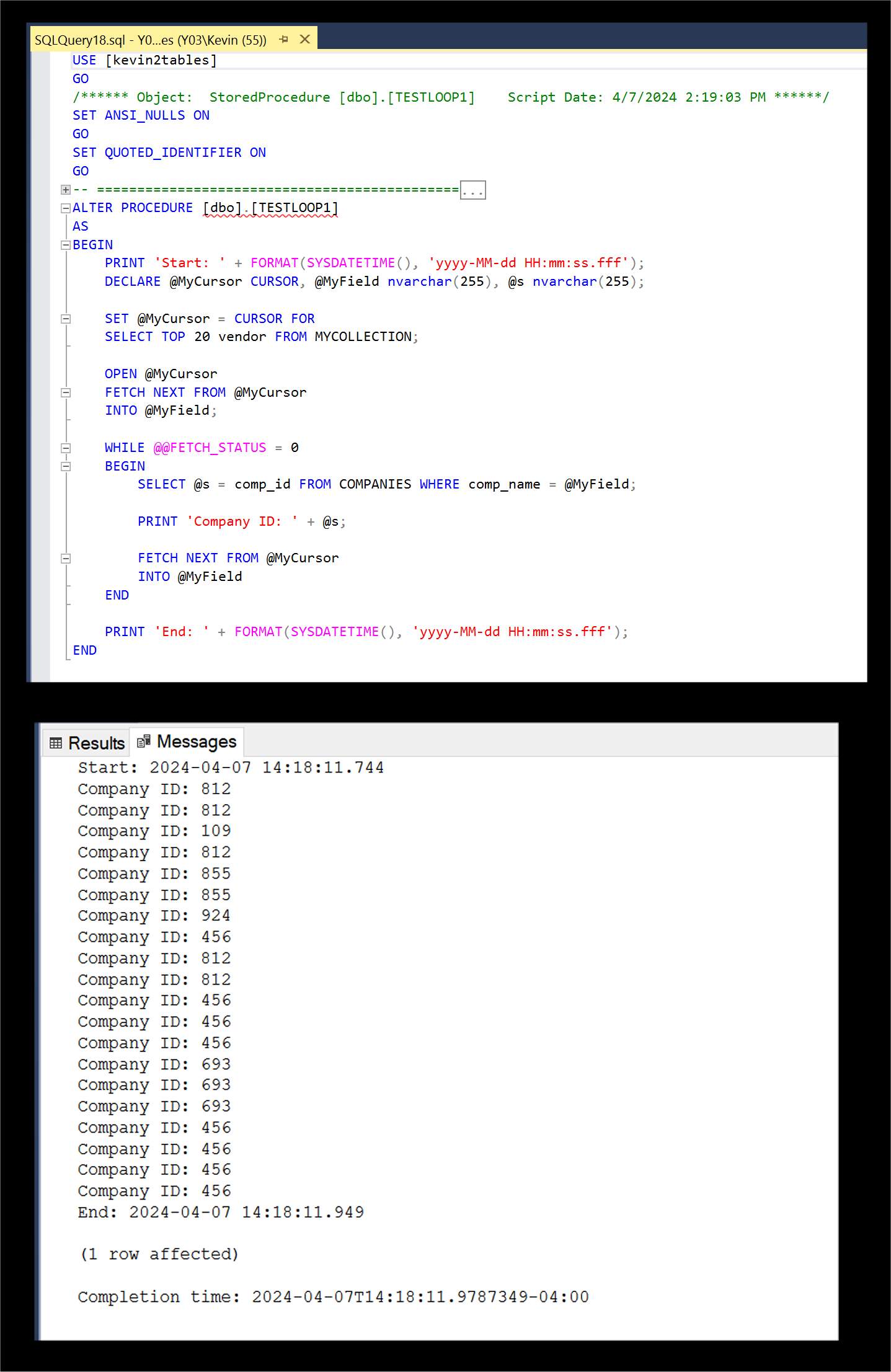
Hi Thomas, the syntax will definitely change if you utilize T-SQL as Alex mentioned.  It is "transactional" SQL made for SQL Server that has a lot more features not found in Access SQL, such as counters, loops, record navigation, variables, and even functions.  See the picture below of what one might look like.  If you have an online SQL Server database, you will (not may) need to utilize those features (to some extent, at least) to optimize speed -- because the more tasks you assign to the server, the less work the client has to do, thus faster speed for the client.
Kevin Yip  @Reply  
     
2 years ago

Thomas Gonder OP  @Reply  
      
2 years ago
I started my application project with the idea that a "storefront" WASN'T going to run over the Internet. As such I've designed everything to run on one PC (for my development), but I have stopped several times to split-test on a 100 mps network on a cheap micro-PC. I've watched the network traffic. The idea was that if an old mini-computer from the 70s and a PC running a port of the DB was fast enough ever since, then ACE dang well should be fast enough on ACCESS with a dedicated PC. So far, I've been very impressed with the performance. As best as I can tell, a lot of traffic is reduced by the simple fact that the majority of the data used by Access sits in memory, without constant need to pull from the ACE backend.

I asked the question as I've gotten to the point in the ADS development where I may want to consider developers that choose to use "cloud" processing and not just a backoffice ACE "server".
Kevin Yip  @Reply  
     
2 years ago
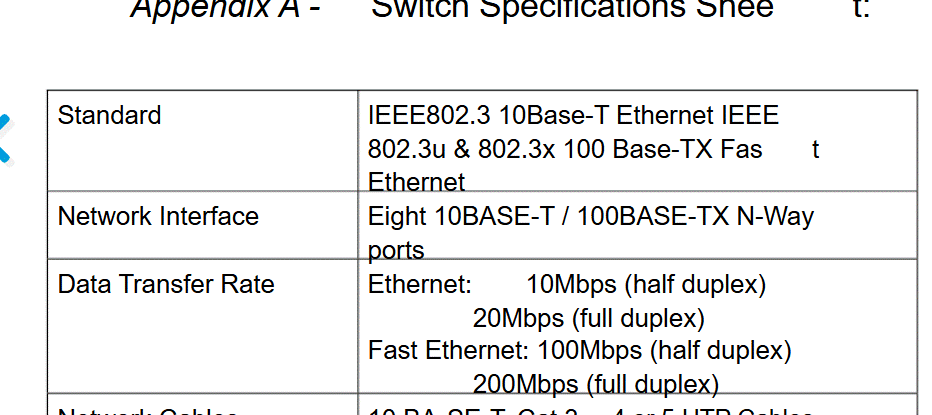
By "network," if you mean local network, it's not the same thing as Internet speed, which is still nowhere nearly as fast as local speed for most users.  I assume you meant your network speed was 100 MBps (megabytes per second), and that is at least eight times as fast as Internet speed, since many users have only about 100 Mbps (megaBITS per second) Internet speed.

10-15 years ago, Internet speed was roughly one-tenth of today's.  So we can assume 10-15 years from now (~2040), we could get 10x Internet speed, which would approach local hard drive speed.  So if you would migrate your database online then, you might not even need to make any changes.  The younger developers among us need to keep this in mind.
Thomas Gonder OP  @Reply  
      
2 years ago

Thomas Gonder OP  @Reply  
      
2 years ago
I somehow didn't get the "b" into my previous post. Typing and proofing error.
It is 100 Mbps, as in GigaFast 800EZ 15 years-old which I'm using for testing.
Still, I'm wondering about actual code changes, not speed.
Kevin Yip  @Reply  
     
2 years ago
Data transfers go both ways, and while fast download speed is the norm nowadays, some users may still have slow upload speed, as low as 5 megabits per second, not even 10BASE-T speed.  So that's another area for testing.

Regarding code changes, I already mentioned a few types: use of T-SQL, re-writing existing SQLs, re-writing VBA to make data transfers more efficient.  Also, business needs, user needs, time available, and of course testing, all determine what types of changes to make.  If a user needs to browse 10k rows in his form, you have to convince him that it can't be done for an online connection.  If it takes too much time to re-write code only to gain a small increase in speed, you have to spend the time and effort that commensurate with what you're going to gain.  Sometimes you have to leave it be instead of trying to make a perfect app.

This thread is now CLOSED. If you wish to comment, start a NEW discussion in Access Developers.
 

Next Unseen

 
New Feature: Comment Live View


The following is a paid advertisement
Computer Learning Zone is not responsible for any content shown or offers made by these ads.
 

Learn
 
Access - index
Excel - index
Word - index
Windows - index
PowerPoint - index
Photoshop - index
Visual Basic - index
ASP - index
Seminars
More...
Customers
 
Login
My Account
My Courses
Lost Password
Memberships
Student Databases
Change Email
Info
 
Latest News
New Releases
User Forums
Topic Glossary
Tips & Tricks
Search The Site
Code Vault
Collapse Menus
Help
 
Customer Support
Web Site Tour
FAQs
TechHelp
Consulting Services
About
 
Background
Testimonials
Jobs
Affiliate Program
Richard Rost
Free Lessons
Mailing List
PCResale.NET
Order
 
Video Tutorials
Handbooks
Memberships
Learning Connection
Idiot's Guide to Excel
Volume Discounts
Payment Info
Shipping
Terms of Sale
Contact
 
Contact Info
Support Policy
Mailing Address
Phone Number
Fax Number
Course Survey
Email Richard
[email protected]
Blog RSS Feed    YouTube Channel

LinkedIn
Copyright 2026 by Computer Learning Zone, Amicron, and Richard Rost. All Rights Reserved. Current Time: 8/8/2026 3:39:58 AM. PLT: 1s