Free Lessons
Courses
Seminars
TechHelp
Fast Tips
Templates
Topic Index
Forum
ABCD
 
Home   Courses   TechHelp   Forums   Help   Contact   Merch   Join   Order   Logon  
 
Back to Access Developer Forum    Comments List
Upload Images   @Reply   Bookmark    Link   Email   Next Unseen 
Update field to MET auto
Debra Triolo 
     
2 years ago
I am unsure how to properly phrase this and apologize if what I am asking is confusing.  I have a field which calculates turnaround time (minus holidays and weekends) called TAT .  I have another field called TAT MET.  When TAT is 5 or below I would like the TAT MET field to automatically populate with either "MET" or "Y" and if the TAT is 6 or more to auto-populate the field with "Not Met" or "N". If the task is not yet started, then the field should remain blank. Thank you in advance for the assistance.
Sami Shamma  @Reply  
             
2 years ago
Hi Debra.

Is TAT MED a field on the table or is it unbound field on the form?
You need to have VBA code that test the value of TAT and store your "MET" or "NOT MET" in TAT MET.
you need the code in both Form "On Current" event as well as TAT "After Update" event.
Thomas Gonder  @Reply  
      
2 years ago
@Debra Regardless of your answer to Sami, you may want to consider renaming your "fields":
TAT to Tat
TAT MET to TatMet
That way your table field and VBA code will have the same *name* and your searching will be easier when changes are needed.
If TatMet is in a table, you may just want to make it a boolean field, since it can't be "MET" and "Y" at the same time.
Also, it's not clear where you are "calculating" TAT, as there are many options for where it can be calculated.
Debra Triolo OP  @Reply  
     
2 years ago
Hi Sami and Thomas!

TAT and TAT_Met are the actual field names and both are actual fields in a larger table.  The TAT field houses the number of days between the time the task is assigned and when it is completed. Its source is a formula.  Based on the number in that field (either greater than 5 or less than 5), the Tat_Met field should automatically reflect Met or not met. This field is currently set up as a short text field.  f it is easier to code it to change to a Y or N, then that would work too.

I am calculating TAT using a formula in the source which utilizes a module I created based on the workdays function and a table that houses holidays. That works without any issues and the values are saved to the TAT field in the table.
Kevin Yip  @Reply  
     
2 years ago
Hi Debra, table fields can only contain *static* data.  They won't be "automatically" updated from calculations somewhere else.  After you do the calculation, you have to *manually* (either with VBA code or manual user entry) update the table field.  Only form fields can be "dynamic."  On a form, if the TAT field is 6, then the TAT_MET field is automatically updated to "Y", with no code nor manual user entry required.  So do that on a form, not in a table.
Debra Triolo OP  @Reply  
     
2 years ago
Hi Kevin.  Yes the fields are on the form are where I have the formula to calculate TAT and where I am looking to have the TAT_Met field auto-populated.  I know I need to create an event with VBA code for the TAT_Met field. As I stated in my original post,  I am just unsure how to code it in order to get it to auto-populate and was looking for guidance on that issue.  I appreciate the comments I have had so far, but none of them address the issue in my post, which is asking for guidance on how to code the event for the TAT_Met field so it will auto-populate based on the value in the TAT field.  If someone can please assist me with that issue, I would really appreciate it.  I have been going back through hours of Richard's videos and have still not come across what I need to help me figure this out.  I am sure it is quite simple and that I am making it harder than it needs to be.  If I did not know how to make a table, name a field or create a simple form, I assure you I would not be posting here.
Alex Hedley  @Reply  
           
2 years ago
Debra Triolo OP  @Reply  
     
2 years ago
Thank you Alex! I will take a look at that video. I appreciate the response!
Alex Hedley  @Reply  
           
2 years ago
You could also do this in a Query with IIF Function so if the TAT is every changed outside of your Form you don't have to go and change TAT_Met manually.
Kevin Yip  @Reply  
     
2 years ago
Hi Debra, as I said, no code is needed (no AfterUpdate needed), because a form field can calculate itself, by being a "calculated field."  Go to TAT_Met's "control source" on the property sheet and type in an expression such as:

     =IIf([TAT]>=6, "Y", "N")

and this expression will automatically calculates and refreshes itself every time the value of TAT is changed.
Debra Triolo OP  @Reply  
     
2 years ago
Thank you. I will take a look at using the IIF function. :)
Debra Triolo OP  @Reply  
     
2 years ago
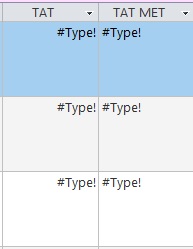
Both fields are functioning great with one exception.  For those records that have not yet been worked on and have no TAT it is instead giving me an error ("Type!") in both fields.   I would rather it just remain blank if there are no values to calculate.
Kevin Yip  @Reply  
     
2 years ago
In that case you need to use "nested IIf()", i.e. IIf() inside another IIf():

   =IIf([TAT]>=6, "Y" , IIf([TAT]<6, "N" ,null))

This means if TAT >= 6. return Y; if it's less than 6, return N; if it's neither, return null.
Richard Rost  @Reply  
          
2 years ago
Or you could use NZ...

=IIF(NZ(TAT,0)>=6, "Y", "N")

Assuming "N" is a valid response for no TAT value. Otherwise you could do:

=IIF(IsNull(TAT),"",IIF(TAT>=6,"Y","N"))
Debra Triolo OP  @Reply  
     
2 years ago
Thank you both!
Debra Triolo OP  @Reply  
     
2 years ago
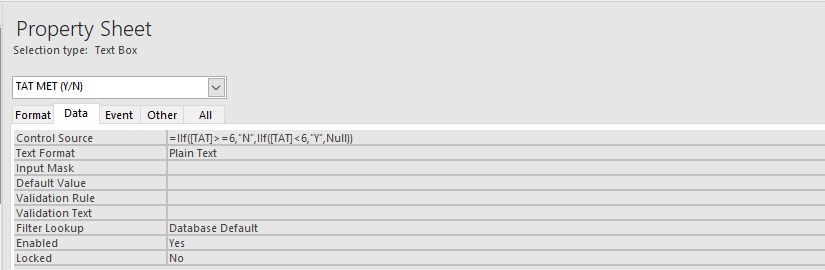
For the original solution you just gave me for the tat_met field- it is still giving me the Type! error. I tried editing it the way Richard suggested and then the way Kevin suggested- neither produced an empty field. Just for the record, My Y and N are reversed >=6, "N" instead of "Y" because our benchmark is a tat of 5 or less.  I do not think that is the issue though. It is reporting results properly, just not handling the null correctly.  

This is what I currently have:

=IIf([TAT]>=6,"N",IIf([TAT]<6,"Y",Null))

I am also trying to add a null statement to the TAT field which is currently running a module using the workdays function to give me a count of days minus holidays and weekends. Tried adding an iif, but it's not the way to go. It keeps rejecting anything I try to do concerning adding a null statement there.
Kevin Yip  @Reply  
     
2 years ago
You may need the Switch() function, which returns null if all criteria are false:

     =Switch([TAT]>=6, "N", [TAT]<6, "Y")

More info about it in Switch Function
Richard Rost  @Reply  
          
2 years ago
Good idea, Kevin. I forgot about Switch.

Debra, what is the data type of TAT right now? Number? Text? Can we see some screen shots of what you're getting?
Debra Triolo OP  @Reply  
     
2 years ago
I have never heard of the switch() function.  I will look into that.  The data type for the TAT field is number.  I will try and upload some screen shots
Debra Triolo OP  @Reply  
     
2 years ago

Debra Triolo OP  @Reply  
     
2 years ago

Debra Triolo OP  @Reply  
     
2 years ago

Kevin Yip  @Reply  
     
2 years ago
The Type error can "cascade" to all dependent values.  Tat Met's value depends on Tat's value, which depends on the value returned by the WorkingDays() function (a custom function you wrote?), which in turn depends on the arguments in the function, which may depend on something else.  If the values that everything depends on has a Type error, then everything down the line will get the Type error.  So you need to trace backward to the source of all these values, and fix the Type error there.
Debra Triolo OP  @Reply  
     
2 years ago
The TAT field in the table is marked for number only and the TAT_Met field in the table is marked for short text.  Should I change over TAT to short text too?  

The working days function I am using is Function WorkingDays(ByVal fromDate As Date, ByVal toDate As Date) As Long
    While fromDate <= toDate
        Select Case True
            Case Weekday(fromDate, vbMonday) > 5
            Case DCount("*", "Holidays", "Holiday = #" & Format(fromDate, "mm/dd/yyyy") & "#") > 0
            Case Else: WorkingDays = WorkingDays + 1
        End Select
        fromDate = fromDate + 1
    Wend
End Function

I have it saved as a module.

I have the following listed as the source for the TAT field:

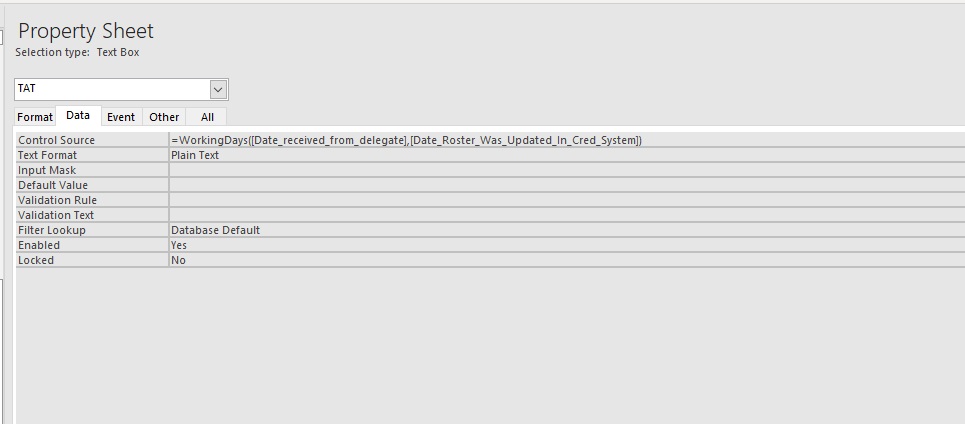
=WorkingDays([Date_received_from_delegate],[Date_Roster_Was_Updated_In_Cred_System])

Debra Triolo OP  @Reply  
     
2 years ago
sorry hit enter.  So it is using the two days for the range and counting the days between minus any weekends or company holidays.  This formula is working great- no complaints there.
Richard Rost  @Reply  
          
2 years ago
OK, that's similar to my function.

Did you try:

=IIF(IsNull(TAT),"",IIF(TAT>=6,"Y","N"))
Kevin Yip  @Reply  
     
2 years ago
"Select Case True" doesn't seem to make sense.  "Select Case" should be followed by the value to be checked.  Secondly, the function doesn't always return a value, because "WorkingDays" doesn't always get a value if you follow the code.  Thirdly, the function doesn't account for the possibility that fromDate and toDate could be null.  If [Date_received_from_delegate] and [Date_Roster_Was_Updated_In_Cred_System] are form fields, they could be null, in which case your function would cause the Type error too.
Richard Rost  @Reply  
          
2 years ago
Good catch, Kevin. I didn't scrutinize the code closely.

Debra: use my function. Watch the videos first.
Debra Triolo OP  @Reply  
     
2 years ago
Is there a way to change working days to account for the null value for those tasks which have not yet been worked, and therefore do not have dates?  I will try your function and watch the videos! thank you!
Alex Hedley  @Reply  
           
2 years ago
Should write some tests with 🐤 Rubberduck
Kevin Yip  @Reply  
     
2 years ago
Hi Debra, if toDate an fromDate can be null, then you can't declare them as Date in your function, because that will instantly cause an error if either date is not a valid date.  So you need to declare them as Variant:

     Function WorkingDays(ByVal fromDate As Variant, ByVal toDate As Variant) As Long

Inside the function, you need to check if toDate and fromDate are valid dates, using the IsDate() function ( https://599cd.com/glossary/access/logical/isdate/?key=599CDBlog ).
Debra Triolo OP  @Reply  
     
2 years ago
I tried using the workingdays function- it works great, but when there are no dates in one or both fields it is still giving me the Type error. I have not yet found any type mismatch. Not sure if I am missing something else.
Kevin Robertson  @Reply  
          
2 years ago
Are you using Richards Function?

This modification will prevent the error and the Function will return a zero if one or both dates are missing.

    Public Function MyNetWorkDays(StartDate As Variant, EndDate As Variant) As Long

        Dim D As Date, OKToAdd As Boolean, H As Long
    
        If IsNull(StartDate) Or IsNull(EndDate) Then
            MyNetWorkDays = 0
            Exit Function
        End If

        ' the rest of the Function goes here
        ' can't post all the code in the public forum

    End Function
Debra Triolo OP  @Reply  
     
2 years ago
Yes I am using his function.  I will add this in. Thank you!
Debra Triolo OP  @Reply  
     
2 years ago
Now it is throwing in a  Name? error in the TAT field and the Type! error in the TAT Met field. There is obvi a name mismatch someplace but I am having trouble tracing it back... I will keep at it though...
Debra Triolo OP  @Reply  
     
2 years ago
I still cannot figure out why it is throwing up these errors. I have been looking through everything all day :(
Debra Triolo OP  @Reply  
     
2 years ago
@Kevin I went back and the source of the TAT field is based on the workingdays function (or MyNetworkDays function - both I have utilized and both work).  

Both of those modules are coded to calculate the number of business days (minus weekends and holidays) taken from two date fields. I double checked my table and those fields that are being used for the calculation are both date fields, with a format of mm/dd/yyyy. I also checked the data type for TAT is set to number, and the TAT_Met field was set to short, I tried that and then I changed it to long, just to see if that changed anything, but there is still no change.  

If there are dates in the two fields being utilized for the workingdays/MyNetworkDays calculation- then the fields are working perfectly reporting the correct number of days, and then entering Y or N based on whether the TAT was met or not.

It is only when one or both of the date fields are blank that I am getting the #Type! error in both columns. I tried adding in all the different suggestions from everyone on how to handle the null values, but nothing is working, likely because of this error. I don't know where else to look. There are no other fields or data sources involved where the data type may be mismatched. Any other suggestions?
Debra Triolo OP  @Reply  
     
2 years ago
So I am going back over everything everyone said and here and realized that the calculations and changes made on the form are not being saved to my table.  I also noticed that Sami had said to try entering the VBA code under "on current', but I do not see a choice for that in the event builder. I see before update, and after update, but not on current.  Is it called something else?  I currently just have the code for both TAT and Tat_Met listed under the source field.... any help will be greatly appreciated. I have been wracking my brain..
Kevin Robertson  @Reply  
          
2 years ago
On Current is in the Form events.
Debra Triolo OP  @Reply  
     
2 years ago
Aha! Thank you Kevin.  I was looking at the field properties.  Let me try putting the VBA code in there and see if that resolves these issues. Thank you!
Debra Triolo OP  @Reply  
     
2 years ago
Kevin - I have myself all turned around and confused.  Am I supposed to put the entire vba code as an event for On Current for the form or just the truncated portion that I currently have listed as the data source for the actual field?  Sorry if this is a dumb question.  I think I have literally fried my brain with this one this time.
Debra Triolo OP  @Reply  
     
2 years ago
I still cannot get this to work properly.  I was thinking perhaps I should try having the code fire off after a date is entered in what would be my end date- have it then calculate the TAT and put the result automatically in the TAT field, which in turn would trigger the Tat_Met field.  This will avoid having a null result, since it won't trigger until a valid date is entered into the date field.  It sounds good in theory, but now the code I was using is not working at all. I am not sure what I screwed up now. Ugh. Help.
Debra Triolo OP  @Reply  
     
2 years ago
Ok I got it to work. Of course it is likely not the proper way to do it, but it appears to be working. I went back and put in both VBA strings under after update for the date field that corresponds to the end date.  One line of code having it go to the tat field and enter in the calculation from working days. Then another line telling it to go to the tat_met field and enter in Y or N based on the whether or not the value in the tat field is >=6. It also appears to now be saving the information to my main table as well. I am way too tired to thoroughly test it out right now, but it looks promising!
Kevin Yip  @Reply  
     
2 years ago
If the control source is a calculated expression, it is a "calculated field," and its value is NOT saved into the table (maybe you mistakenly thought it was).  It is only saved into the table if the control source is just a field name.  If you want to save a calculated expression into a table, using VBA like you just did is, in fact, the correct way.
Debra Triolo OP  @Reply  
     
2 years ago
Hi Kevin.  While what I did is working now for new entries.  It is not working for existing entries- items that were already in the table with the date field filled out that for whatever reason had a blank TAT or Tat_Met field.  Is there any way to have those automatically corrected, or do I need to go into each one and "update" the date field to ensure all are working accordingly?
Kevin Yip  @Reply  
     
2 years ago
You could use an "update query" to update blank fields with expressions so you wouldn't have to update each record manually.  This site should have several free or paid videos on that.

To reiterate, the control source needs be the field name for it to affect the underlying table.
In your pictures above, you put an expression in the control source, and that is not going to update the table.  To affect the Tat or Tat Met field in the table, the control source needs to say Tat or Tat Met.  That is the reason why you have all those blank fields in your table.  This is not something wrong with Access.  This is how things fundamentally work.
Debra Triolo OP  @Reply  
     
2 years ago
Yes I know. I removed the code as the source and replaced it with the actual field.  I had gotten the notion from something I read or watched, but realized last night that in this application it was working against me since I needed the value saved to the main table.  I am still having issues with null.  I have tried putting in the code given to me above to mitigate the null values, but it is definitely the culprit behind the type error. I am still playing with it.   Also, in regard to your last reply- using an update query with a blank expression would overwrite the dates in the fields, so that would not help me update all the records which already have dates, but have not had their TAT or Tat_Met fields updated according to the new VBA code.  The other blank fields I have are the result of tasks which have not yet been completed, they may have a start date, but no end date or no dates at all- resulting in a null value in one or both date fields that the VBA code is based upon.
Debra Triolo OP  @Reply  
     
2 years ago
This is what I am attempting to use to mitigate the null values issue....needless to say it is not working.  Any ideas?

Private Sub Form_Current()
TAT = WorkingDays([Date_received_from_delegate], [Date_Roster_was_updated_in_Cred_System])

If Me.Date_received_from_delegate = Null Then Exit Sub
If Me.Date_Roster_was_updated_in_Cred_System = Null Then Exit Sub
TAT_MET = IIf([TAT] >= 6, "N", "Y")


End Sub

again - the tat and tat_met fields are working fine as long as the date fields are populated. I have this on the form page under on_current
Kevin Robertson  @Reply  
          
2 years ago
The underscores in your field names may be causing problems. Try enclosing in square brackets.
Kevin Yip  @Reply  
     
2 years ago
Hi Debra, you can put criteria into an update query so it will only update fields that satisfy the criteria and won't overwrite fields that don't satisfy them.

Regarding WorkingDays() not being able to handle null arguments, go to the immediate window and test with:

?WorkingDays(Null, #10/15/24#)
?WorkingDays(#10/15/24#, Null)
?WorkingDays(Null, Null)

to see what results (or errors) are returned.
Debra Triolo OP  @Reply  
     
2 years ago
I ran the tests and here are the results:
?WorkingDays(Null, #10/15/24#)
?WorkingDays(#10/15/24#, Null)
?WorkingDays(Null, Null)

--all three yielded the same result : "runtime error 94" invalid use of null.
Debra Triolo OP  @Reply  
     
2 years ago
I *think* I fixed it.  I went back and rewatched Richard's tech help video on the runtime 94 error and used the following:

If IsNull(Date_Received_from_delegate) then exit sub

I did the same for the other date field and now both are no longer producing an error, and also do not appear to have the #Type! error either.  

Now the last time I thought I had this fixed it came back to haunt me. Let's see if this did the trick.  Thank you to everyone for helping me out- sorry to be such a PITA.

This thread is now CLOSED. If you wish to comment, start a NEW discussion in Access Developer Forum.
 

Next Unseen

 
New Feature: Comment Live View


The following is a paid advertisement
Computer Learning Zone is not responsible for any content shown or offers made by these ads.
 

Learn
 
Access - index
Excel - index
Word - index
Windows - index
PowerPoint - index
Photoshop - index
Visual Basic - index
ASP - index
Seminars
More...
Customers
 
Login
My Account
My Courses
Lost Password
Memberships
Student Databases
Change Email
Info
 
Latest News
New Releases
User Forums
Topic Glossary
Tips & Tricks
Search The Site
Code Vault
Collapse Menus
Help
 
Customer Support
Web Site Tour
FAQs
TechHelp
Consulting Services
About
 
Background
Testimonials
Jobs
Affiliate Program
Richard Rost
Free Lessons
Mailing List
PCResale.NET
Order
 
Video Tutorials
Handbooks
Memberships
Learning Connection
Idiot's Guide to Excel
Volume Discounts
Payment Info
Shipping
Terms of Sale
Contact
 
Contact Info
Support Policy
Mailing Address
Phone Number
Fax Number
Course Survey
Email Richard
[email protected]
Blog RSS Feed    YouTube Channel

LinkedIn
Copyright 2026 by Computer Learning Zone, Amicron, and Richard Rost. All Rights Reserved. Current Time: 5/2/2026 7:15:36 AM. PLT: 1s