Free Lessons
Courses
Seminars
TechHelp
Fast Tips
Templates
Topic Index
Forum
ABCD
 
Home   Courses   TechHelp   Forums   Help   Contact   Merch   Join   Order   Logon  
 
Back to Access Forum    Comments List
Upload Images   @Reply   Bookmark    Link   Email   Next Unseen 
Adding Time
Toine van Oudheusden 
     
2 years ago
Dear Richard..

How can i add time tot a whole number. Have a DB for all my music. Like to list all the songs per album/CD with the time. Like to add the time for the total of time on a album of CD. How do i do that?

Anthony
Tilburg
The Netherlands
Kevin Robertson  @Reply  
          
2 years ago
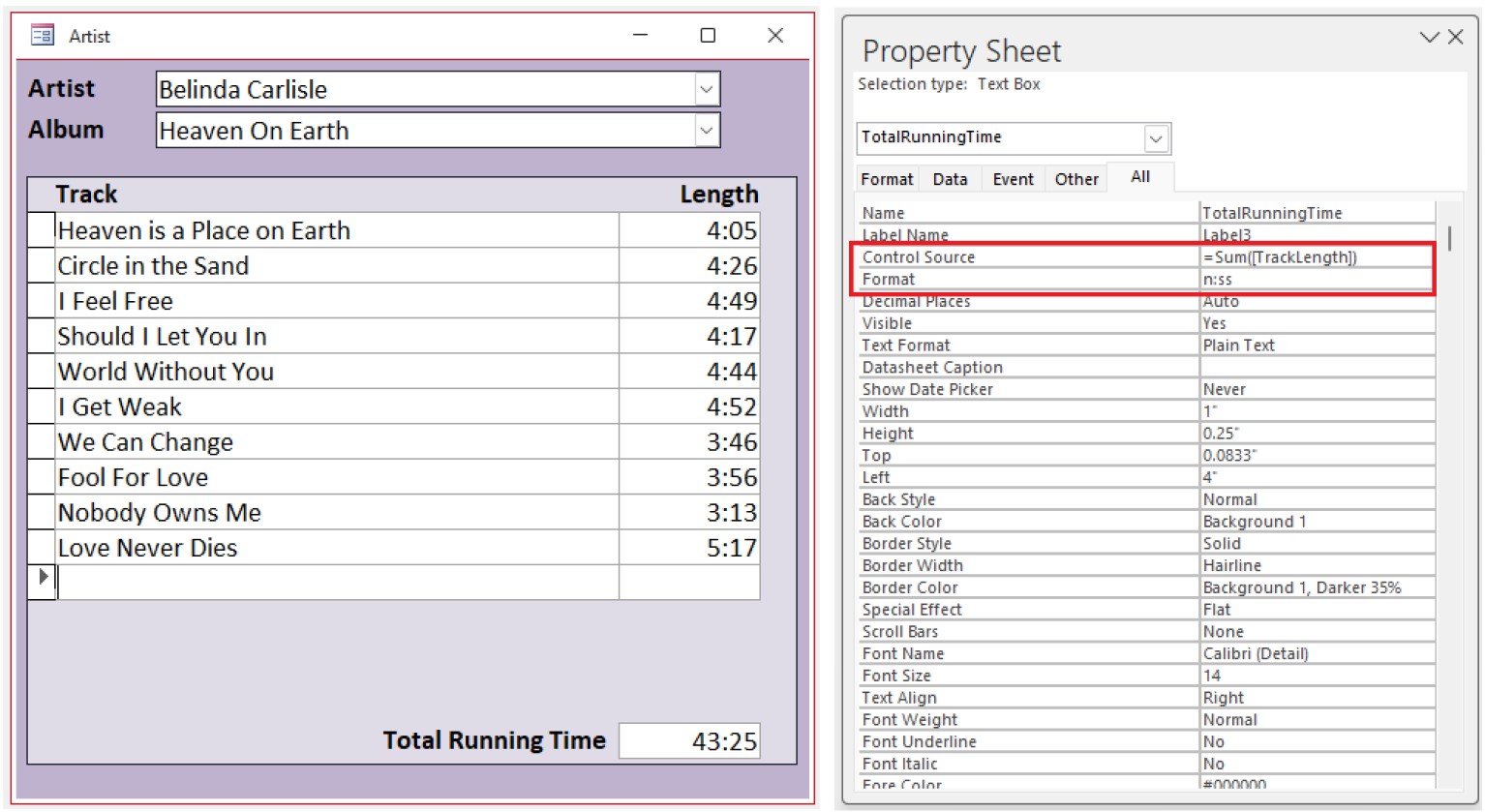
Use the Sum() function to total up the length of each track on the album.
Kevin Robertson  @Reply  
          
2 years ago

Toine van Oudheusden OP  @Reply  
     
16 months ago
Have send this question earlier but did not see an answer or I missed this answer. Can you tell me how to add time together like songs on a CD. I have a database of all my CD's and like to count the track time together. This all works in a subform so how do I do that?
Kevin Robertson  @Reply  
          
16 months ago
I gave you an example last time you posted (with screenshot)

Adding Time
Toine van Oudheusden OP  @Reply  
     
16 months ago
Oh Kevin i am very sorry if i missed that. Won't bother you again.
Toine van Oudheusden OP  @Reply  
     
6 months ago
I have asked this a while ago en got an answer from Kevin? To use the SUM function and he had a screenshot as well. Now I have tried this but this still does not work. I have a music database where I have a table with track information and the timefield is a Date/Time field. If I follow the example from Kevin this wil not add up the total time of all tracks on een CD. What do I do wrong?
Donald Blackwell  @Reply  
        
6 months ago
Please be more specific. See Rule #2.

If Kevin's method in your "Adding Time" post didn't work, we'll need to see your form/field properties in design view to see what is happening
Toine van Oudheusden OP  @Reply  
     
6 months ago

Toine van Oudheusden OP  @Reply  
     
6 months ago
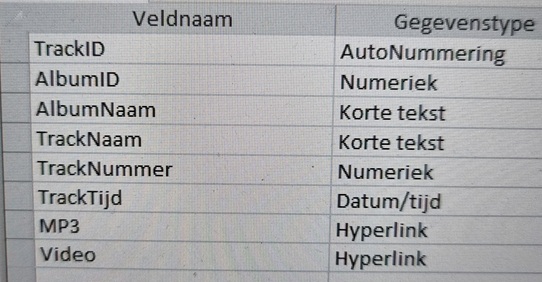
Here are the fields Naam= Name, Tijd= Time, Datum= Date
Donald Blackwell  @Reply  
        
6 months ago
Are you trying to add them up directly in the table, or via a form/subform like Kevin's?

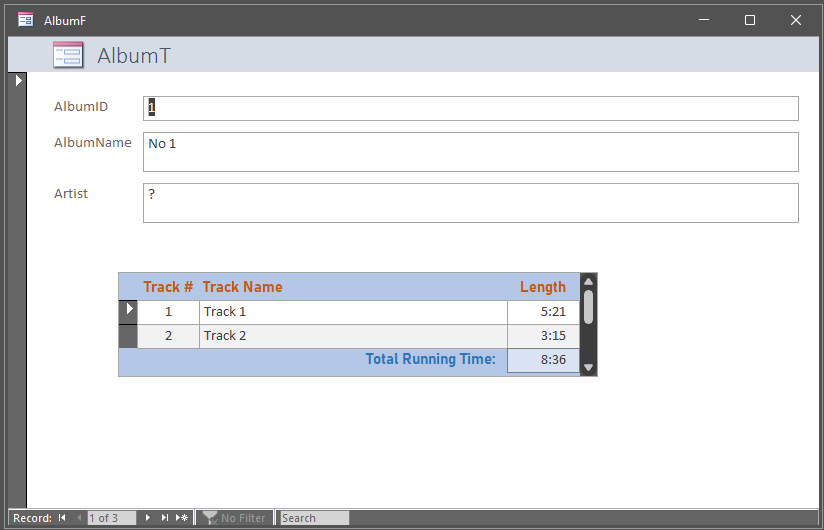
I threw together a couple of dummy tables, (AlbumT,TrackT), and a couple of forms (AlbumF,TrackSF).

In my version of TrackT, for my TrackTime field, I had to set format to h:nn:ss and input mask to 09:09:00 or any time I tried to just enter minutes and seconds it kept the minutes as hours and the seconds as minutes.

Then, in the footer of TrackSF, like Kevin, I added a TotalTrackTime field with format n:ss and control source of =SUM(TrackTime). Once the table took the track time properly, the form functioned similar to Kevin's.
Donald Blackwell  @Reply  
        
6 months ago

Tom Juric  @Reply  
     
6 months ago
1. Access Right Function :
     x=10:21
    (Left[x,2])=21 (do this for all times to find seconds)
2. Sum these seconds and then divide by 60 to get minutes.  
3. ADD numbers from 2 above to your minutes

FOR loop works wonders
Toine van Oudheusden OP  @Reply  
     
5 months ago
Donald What sort of field do I have to put in my table for track time? Is this a Date/Time field or something else? What do I put in for format?
Donald Blackwell  @Reply  
        
5 months ago
Toine In the dummy table I built, I set the track time field to date/time with the following properties:

Format: h:nn:ss
input mask: 09:09:00

Any other way I tried putting the info into the table, it would give me an error or record the minutes as hours. So, for instance, if your track time is 3 minutes 16 seconds, it can be typed in as 0:3:16 or 000316

Then in your Track List form, you'd have your track time field with format: n:ss

And on the form footer, Total Running Time control source "=Sum(TrackTime)" formatted as needed (i.e. if no albums go over an hour, it could be "n:ss" otherwise "h:nn:ss")
Toine van Oudheusden OP  @Reply  
     
5 months ago
I am sorry but it will not work what I do. I think that I do not have all the fieldnames correctly
Donald Blackwell  @Reply  
        
5 months ago
Ok, so let's break it down... In your table, where your tracks are stored, after you have entered them, do they show properly the amount of time of each track in the datasheet view?

If no, then we need to look closer at your table field properties at the bottom, specifically "TrackTijd"

If yes, then we need to look at your forms:

In the subform (or subreport) that lists the tracks, are the track times displaying correctly there? If no, then we need to see the properties of the subreport in design view with the TrackTijd field selected.

If yes, then, where are you trying to get the total running time to show? Is it in the footer of that subform/report or are you trying to get it in the main "Album" formn/report?

If in the footer of the subform, the total field control source should be =Sum(TrackTijd)

If in the main "Album" form, the total field control source should be =Sum(SUBFORMCONTROLNAME.Form!TrackTijd)

Now, if you named the track time control, something different, that will be what will be in the Sum function.
Toine van Oudheusden OP  @Reply  
     
5 months ago
First question: yes I see 04.04 as 4 minuts and 4 seconds.
Second question: yes I see the same time
Total time to show will be in the subform related to the album in the footer but can not get e control source to add sum. The main foem ALBUM does not have a total because this is in the sunform. Do I copy the tracktime from the table in the footer or do i make a nieuw field?
Donald Blackwell  @Reply  
        
5 months ago
The alternative you could try would be to set the Total Running Time in the sub form's control source to be:

=DSUM("TrackTijd", "TRACKT", "AlbumID= "& AlbumID)

Replace "TRACKT" with the name of the table that stores your track information. This code should work regardless of whether you place it in the subform or the mainform. If not, then we'd need to see screen shots of your forms in design view with the total field properties pane so we could see what is going on.
Toine van Oudheusden OP  @Reply  
     
5 months ago
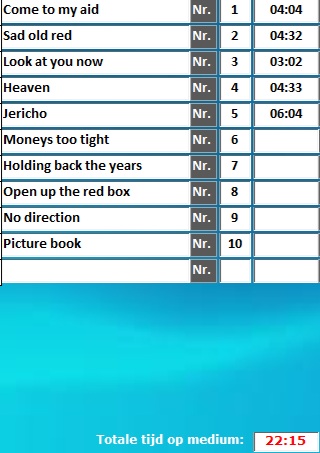
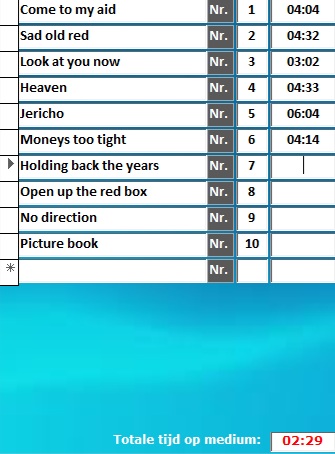
I have found the problem. Input for 5 records (Tracktime) is fine but bij input record 6 the total goes wrong. Where can I find this sollution?
Toine van Oudheusden OP  @Reply  
     
5 months ago

Toine van Oudheusden OP  @Reply  
     
5 months ago

Donald Blackwell  @Reply  
        
5 months ago
Hmm, I was able to get the total in your last picture with a typo, but otherwise, mine is adding up fine.

For example, I entered the times for tracks 1 through 5 the same as yours. If I enter "0.4.14" or "0:4:14" for Track 6, it will give me 26:29. However, if I typo Track 6 and enter "0.40.14" or "0:40:14" then I get the 2:29 as it is rolling over to hours but we're not seeing it. However, yours isn't showing that so I'm not entirely sure what is going on.

In  Time as a Duration, Richard explains about there not being a really good way to track duration which is similar to an album track list i.e. engine hours vs total running time. That video shows some other techniques for handling time that might give more reliable results without having to type in a 0 for hours.

Also, with the method we've been working on, if you do ever add an album with more than an hour with of content, you'll need to modify the total field to display it anyway and might confuse the calculations even more.
Alex Hedley  @Reply  
           
5 months ago
Toine van Oudheusden OP  @Reply  
     
5 months ago
I have been dealing with this problem voor a long time now and still i cant get it to work. Now Richard has said to look at this so i hope it will run scortly.
Alex Hedley  @Reply  
           
5 months ago
Toine if you're still having problems it's probably worth paying for help via the Access Developer Network
Richard Rost  @Reply  
          
4 months ago
Toine this is the core problem...

You are entering track durations as if they are minutes and seconds, but Access is treating them as time of day (hours and minutes). So values like 04:04 are being read as 4 hours and 4 minutes, not 4 minutes and 4 seconds. Once the total passes 24 hours, Access wraps the value, which is why it suddenly drops from 26:29 to 02:29.

Donald spotted this earlier when he noticed the rollover behavior. Nothing is actually breaking, it is just a display and data-type mismatch.

The quickest and easiest fix is to format the track time and the total as hours:minutes:seconds (for example h:nn:ss or [h]:nn:ss for the total). Once you do that, you will see that the math is working correctly and the hours are simply accumulating.

Any other solution, such as storing seconds or forcing mm:ss entry, requires more changes. I'll talk about this a little more in Quick Queries #74, but for now this should get you unstuck and show you what is really happening.

This thread is now CLOSED. If you wish to comment, start a NEW discussion in Access Forum.
 

Next Unseen

 
New Feature: Comment Live View


The following is a paid advertisement
Computer Learning Zone is not responsible for any content shown or offers made by these ads.
 

Learn
 
Access - index
Excel - index
Word - index
Windows - index
PowerPoint - index
Photoshop - index
Visual Basic - index
ASP - index
Seminars
More...
Customers
 
Login
My Account
My Courses
Lost Password
Memberships
Student Databases
Change Email
Info
 
Latest News
New Releases
User Forums
Topic Glossary
Tips & Tricks
Search The Site
Code Vault
Collapse Menus
Help
 
Customer Support
Web Site Tour
FAQs
TechHelp
Consulting Services
About
 
Background
Testimonials
Jobs
Affiliate Program
Richard Rost
Free Lessons
Mailing List
PCResale.NET
Order
 
Video Tutorials
Handbooks
Memberships
Learning Connection
Idiot's Guide to Excel
Volume Discounts
Payment Info
Shipping
Terms of Sale
Contact
 
Contact Info
Support Policy
Mailing Address
Phone Number
Fax Number
Course Survey
Email Richard
[email protected]
Blog RSS Feed    YouTube Channel

LinkedIn
Copyright 2026 by Computer Learning Zone, Amicron, and Richard Rost. All Rights Reserved. Current Time: 5/1/2026 10:43:30 PM. PLT: 0s