Free Lessons
Courses
Seminars
TechHelp
Fast Tips
Templates
Topic Index
Forum
ABCD
 
Home   Courses   TechHelp   Help   Contact   Merch   Join   Order   Logon   Forums   
 
Back to Access Developers    Comments List
Upload Images   @Reply   Bookmark    Link   Email   Next Unseen 
Chronic hourglass while running Access
Nathan Shepard 
      
2 years ago
My laptop has been giving me chronic hourglass every time I Do soething inside my database .

Anyone have any ideas about I can do to correct this?

I thank you for reading and/or responding

Nathan.
Nathan Shepard OP  @Reply  
      
2 years ago

Nathan Shepard OP  @Reply  
      
2 years ago

Nathan Shepard OP  @Reply  
      
2 years ago
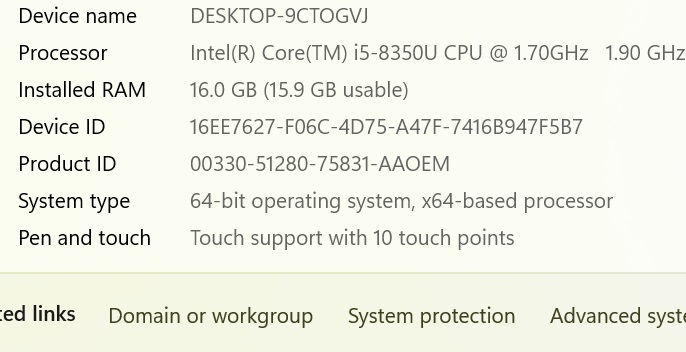
Now I know that my laptop is a dinosaur.  It does suit my purpose.

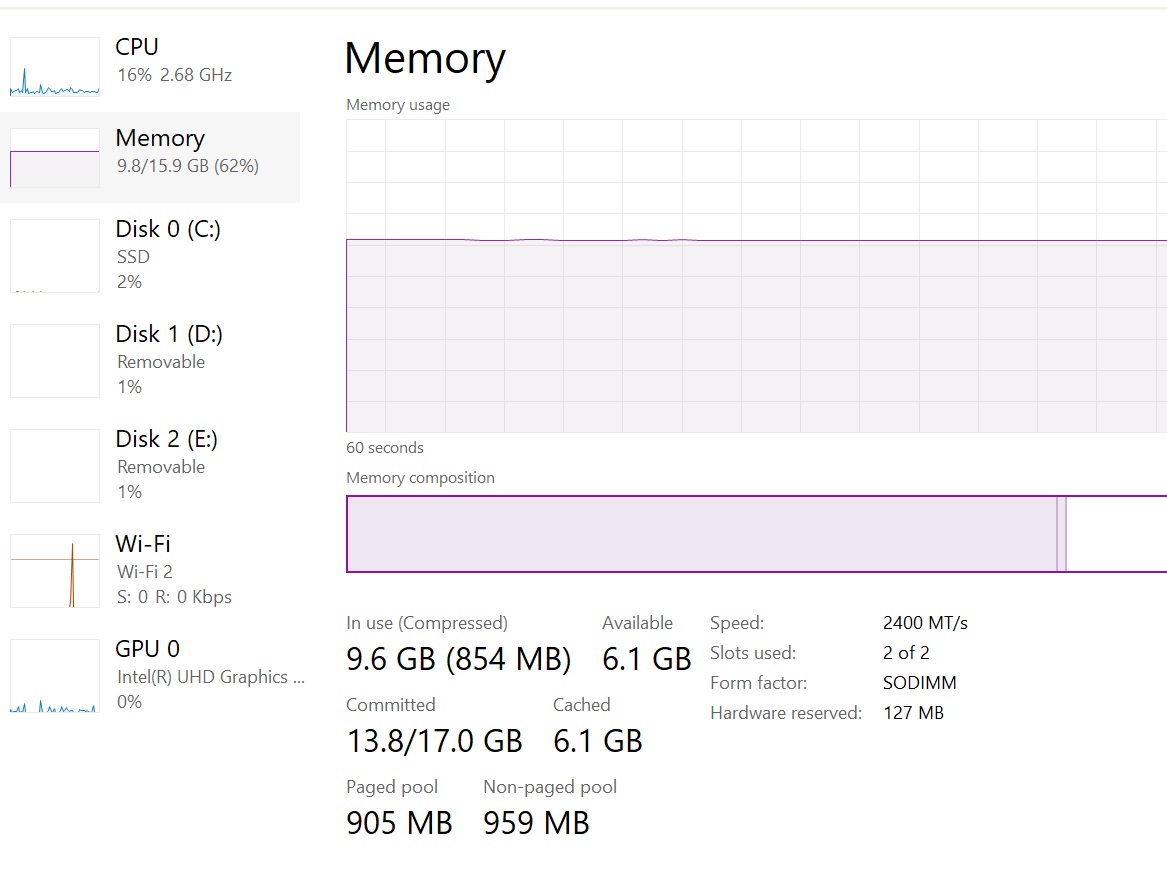
My question is based on the data above.  Am I using too much memory?  What can I do to stop the hourglasses?

Is there away to speed up the processor?

Nathan
Nathan Shepard OP  @Reply  
      
2 years ago
I am using Microsoft Office Which is the 64 bit version.
Nathan Shepard OP  @Reply  
      
2 years ago
Which means a new laptop?  Based on the data above.  am I using to much memory.  It one time she was pretty fast.  tyhe old girl slowed down.

Thank you Sami for responding.

Nathan
Thomas Gonder  @Reply  
      
2 years ago
That's about how much memory my Access application uses.
When you say chronic, for how long does it stay that way until it goes back to the regular cursor?
When it shows as an hourglass, how much CPU% is being used?
Are you setting the cursor to hourglass in your application?
Is there any new code that could be running in a big loop?
Kevin Yip  @Reply  
     
2 years ago
My CPU is twice as fast as your and my RAM double yours, and sometimes Access can still hang, usually when an operation is not optimized and taking too long, and/or forms are corrupted or the database itself is corrupted.

Was your usage diagram taken when Access was hanging?  If not, you need to wait till while Access is hanging, then go to the task manager and check the usage.
John Davy  @Reply  
         
2 years ago
Hi Nathan

An "hourglass always running" means that a visual representation of an hourglass, often used as a loading indicator on computer screens, is continuously displayed, signifying that a program is currently processing information and is actively working on a task in the background, even if it appears to be inactive to the user

Have you tried CTRl ALT Delete and see what is running?  John

This thread is now CLOSED. If you wish to comment, start a NEW discussion in Access Developers.
 

Next Unseen

 
New Feature: Comment Live View


The following is a paid advertisement
Computer Learning Zone is not responsible for any content shown or offers made by these ads.
 

Learn
 
Access - index
Excel - index
Word - index
Windows - index
PowerPoint - index
Photoshop - index
Visual Basic - index
ASP - index
Seminars
More...
Customers
 
Login
My Account
My Courses
Lost Password
Memberships
Student Databases
Change Email
Info
 
Latest News
New Releases
User Forums
Topic Glossary
Tips & Tricks
Search The Site
Code Vault
Collapse Menus
Help
 
Customer Support
Web Site Tour
FAQs
TechHelp
Consulting Services
About
 
Background
Testimonials
Jobs
Affiliate Program
Richard Rost
Free Lessons
Mailing List
PCResale.NET
Order
 
Video Tutorials
Handbooks
Memberships
Learning Connection
Idiot's Guide to Excel
Volume Discounts
Payment Info
Shipping
Terms of Sale
Contact
 
Contact Info
Support Policy
Mailing Address
Phone Number
Fax Number
Course Survey
Email Richard
[email protected]
Blog RSS Feed    YouTube Channel

LinkedIn
Copyright 2026 by Computer Learning Zone, Amicron, and Richard Rost. All Rights Reserved. Current Time: 8/7/2026 10:41:34 PM. PLT: 2s