Free Lessons
Courses
Seminars
TechHelp
Fast Tips
Templates
Topic Index
Forum
ABCD
 
Home   Courses   TechHelp   Help   Contact   Merch   Join   Order   Logon   Forums   
 
Back to Access Developers    Comments List
Upload Images   @Reply   Bookmark    Link   Email   Next Unseen 
Export to 837 files from access
Ian Joseph 
   
2 years ago
I developed an EMR for a Clinic. They now need to be able to transmit 837 files to a secure server for insurance claims. Any ideas on how this could be accomplished in access. I researched a bit on the subject but I just want to get any tips on the subject, maybe someone may have a suggestion that may be helpful.
Kevin Yip  @Reply  
     
2 years ago
You can export Access data to PDF, Excel (xls*), or text (txt, csv) manually on the navigation pane or with VBA commands such as DoCmd.OutputTo.  To do it 837 times, you may use some kind of a looping in VBA.  Regarding transmitting to a secure server, you need to find out from the other party how exactly it's supposed to be done.  Some may require you to send via an FTP client, web interface, EDI, or some other methods.
Ian Joseph OP  @Reply  
   
2 years ago
not 837 times,   standard 837 file format is used for medical billing claims
Kevin Yip  @Reply  
     
2 years ago
If you are talking about EDI 837 documents, you need to be well-versed in the EDI technology and, of course, how to implement it in your system (Access, in your case).  If you can't do it, you need to pay others to do it (there are "EDI service bureaus" that do this).  I've done it, and so has Richard, so it's not impossible.  It all depends on your expertise, and, if you possess the expertise, whether you want to implement it all on your own or hire a consultant to do it.

If you are not well-versed in EDI technology:

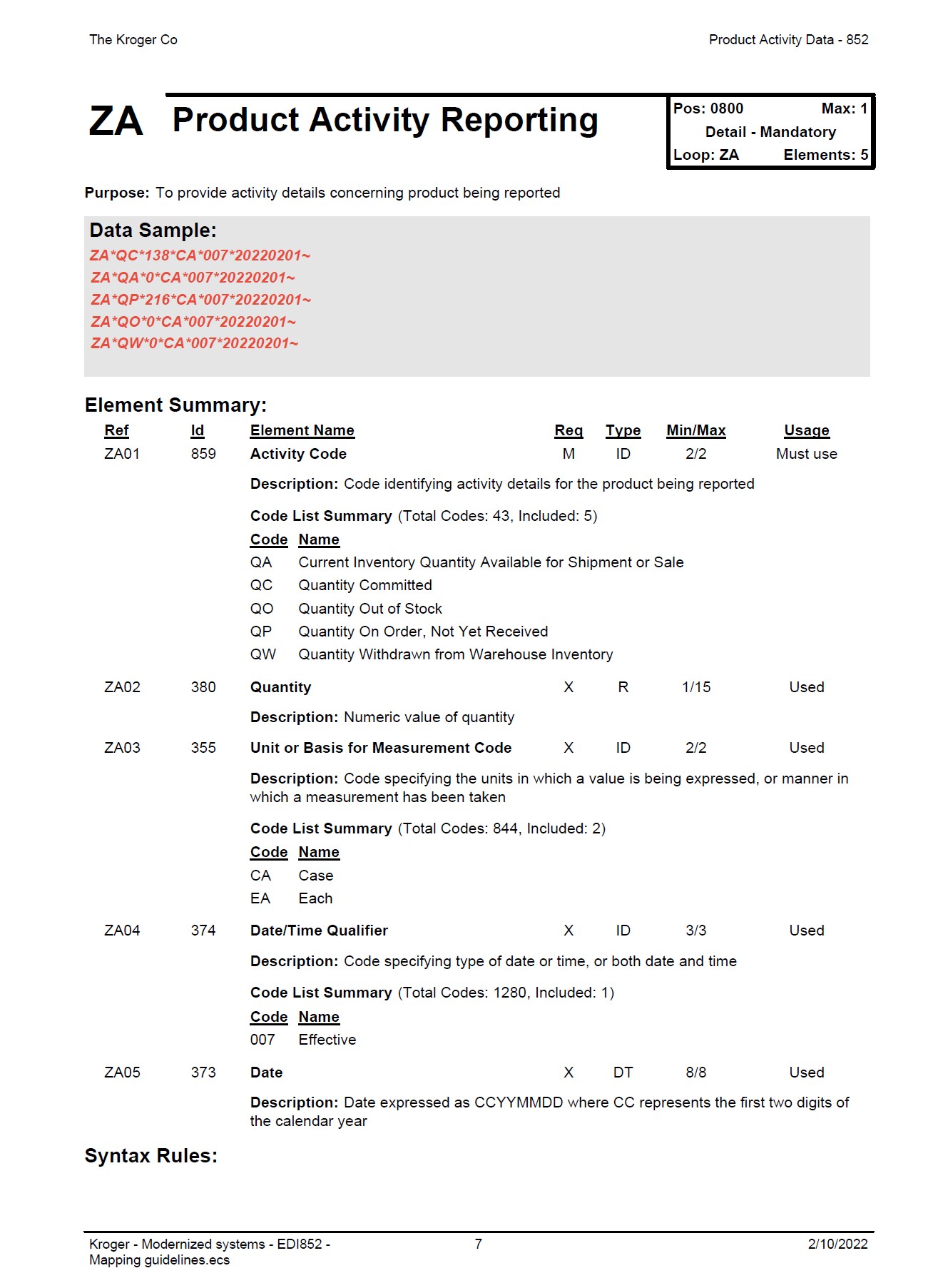
EDI is an industry standard, but it is implemented differently by different companies.  As I said, you need to ask your trading partner (to whom you are to send the 837) for the exact requirements of how to compose such a document.  They will give you an "EDI 837 mapping specification" (or "implementation guide") that will look something like the picture below.  It basically tells you how to compose the document.  It is a highly structured format that you need to adhere to precisely (where to put each field, how long each field should be, etc.).  The red text "data sample" in the picture below is what a finished document would look like.  It is in text format, and it uses delimiters to separate each field.  A line with address info would look like:  

     N3*P.O. BOX 48130~N4*JACKSONVILLE*FL*32247

If you are well-versed in VBA, writing code for exporting Access data to a delimited text file is not the most difficult thing in the world.  The difficult thing is to keep up with the requirements of your trading partners.  They may revise the mapping guide, and you'll have to rewrite your code.  And if you have lots of trading partners and/or lots of documents you have to do this for, the amount of your work multiplies.
Kevin Yip  @Reply  
     
2 years ago

This thread is now CLOSED. If you wish to comment, start a NEW discussion in Access Developers.
 

Next Unseen

 
New Feature: Comment Live View


The following is a paid advertisement
Computer Learning Zone is not responsible for any content shown or offers made by these ads.
 

Learn
 
Access - index
Excel - index
Word - index
Windows - index
PowerPoint - index
Photoshop - index
Visual Basic - index
ASP - index
Seminars
More...
Customers
 
Login
My Account
My Courses
Lost Password
Memberships
Student Databases
Change Email
Info
 
Latest News
New Releases
User Forums
Topic Glossary
Tips & Tricks
Search The Site
Code Vault
Collapse Menus
Help
 
Customer Support
Web Site Tour
FAQs
TechHelp
Consulting Services
About
 
Background
Testimonials
Jobs
Affiliate Program
Richard Rost
Free Lessons
Mailing List
PCResale.NET
Order
 
Video Tutorials
Handbooks
Memberships
Learning Connection
Idiot's Guide to Excel
Volume Discounts
Payment Info
Shipping
Terms of Sale
Contact
 
Contact Info
Support Policy
Mailing Address
Phone Number
Fax Number
Course Survey
Email Richard
[email protected]
Blog RSS Feed    YouTube Channel

LinkedIn
Copyright 2026 by Computer Learning Zone, Amicron, and Richard Rost. All Rights Reserved. Current Time: 8/18/2026 12:34:48 AM. PLT: 1s