Free Lessons
Courses
Seminars
TechHelp
Fast Tips
Templates
Topic Index
Forum
ABCD
 
Home   Courses   TechHelp   Help   Contact   Merch   Join   Order   Logon   Forums   
 
Back to Access Developers    Comments List
Upload Images   @Reply   Bookmark    Link   Email   Next Unseen 
Large CheckBoxes
Julie Bennett 
     
19 months ago
I just watched Large CheckBox video but it refers to Wingdings2.  I have only Wingdings.  I ran all the Wingdings in Excel and the tick came up as a U with two dots above it.  How do I tell Access VBA what to use?  Capital P did not produce a Tick mark in Wingdings.
Julie Bennett OP  @Reply  
     
19 months ago
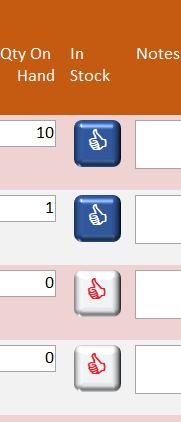
ps: I could not find a ASCII character code for Tick or X symbols.  I used Char252 for true and Char251 for false.  The result made me laugh out loud so I am keeping it.  Although a Thumbs Down for false would be better...  :)
Julie Bennett OP  @Reply  
     
19 months ago

Thomas Gonder  @Reply  
      
19 months ago
I don't recall Richard mentioning it, but if your check boxes have a label, you can click on that too to make a change.
Yeah, that doesn't help to see the checkbox, but even with my eyes, that's not a problem.

But more to your question...

Thomas Gonder  @Reply  
      
19 months ago

Jeffrey Kraft  @Reply  
      
19 months ago
You should be able to download the file.  The Wingding file names are as follows:
    Wingdings             Wingding.ttf
    Wingdings2           Wingdng2.ttf
    Wingdings3           Wingdng3.ttf
Julie Bennett OP  @Reply  
     
19 months ago
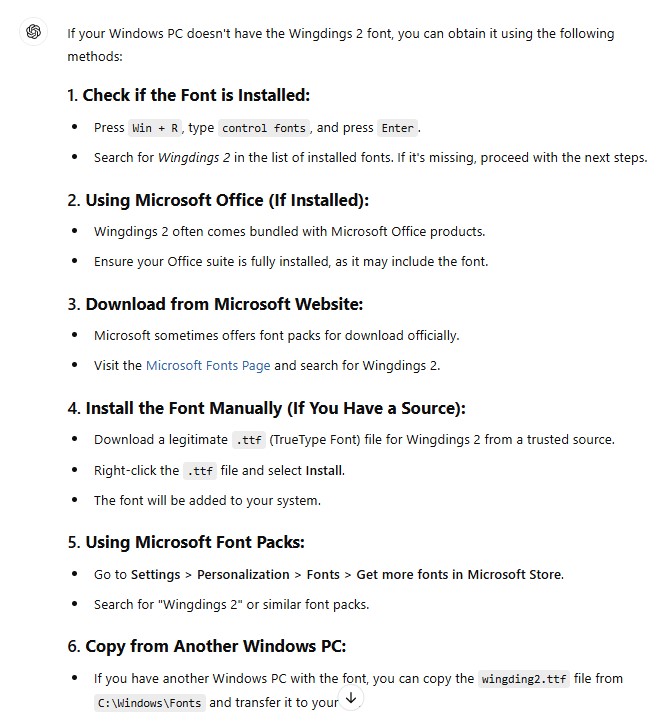
Thank you, Jeffrey.  Unfortunately, Microsoft Windows 11 does not have Wingding2.  I searched for Wingding2.ttf and it came back with several download sites but I don't know if any of them are trustworthy.  I am in Australia so I don't know if this makes a difference to what Fonts Microsoft make available to Win.11.  I'll keep trying for ISCII code.
Julie Bennett OP  @Reply  
     
19 months ago
Thank you also to Thomas for your assistance.
Jeffrey Kraft  @Reply  
      
19 months ago
It's not default with Windows 11 but it should have been part of the Office installation. I have Windows 11. It could also be called Wingdng2.ttf.  On your PC it would be in the C:\Windows\Fonts folder
Thomas Gonder  @Reply  
      
19 months ago
@Julie Maybe the font was an oversight on your language version of Windows. Wingdings, 2, 3 are on my recent laptop with Windows 11 and Office in Spanish. In Windows 11, using Windows File Explorer (ctrl+E) if you go to folder suggested by Jeffrey, on the top left you will see a link "Font settings". See if any are checked and you may want to try "Restore default font settings". If you're using a company computer, perhaps the administrator removed certain Windows files?
Julie Bennett OP  @Reply  
     
19 months ago
I just figured it out.  This is another ploy by Microsoft to get people to sign up to Office 365.  I use a stand alone copy of Office 2021 in Windows 11 and have noticed things in Access that do not work (such as Auto Expand property).  Whilst losing a Font isn't so important, not being able to use all the properties of Access is very annoying.  So, no Tick marks in Access although I found u with two overhead dots worked in Excel and it cannot be copied across to Access.  It is weird but I will learn to work around the small issues.  PS: Font folder only shows one Wingdings.  Thanks to all for your suggestions.
Julie Bennett OP  @Reply  
     
19 months ago
OK. I "bit the bullet" as the saying goes and signed up for Office 365.  I now have Wingdings2 and Auto Expand is working.  I just have to "move with the times", LOL.
Thomas Gonder  @Reply  
      
19 months ago
It's odd, in that I don't have the Windings problem with my Office 2021. But like you, I keep thinking it may be time to go 365 and be done with it, even though Microsoft is way down on the list of companies I like to donate to.
Jeffrey Kraft  @Reply  
      
19 months ago
I'm using Office 2016, have the fonts in question. Don't see myself jumping on the 365 bandwagon for several reason. Yes there are some features that I don't have.  2 I can quickly come up with regarding Excel. One of which is available on the Office 365 Free or whatever it is.  The only problem is as time passes my 2016 will be more and more obsolete(ish). Not much has changed but...
Thomas Gonder  @Reply  
      
19 months ago
@Jeffrey K. It's a tough decision for a developer. We may want to remain backwards compatible, meaning develop on an older base version and hope that it will work on the newer. Or go with 365 which will supposedly always be up-to-date, more standardized, bugs gone that will allow use of certain features. However, then insisting that clients too abandon their existing version and pay the piper. I'm on the fence.

Any ideas from the peanut gallery?
Alex Hedley  @Reply  
           
19 months ago
Only need a paid license for developing
Users can update to any Runtime
Thomas Gonder  @Reply  
      
19 months ago
@Alex One of the reasons I decided to go with Access: a lot of users I deal with consider themselves data analysts. They want to manipulate the data 100 ways and back. While most aren't ready to create a proper relational database, much less all the required jobs (what I call a piece of an application, usually called from a menu), they can master queries and reports without too much training.

It would be nice if Microsoft had an option to add those two (selection queries and reports) to a Runtime, without letting the users get into the design of tables, forms or code. I'm working on this control for the full version, but I don't think I can keep them out of dynamic, delete and update queries.

This thread is now CLOSED. If you wish to comment, start a NEW discussion in Access Developers.
 

Next Unseen

 
New Feature: Comment Live View


The following is a paid advertisement
Computer Learning Zone is not responsible for any content shown or offers made by these ads.
 

Learn
 
Access - index
Excel - index
Word - index
Windows - index
PowerPoint - index
Photoshop - index
Visual Basic - index
ASP - index
Seminars
More...
Customers
 
Login
My Account
My Courses
Lost Password
Memberships
Student Databases
Change Email
Info
 
Latest News
New Releases
User Forums
Topic Glossary
Tips & Tricks
Search The Site
Code Vault
Collapse Menus
Help
 
Customer Support
Web Site Tour
FAQs
TechHelp
Consulting Services
About
 
Background
Testimonials
Jobs
Affiliate Program
Richard Rost
Free Lessons
Mailing List
PCResale.NET
Order
 
Video Tutorials
Handbooks
Memberships
Learning Connection
Idiot's Guide to Excel
Volume Discounts
Payment Info
Shipping
Terms of Sale
Contact
 
Contact Info
Support Policy
Mailing Address
Phone Number
Fax Number
Course Survey
Email Richard
[email protected]
Blog RSS Feed    YouTube Channel

LinkedIn
Copyright 2026 by Computer Learning Zone, Amicron, and Richard Rost. All Rights Reserved. Current Time: 8/8/2026 2:30:16 AM. PLT: 1s