Split Transactions
By Richard Rost

 7 months ago
Managing Split Transactions & Multiple Categories In this video, we talk about how to handle split transactions in Microsoft Access when a single transaction needs to be assigned to multiple categories. We discuss why using a single category field is limiting, explain the use of a split table to resolve these issues, and cover how to set up the one-to-many relationship between the transaction and split tables. We also look at form design considerations for managing and editing split transactions and why this approach makes databases more flexible and scalable. Ariana from Columbus, Georgia (a Platinum Member) asks: I built a check register database in Microsoft Access following along with your video. It works pretty well. I can track deposits, expenses, and I added categories. But some transactions need to be split across multiple categories. I know software like QuickBooks can do this, but I'm trying to do this in my own database. How do split transactions work, and how would I design this in Access? PrerequisitesRecommended Courses
Keywords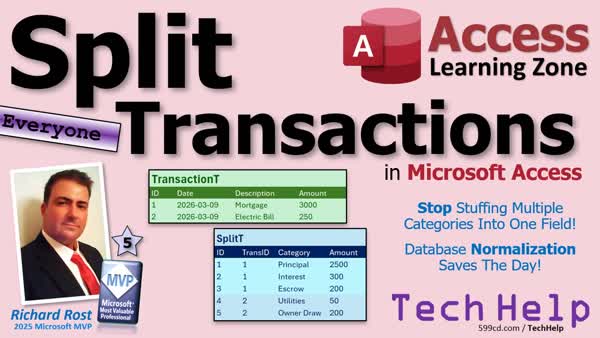 TechHelp Access, split transactions, split table, split categories, check register database, financial database design, one-to-many relationship, junction table, subform, modal pop-up form, editing splits, category table, rolling back transactions, business and personal expenses, order entry analogy
More InformationTranscript Ever run into a transaction that needs to be split across multiple categories? And then you realize your database has no idea how to handle it? Welcome to another TechHelp video brought to you by AccessLearningZone.com. I am your instructor Richard Rost.
Today we are going to talk about split transactions in Microsoft Access and why a simple category field eventually breaks down in real-world financial databases. We will discuss the concept of using a split table, how the relationship works, and why this design is the standard way to handle transactions that belong to more than one category.
Today's question comes from Ariana in Columbus, Georgia, one of my platinum members. She says,
I can track the deposits, expenses, and I added categories. But some transactions need to be split across multiple categories. I know software like QuickBooks can do this, but I am trying to do this in my own database. How do split transactions work and how would I design this in Access?
That is a great question. It is something that comes up a lot when people start building financial databases. I get asked this all the time. In fact, I think it is the number one comment on my check register database.
So let us talk about it. When people first build a check register in Access, they usually start with a very simple design. You have a transaction table with things like the date, description, amount, and you can add a category. Maybe you have got categories like rent, utilities, office supplies, stuff like that. Every transaction gets assigned to exactly one category if you put a category ID in your transaction table.
Honestly, for a lot of simple tracking systems, that is perfectly fine. But the moment you start dealing with real-world financial data, you quickly run into situations where a single transaction can belong to multiple categories.
Let us say you have a home office like I do. You might determine that 10 percent of your household utilities are related to your business and the rest are personal. So when you pay the electric bill, it is technically one payment, but from an accounting perspective, part of that is a business expense and part of it is personal.
Another classic example is a mortgage payment. You write one check to the bank every month, but that payment is actually made up of several pieces. There is principal, there is interest, there are property taxes and insurance that go in through escrow. It is one payment, but those pieces can be categorized differently. If your database only has one category field per transaction, you hit a wall pretty quickly.
Some people will try to work around this by adding categories over here like category one, category two, category three, but that gets messy fast and does not scale well at all. What happens when you need four splits or five? Now you are adding another field and redesigning your database again. It is the same problem you run into with order entry. If you have one order table, you cannot have line one, line two, line three and have like ten lines. What happens if you have 11 items on the order now? You get the same problem.
A better approach is to use a second table, a split table. This would be the same analogy as the order entry table having order details - the line items. A split table simply means that one transaction can be divided into multiple pieces and each piece has its own category and its own amount, but they all belong to the same original transaction.
For example, you might have a $3,000 mortgage payment and a $250 electric bill, but those are broken up into different categories. So your mortgage payment (transaction one) has principal, interest, and the escrow for your taxes and insurance. Transaction two for your electric bill - utilities - that is maybe your business percentage of it, and then the owner percentage of it, which does not get applied toward your business, is the rest of it.
The transaction table holds the actual payment amount that you made to your mortgage or to your electric bill or whatever. The splits table is what holds all of the categories where you apply this stuff to. So you have got a basic one-to-many relationship going on here. From a database perspective, you can have a check register table that has all of your regular transactions in it. This is what I have built in my check register database. That is this guy. This is what Arianna was talking about up front. This is the database she started with. She added a category ID in here so each transaction can belong to a category. I have got a category table here.
You could put a category ID in the check register table, but then you are locked into just one category per transaction. The key is to use a middle table here, a split table. You can think of it like a junction table in a many-to-many relationship, but either way, it is a many-to-many if you are looking at check register transactions to categories, then your splits handle the middle work.
From a form perspective, close these guys down here. Here is the check register form. Here are all your transactions. Here we have a subform that shows the individual splits. This electric payment right here, $20 of it goes toward the actual utilities, the rest of it is an owner draw.
I find editing this stuff, unless you want to be doing constant math, it works better if you make an edit splits button. I lock this thing down so it is read only. Then this edit splits pops up a little modal pop-up window where you can do your math and stuff in here. Then you can either save or cancel it because you do not want the users just messing with stuff back in here. I am going to hit cancel.
The key concept here is that you have got a relationship between two tables. Then, when you do all of your accounting as far as how much money you spent on each of your categories or tax time comes around, you base your reports on the split information because that is the actual categories for your transactions.
Watch my check register video to get started with building that check register. My relationships video will teach you how to set up the tables and form the relationships between them. My subforms video will teach you how to build that subform. This video will teach you about modal and pop-up forms.
If you want to see all of this put together, I just recently finished my Access Developer Level 54 class that covers building this split transaction system in detail, including adding percentages and rolling back transactions if the user hits cancel and all kinds of other stuff. There is a link. I will put a link down below you can click on as well. Let us check it out.
The big takeaway today is if a transaction can belong to more than one category, you solve it with a split table, not extra category fields. That simple design change makes your database much more flexible and scalable.
Post a comment down below and let me know what you thought of today's video and how you might use split tables in your own database.
That is going to be your TechHelp video for today brought to you by AccessLearningZone.com. I hope you learned something. Live long and prosper, my friends. I will see you next time. Intro In this video, we talk about how to handle split transactions in Microsoft Access when a single transaction needs to be assigned to multiple categories. We discuss why using a single category field is limiting, explain the use of a split table to resolve these issues, and cover how to set up the one-to-many relationship between the transaction and split tables. We also look at form design considerations for managing and editing split transactions and why this approach makes databases more flexible and scalable. Quiz Q1. What is the main problem with using a single category field for transactions in a financial database?
A. It prevents storing transaction amounts
B. It restricts each transaction to only one category
C. It complicates importing data
D. It makes sorting transactions impossible
Q2. Why does adding more category fields (Category 1, Category 2, etc.) not solve the issue efficiently?
A. It makes reports easier to generate
B. It is scalable for large transaction databases
C. It leads to messy, non-flexible, and unscalable design
D. It does not work with standard SQL databases
Q3. What is the better solution for handling transactions that belong to multiple categories?
A. Create a new database for each category
B. Add multiple amount fields in the transaction table
C. Use a split table that relates transactions to categories
D. Use a spreadsheet instead of a database
Q4. What type of relationship does a split table typically represent between the transaction table and categories?
A. One-to-one
B. Self-join
C. Many-to-one
D. One-to-many
Q5. What real-world scenario was used as an example of split transactions in the video?
A. Restaurant meal split among friends
B. Mortgage payment split into principal, interest, taxes, and insurance
C. Stock portfolio allocation
D. Multiple vendors in a purchase order
Q6. In database design, what is another situation compared in the video that benefits from a split or detail table?
A. Single user login
B. Product inventory tracking
C. Order entry systems with multiple line items
D. File attachment management
Q7. What is the main advantage of using a split table for financial transactions?
A. Preventing data backup issues
B. Enabling transactions to belong to multiple categories for flexible tracking and reporting
C. Preventing form creation
D. Replacing the need for a check register
Q8. How do forms typically handle split transactions in Access, as described in the video?
A. By locking the main form and requiring manual updates to the table
B. By using a main form for transactions and a subform for splits
C. By creating a report for every transaction
D. By using only modal dialog boxes for every data entry
Q9. Where should reports about category spending be based when using split transactions?
A. The main transaction table
B. The subforms only
C. The split table, since it contains the true category details
D. Only the form layout
Q10. What is the big takeaway emphasized at the end of the video?
A. Single category fields should always be used
B. Split tables make databases less flexible
C. If a transaction can belong to more than one category, use a split table instead of extra category fields
D. Limiting the number of splits simplifies database design
Answers: 1-B; 2-C; 3-C; 4-D; 5-B; 6-C; 7-B; 8-B; 9-C; 10-C
DISCLAIMER: Quiz questions are AI generated. If you find any that are wrong, don't make sense, or aren't related to the video topic at hand, then please post a comment and let me know. Thanks. Summary Today's video from Access Learning Zone covers how to handle split transactions in Microsoft Access, specifically situations where a single financial transaction needs to be allocated across multiple categories. This is a common issue that arises as people start building more advanced financial databases, and a single category field just cannot keep up with real-world complexity.
Often, your first check register might be a straightforward setup with each transaction having a date, description, amount, and a category. For small or simple tracking purposes this works just fine. However, once you encounter transactions that truly belong in more than one category it becomes an issue. For example, if you run a home office, maybe only part of your utility bill is a business expense while the rest is personal. When you pay that bill, it is a single payment but it should be categorized in two places.
Another classic example is a mortgage payment. You send the bank one check, but that amount pays toward principal, interest, property taxes, and possibly insurance. Each of those components should be placed in its own category, and a system that only allows for one category field becomes inadequate.
Some people try to patch this by simply adding more category fields to the transactions table, naming them things like Category1, Category2, etc. The issue with this design is that it quickly becomes unmanageable as the number of categories a transaction can involve is unpredictable. This approach is also structurally flawed since every time you need another split, you have to redesign your table.
A better way is to introduce a split table. In database design, this works just like an order entry system, where you have an order table and a separate table for order details or line items. The split table allows you to break a single transaction into several parts, with each piece having its own category and amount but still being tied to the original transaction.
For example, your mortgage payment might be broken down with portioned amounts for principal, interest, and insurance, each recorded as a split under the same transaction. Similarly, your electric bill could be divided between business and personal use. The main transactions table holds the total amounts and payment information, while the splits table handles the breakdown of how those amounts are distributed by category.
From a relationship standpoint, the transactions table connects to the splits table in a one-to-many relationship. Each transaction can have multiple splits, one for each category it touches. This setup is very similar to a junction table used in many-to-many relationships.
When building your forms, you'd have a main transaction form and a subform to show its splits. Editing splits is much easier if you provide a dedicated button to open up a special modal popup form for managing and recalculating these splits. Making this popup read-only until the user chooses to make edits ensures data integrity and user-friendliness.
It is important to base your financial reports on the split records, since they accurately reflect category allocations needed for things like business deductions or tax calculations.
If you want to build a system like this, I recommend watching my check register tutorial for the basics, then look for videos covering relationships and subforms in Access to handle the table design and form setup. I also have a tutorial focused on modal and popup forms for handling splits efficiently.
For a more comprehensive guide, I have a course called Access Developer Level 54, which walks through the creation of a split transaction system, including advanced features like allocating payments by percentage and supporting transaction rollbacks if a user cancels out of editing.
The main principle from today's lesson is that when a transaction can belong to more than one category, using a split table is the best solution. This method keeps your database flexible and able to handle growth as your needs become more complex.
You can find a complete video tutorial with step-by-step instructions on everything discussed here on my website at the link below. Live long and prosper, my friends. Topic List Problems with single category fields in transactions
Real-world need for split transactions
Examples of multi-category financial transactions
Design issues with multiple category fields
Introduction to split tables for transactions
One-to-many relationship for transactions and splits
Analogies with order line items in databases
Configuring a splits table with category and amount
Subform display of transaction splits
Editing splits using modal pop-up forms
Reporting on categories using split data
Benefits of split tables for flexible database design Article When you start building a financial tracking database in Microsoft Access, it is common to create a simple transaction table. This table might include fields for the date, description, amount, and a single category. For many basic scenarios, having one category per transaction might seem sufficient. You could assign categories such as rent, utilities, office supplies, and so on, simply by including a CategoryID in the transaction table that links to a separate category table.
However, real-world financial tracking often requires more flexibility. In practice, you will quickly encounter transactions that need to be split across multiple categories. For example, imagine you have a home office and determine that 10 percent of your electric bill is a business expense while the rest is personal. When you pay the bill with a single payment, you need to record it as one transaction in your database, but account for that payment in two different ways. Another example is a mortgage payment, which typically includes several components: principal, interest, property taxes, and insurance. These parts of the payment belong in different categories even though you made just one payment.
If your database design only allows for one category per transaction, you hit a wall. Some people try to work around this by adding extra fields to the transactions table - Category1, Category2, and so on - but this quickly becomes messy and unmanageable. If you have a transaction that needs four or five splits, you end up redesigning your table each time. This method does not scale and is considered poor database design.
A far better solution is to use a split table. This approach is similar to how order entry works with an order details table for line items. The split table allows you to divide a single transaction into multiple parts, with each part having its own category and amount. All of these parts are still linked to the original transaction.
To implement this in Microsoft Access, you start by having your main transactions table (for example, CheckRegister), which records high-level information about each payment - such as the total amount paid, date, and payee. Instead of including a CategoryID directly in this table, you create a separate SplitTransactions table. Each record in this split table will reference the main TransactionID, the CategoryID, and the specific amount associated with that category for this transaction.
For example, suppose you have a mortgage payment of $3,000. In the SplitTransactions table, you might have one entry for principal, another for interest, and more for escrow items, each with its portion of the amount and its own category. Similarly, for your $250 electric bill, the split table might have one entry categorizing the business portion and another for the personal portion.
The relationship between these two tables is one-to-many: each transaction in the main table can have multiple associated records in the split table. This setup provides flexibility, making it easy to handle any number of splits per transaction without altering your database structure. The categories themselves are managed in a third table (Category), which holds the list of possible categories and is linked by CategoryID.
When it comes to user interface, a common approach is to use a main form that displays the transaction and a subform that lists the split details for that transaction. For instance, with the mortgage example, the form shows the transaction at the top and the multiple split entries below. This allows users to see and edit how the total amount is divided among categories. For better usability, you may want to provide a dedicated button to open a pop-up form for editing splits, especially if calculations are involved. This pop-up can allow the user to add, modify, or remove splits and ensure that the sum of splits matches the total transaction amount before saving.
All reporting and analysis for purposes like tax preparation or budgeting should reference the split table, not just the transaction table. Queries and reports can easily sum amounts by category, giving you accurate totals even when individual transactions are split across multiple categories.
To summarize, the key concept is that whenever you encounter transactions that span more than one category, you should implement a split table structure instead of multiple category fields on your transactions table. This not only streamlines your database but makes it far more flexible and scalable, handling future requirements with ease. Here is a simplified example of the potential table structure:
Table: Transactions
- TransactionID (Primary Key)
- Date
- Payee
- Amount
Table: SplitTransactions
- SplitID (Primary Key)
- TransactionID (Foreign Key)
- CategoryID (Foreign Key)
- SplitAmount
Table: Categories
- CategoryID (Primary Key)
- CategoryName
By setting up your database this way, you can effectively manage even complex real-world financial scenarios. This approach gives you the same flexibility as accounting software like QuickBooks and puts you on the path to building robust financial tracking systems in Access. Primary Topics
split transactions, database design, Access tables, financial categorization, one-to-many relationships, split table, check register, subforms
Secondary Topics
modal forms, pop-up forms, user interface design, scaling databases, junction tables
|





