Free Lessons
Courses
Seminars
TechHelp
Fast Tips
Templates
Topic Index
Forum
ABCD
 
Home   Courses   TechHelp   Forums   Help   Contact   Merch   Join   Order   Logon  
 
Back to Edit Mode    Comments List
Upload Images   @Reply   Bookmark    Link   Email   Next Unseen 
Undo Does Not Work if You Edit a Field in Subform
Nils Larsen 
   
11 months ago
I watched the extended cut and created the identical buttons and code.  When in edit mode, I can edit all fields in both the form and subform as expected and as shown in the free video.  But, if I edit something in the main form, then edit something in the subform, the main form is saved (ie no longer dirty, no more pencil icon), This makes the "undo" code in the Cancel button not undo anything when the Cancel button is clicked.  Also, if I only edit something in the subform (it becomes dirty with the pencil icon), then when I click on the Cancel button (in the main form), the subform becomes saved (no longer dirty) by the act of essentially moving focus to a control on the main form (the Cancel button).  Am I missing something?
Jeffrey Kraft  @Reply  
      
11 months ago
Richards code for the cancel button only takes into consideration the Parent form. If you are editing and want to cancel on the subfrom just hit the escape key.  I started writing code for the Subform - it's a little long and then I realized that you have to take into consideration it being single or continuos.
Nils Larsen OP  @Reply  
   
11 months ago
Thanks Jeffrey!   The main point of the extended cut video was dealing with the subform, but then the Cancel button part didn't pertain to the subform, as you mention.  Still a net-positive for me for learning.
Best,
Nils
Jeffrey Kraft  @Reply  
      
11 months ago
Nils.  Thats what bugged me about the video as well.  I played around and was able to hit the subform.  But then realized it wasn't going to work with it being continuous.  I had another idea that I would do something like Access Developer 17 Remove Multi Select.  In that video he has 2 list boxes.  One is a copy of the first.  My train of thought was go have unbound fields that had copies of the data.... it (the idea) died when I thought about the continuos form however.  Sigh.
Sami Shamma  @Reply  
             
11 months ago
If you gentlemen are interested in a complete UNDO system, watch  Access Developer 46
Jeffrey Kraft  @Reply  
      
11 months ago
I will eventually get there.  Still watching Dev. 35.  11 weeks from now I will get it...
Nils Larsen OP  @Reply  
   
11 months ago
Thanks, Sami and Jeffrey—

I started using Access back in ’94 when I was working in Geographic Information Systems (GIS). I used it quite heavily for several years, and then more intermittently as I developed personal and entrepreneurial databases—for my antique map business, and more recently for my wife’s fashion business.

I figured it was about time to go back to basics, build a solid foundation, and work through the classes methodically.  It will probably take me a little longer than 11 weeks though... ha!

Best regards,
Nils
Sami Shamma  @Reply  
             
11 months ago
Hi, Nils.

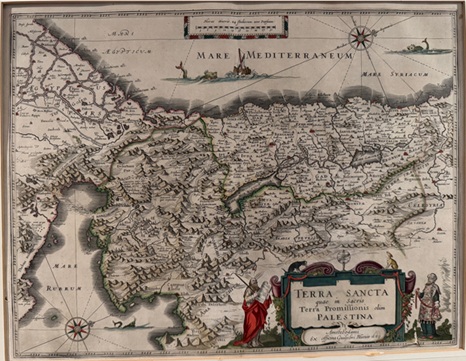
About 35 years ago, I was gifted an antique colored map of the Holy Land dated 1624.
Nils Larsen OP  @Reply  
   
11 months ago
Probably an Abraham Ortelius map. Nice!  I may make some updates and upgrades to my MapDatabase and will reach out on the forum with any questions or help needs.  Thanks again!
Sami Shamma  @Reply  
             
11 months ago

Sami Shamma  @Reply  
             
11 months ago

Nils Larsen OP  @Reply  
   
11 months ago
Just now saw this Sami!  Nice map, Blaeu's not Ortelius' map.  I have a question and will reach out on the Search/Filter thread for that.  Check out my site if you like larsenfinemaps.com. I have one Blaeu map on there...  OK, back to VBA.
Sami Shamma  @Reply  
             
11 months ago
Nice website. Maybe one day I will add to my lonely map.

As I said, my map was a gift. What do you think its current value is?

This thread is now CLOSED. If you wish to comment, start a NEW discussion in Edit Mode.
 

Next Unseen

 
New Feature: Comment Live View


The following is a paid advertisement
Computer Learning Zone is not responsible for any content shown or offers made by these ads.
 

Learn
 
Access - index
Excel - index
Word - index
Windows - index
PowerPoint - index
Photoshop - index
Visual Basic - index
ASP - index
Seminars
More...
Customers
 
Login
My Account
My Courses
Lost Password
Memberships
Student Databases
Change Email
Info
 
Latest News
New Releases
User Forums
Topic Glossary
Tips & Tricks
Search The Site
Code Vault
Collapse Menus
Help
 
Customer Support
Web Site Tour
FAQs
TechHelp
Consulting Services
About
 
Background
Testimonials
Jobs
Affiliate Program
Richard Rost
Free Lessons
Mailing List
PCResale.NET
Order
 
Video Tutorials
Handbooks
Memberships
Learning Connection
Idiot's Guide to Excel
Volume Discounts
Payment Info
Shipping
Terms of Sale
Contact
 
Contact Info
Support Policy
Mailing Address
Phone Number
Fax Number
Course Survey
Email Richard
[email protected]
Blog RSS Feed    YouTube Channel

LinkedIn
Copyright 2026 by Computer Learning Zone, Amicron, and Richard Rost. All Rights Reserved. Current Time: 4/29/2026 11:49:58 PM. PLT: 0s