I'm in a single user enviroment with no connection to a backend database.
I have a routine where when I update a field an after update event kicks in to update the date the item was changed.
DetailsPrivate Sub StatusComboBtn_AfterUpdate() Dim S As String
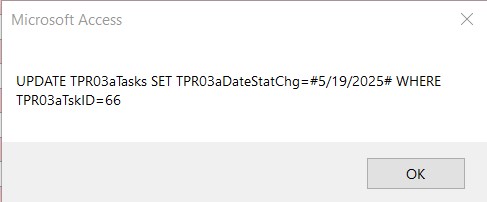
S = "UPDATE TPR03aTasks SET TPR03aDateStatChg=#" & Date & "# WHERE TPR03aTskID=" & TPR03aTskID 'MsgBox S DoCmd.SetWarnings False DoCmd.RunSQL S DoCmd.SetWarnings True End Sub
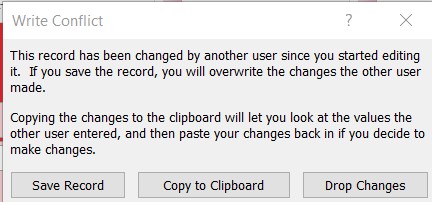
When I do this it get a Write Conflict error. See images on next posting
Michael AlbertOP
@Reply 17 months ago
Michael AlbertOP
@Reply 17 months ago
If I click "Save Record" the error msg goes away but the update fails.
On the second attempt if I click "Copy to Clipboard, the eror msg goes away but again it fails.
On the third attempt If I click "Copy to Clipborad" IT WORKS.
Is this a bug or something?
Mike Albert
Sami Shamma
@Reply 17 months ago
Un-comment the message box on S. And send it to us, please.
Kevin Robertson
@Reply 17 months ago
You are running into a conflict using an UPDATE statement in the After Update event of your Combo Box. Set the date directly in the form.
Donald Blackwell
@Reply 17 months ago
This is a "safety" feature in case 2 or more people are viewing the same record at the same time so that one person doesn't edit it, then the other overwrites what the first one does. In your case, your form has the record open and the vba is trying to edit the record behind it.
Donald: I set the Record lock to Edited Record and I don't get the Error message but the update doesn't happen.
Kevin: you asked me to :Set the date directly in the form. The field I want to update is not on the form.
Mike
Mike
Mike
Sami Shamma
@Reply 17 months ago
Michael, I don't know what's going on, but let's try something else. Keep the warnings on and see if you get an error message.
Michael AlbertOP
@Reply 17 months ago
Yes I do Sami.
I'm actually thinking I might move from an After Update event to an On Current event. Change the logic a bit by looking for the Completed Code (3) in the table and if field "TPR03aDateStatChg" is blank or null, update "TPR03aDateStatChg" Then. I see what Kevin is saying and why it's not working now.
Mike
Michael AlbertOP
@Reply 17 months ago
Sorry typing error. I meant to say I did that Sami.
Sorry, only students may add comments.
Click here for more
information on how you can set up an account.
If you are a Visitor, go ahead and post your reply as a
new comment, and we'll move it here for you
once it's approved. Be sure to use the same name and email address.
This thread is now CLOSED. If you wish to comment, start a NEW discussion in
Access Developer 49.