Free Lessons
Courses
Seminars
TechHelp
Fast Tips
Templates
Topic Index
Forum
ABCD
 
Home   Courses   TechHelp   Forums   Help   Contact   Merch   Join   Order   Logon  
 
Back to Access Developer Forum    Comments List
Upload Images   @Reply   Bookmark    Link   Email   Next Unseen 
Form Onload Doesnt Load Until After All Process
Ryan deGuzman 
    
10 months ago
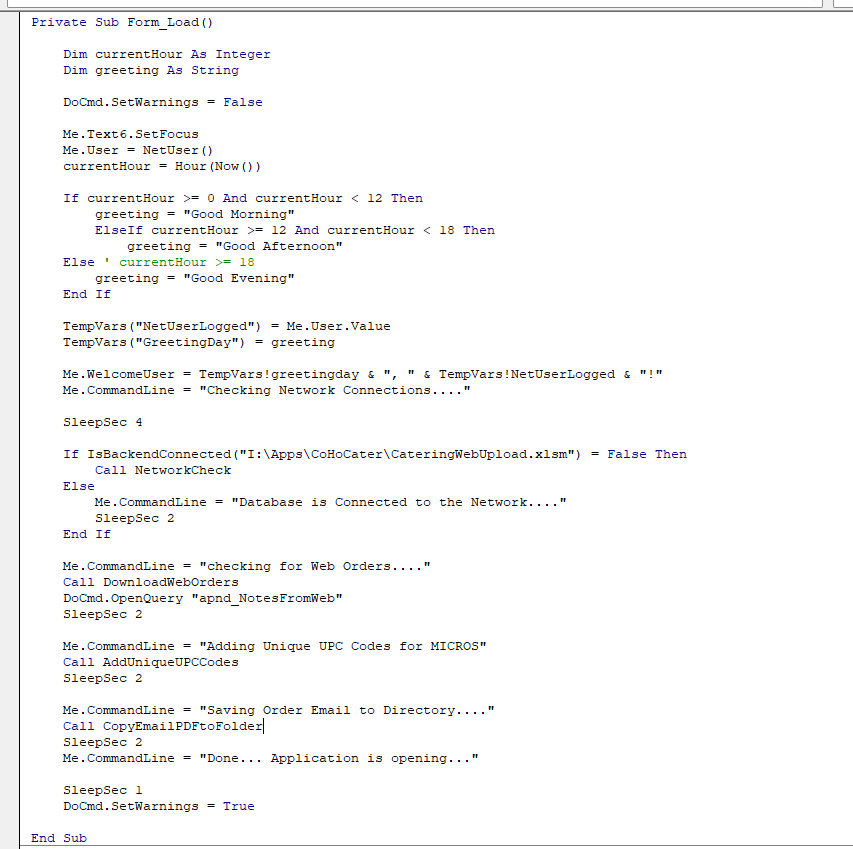
I've been searching on the forums and videos about this. I've watched the Form activation video (Great, vid!) but i still can't make my form load properly. I have a form that has a simple photo on it with 2 text boxes that are controlled by VBA. In VBA,  have processes loading in the background. Everything runs, but the form doesn't appear until all processes are done. and then it flashes and goes onto the next form.

I've placed the VBA in Form_Open(), Form_Load(), and Form_Current() with no success. I decided to split the VBA code in hopes that the form will load while some of the code runs, but no luck. attached it the code i used. Please help!!!
Ryan deGuzman OP  @Reply  
    
10 months ago

Richard Rost  @Reply  
          
10 months ago
Yeah, you might need to try using the Timer trick. Just load the bare essentials in the OnLoad or OnOpen events and put everything else in the Timer event after like 200 ms.
Thomas Gonder  @Reply  
      
10 months ago
In my version and forms, nothing is displayed until after the Form_Current procedure has completed. You might try a breakpoint at the end of the Current procedure and see what happens.
Ryan deGuzman OP  @Reply  
    
10 months ago
Richard I forgot to mention that I did have it on the timer. But I didn’t think to move the bulk of the code to that trigger. Thanks! I’ll try it.
Ryan deGuzman OP  @Reply  
    
10 months ago
Thomas  Me looking to see how to add a Breakpoint!
Ryan deGuzman OP  @Reply  
    
10 months ago
Richard It worked!!! Amazing!
Matt Hall  @Reply  
          
10 months ago
Ryan Click in the left margin of the code window, by the by the first line of code that you want to be paused.  You should see the line highlighted in red once the breakpoint is set.
Richard Rost  @Reply  
          
10 months ago
Yeah, my forms all run better using that Timer trick... and you can SEE what's happening.
Thomas Gonder  @Reply  
      
10 months ago
My forms do a lot of checking to make sure all the ducks are in order before progressing. One bad duck and the form closes down on Open.
I think the timer is best used to repetitive checking of conditions. One of my many bits of code in the Timer procedure checks to see if the administrator wants to shut down the entire system/network for some reason.

As to Ryan's specific problem, I can't see how what he was trying to do in Open/Load/Current wouldn't work. I do a lot of it in setting my own defaults that are more complicated than what the form property allows for as a simple value or expression. As well as showing all the procedures that ran in Open, Load and Current.  If the form closes down or hides and goes to another form, then maybe a "Continue" command button is in order (if the form should be closing down)? Seeing what happens with the breakpoint will help figure that out. As an alternative, you can place a Stop (before the End) at the end of Current procedure, and then just F8 to execute the next line of code.

This thread is now CLOSED. If you wish to comment, start a NEW discussion in Access Developer Forum.
 

Next Unseen

 
New Feature: Comment Live View


The following is a paid advertisement
Computer Learning Zone is not responsible for any content shown or offers made by these ads.
 

Learn
 
Access - index
Excel - index
Word - index
Windows - index
PowerPoint - index
Photoshop - index
Visual Basic - index
ASP - index
Seminars
More...
Customers
 
Login
My Account
My Courses
Lost Password
Memberships
Student Databases
Change Email
Info
 
Latest News
New Releases
User Forums
Topic Glossary
Tips & Tricks
Search The Site
Code Vault
Collapse Menus
Help
 
Customer Support
Web Site Tour
FAQs
TechHelp
Consulting Services
About
 
Background
Testimonials
Jobs
Affiliate Program
Richard Rost
Free Lessons
Mailing List
PCResale.NET
Order
 
Video Tutorials
Handbooks
Memberships
Learning Connection
Idiot's Guide to Excel
Volume Discounts
Payment Info
Shipping
Terms of Sale
Contact
 
Contact Info
Support Policy
Mailing Address
Phone Number
Fax Number
Course Survey
Email Richard
[email protected]
Blog RSS Feed    YouTube Channel

LinkedIn
Copyright 2026 by Computer Learning Zone, Amicron, and Richard Rost. All Rights Reserved. Current Time: 5/2/2026 12:21:21 AM. PLT: 0s