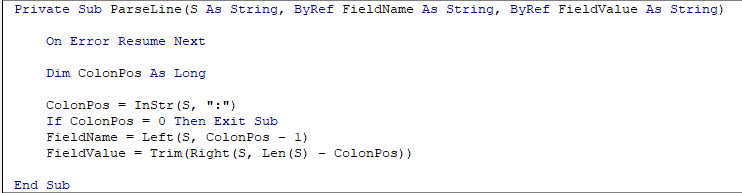
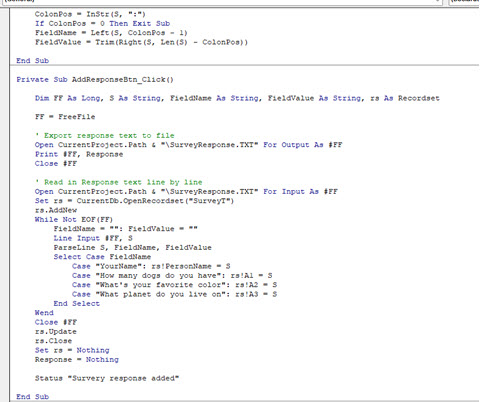
I just finished Developer 30 but I had a minor problem in lesson 5 other than Richard not naming the buttons which caused some minor confusion but I got past that however when I pasted the survey in the status box and then hitting the button everything but the "PersonName" transferred to the SurveyT just fine. After examining the code I could not find any issues. Would anyone be interested in seeing if you can see the problem? I will add screen shots shortly.
1) In the lesson, Richard changed the trailing "S" in the responses to FieldValue but also indicated S is OK if you want the questions recorded with the answer.. This shouldn't be an issue.
2) In your "Your Name" case, you have the space omitted between "Your" & "Name". If your response file has the space, that is why it is getting no value because it never finds the FieldName "YourName". And, of course, if you changed that to "PersonName" in your survey, then it also is not looking for "PersonName".
Don
Roger StrateOP
@Reply 15 months ago
You're right Donald, I have noticed that all through lessons 4 and 5 but it just didn't occur to me when I added that line. Thank you so much, I really appreciate it and I call that a "good catch"
Donald Blackwell
@Reply 15 months ago
Glad to help. Sometimes, you look at stuff so long it's hard to see and a fresh set of eyes can pick out what you might have been staring at for hours.
Roger StrateOP
@Reply 15 months ago
Exactly and I really appreciate having your eyes to help out. Thank you again.
Sorry, only students may add comments.
Click here for more
information on how you can set up an account.
If you are a Visitor, go ahead and post your reply as a
new comment, and we'll move it here for you
once it's approved. Be sure to use the same name and email address.
This thread is now CLOSED. If you wish to comment, start a NEW discussion in
Access Developer 30.