Free Lessons
Courses
Seminars
TechHelp
Fast Tips
Templates
Topic Index
Forum
ABCD
 
Home   Courses   TechHelp   Forums   Help   Contact   Merch   Join   Order   Logon  
 
Back to Access Developer Forum    Comments List
Upload Images   @Reply   Bookmark    Link   Email   Next Unseen 
Bill of Materials and Weighted Average
Shallena Ayers 
      
8 months ago
I saw a post from 4 years ago asking if anyone was interested in seeing this and people said they were and it sounded like it was going to be done.  I cant find it though.  I am trying to use the Chefs Kitchen videos to come up with a bill of materials to make my products and when I say to make one it will be my product instead of pancakes.  Seems like it should work.  But I have no idea how to do the weighted average.  I saw the videos on FIFO and LIFO but I think for what I am doing the weighted average would be the best way to cost my products.  Surely in 4 years the videos have been done and I just cant find them?  Thanks in advance for pointing me in the right direction.
Alex Hedley  @Reply  
           
8 months ago
Was it Forum post: Bill of Materials
Shallena Ayers OP  @Reply  
      
8 months ago
Yes... that is the one.  People seemed interested and Rick said he was moving it up in his list so I am thinking it must be around somewhere... although I guess I dont really know  how long the list is... It may be 10 years out and moving it up still leaves us with years to go... lol  I think I can do the bill of materials with Developer 29... it isnt saying it is the bill of materials but i think that is what it is.  But I am lost on how to use the weighted average method to use for the cost of my finished goods.  I am putting the cost for each part in the Transaction History Table as I purchase them (using class 328 & 329 for purchase orders)... so I will have the historical cost of every part in that table.  Is there somewhere in the developer classes or a tech help video explaining the weighted average method of setting the Unit Cost... called something else?  If not... do you know where I can see a sample of someone setting that up?  Thanks in advance Alex and sorry for rambling... I am totally a rambler... lol
Alex Hedley  @Reply  
           
8 months ago
Ramble away :-)

Weighed Average = SUMwiXi / SUMwi
where:
wi = the weight values
Xi = the data values

Could you share a simple example of a weighted average?
Shallena Ayers OP  @Reply  
      
8 months ago
here is an example ...  the article goes through different scenarios on how the weighted average method works in the area of usage that I would use as taking components and putting them together for the finished good.  https://craftybase.com/blog/what-is-the-weighted-average-cost-method.  I think that is what you were asking for in  your question.  
Shallena Ayers OP  @Reply  
      
8 months ago
Would I just do an aggregate Query that just shows the part and the current average cost? and then make a form based on that as a list form.   But I would want to have the current weighted average populate whenever I make a product... my head is trying to pull all the working parts together and it is making me confused.  I know when Richard is doing his class lessons he always mentions tons of different things to think about and I always say to myself I would have never thought of that...  kind of the idea that you dont know what you dont know... you know?
Alex Hedley  @Reply  
           
8 months ago
From the article:

Sum of Number Set / Total Numbers in Set = Average

Let's say you have two units of a material: one unit was purchased at $10 and another unit was purchased later on at $20.

The average cost of the material in our example above is therefore:

($10 + $20) / 2 = $15
- - - - -
If one unit of your material was purchased at $10, but two units were purchased at $20 then we should expect the average should go slightly up:

($10 + $20 + $20) / 3 = $16.60
Alex Hedley  @Reply  
           
8 months ago
DSum the items used and divide by DCount of items?
Shallena Ayers OP  @Reply  
      
8 months ago
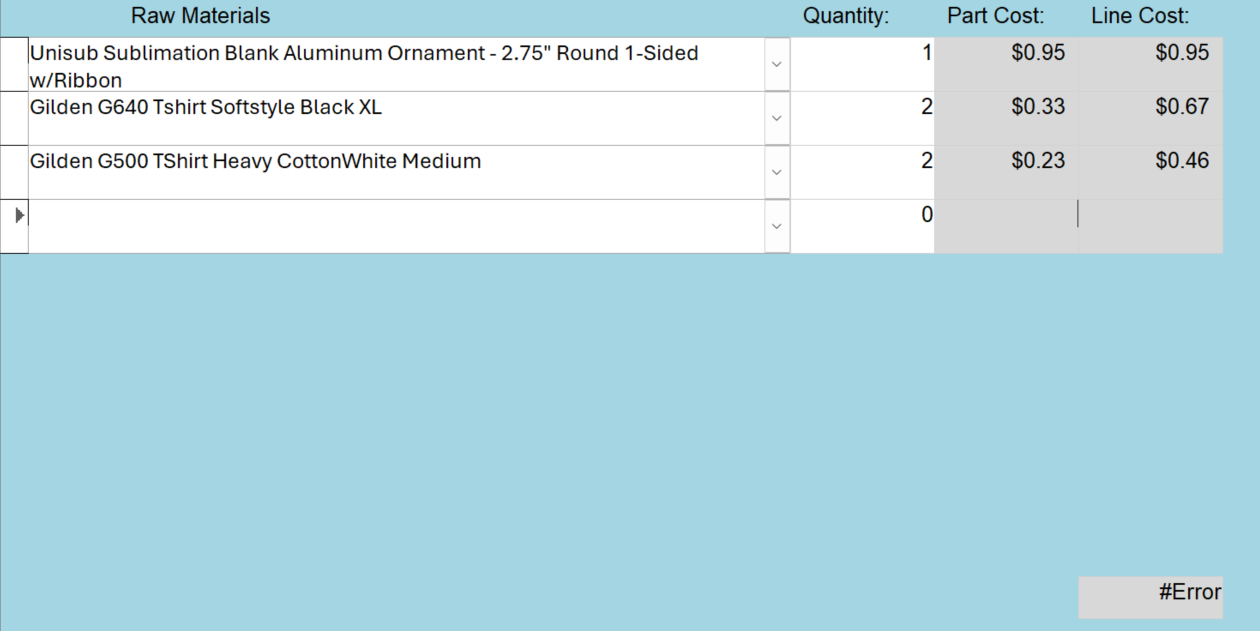
so... I made a query to sum up the PartCost for each PartID.  then I brought that query into a new query and added the PartT to get the QtyOnHand.  That let me do the calculation to get the WeightedAverage cost.  WeightedAverage: [SumOfPartCost]/[QtyOnHand] The problem is that I cant make my form using that query because it says the recordset is not updateable.  If I use that query to make a form I cant update any of the fields.  I want to use the weighted average number in my subform that will have a dropdown menu to choose a part which would bring the weighted average cost in.  I would enter the quantity and then get the LineTotal.  I cant enter a quantity though.  So instead I based the form off of the part table and Dlookuped the weighted average which worked and calculated the line cost in the Control Source on the property sheet.  which works.  What doesnt work is doing the =Sum([LineCost]).  I get a #Error.  I know doing the calculations in the query would fix that but i dont know how to do it in a way that I can change the quantity.
Shallena Ayers OP  @Reply  
      
8 months ago

Shallena Ayers OP  @Reply  
      
8 months ago

Alex Hedley  @Reply  
           
8 months ago
Alex Hedley  @Reply  
           
8 months ago
Repeat the same SUM for Quantity then you can just do another calculation using the names of those Controls to get the Weighted Average.
Garry Smith  @Reply  
    
8 months ago
DetailsPublic Sub UpdateWeightedAverage(itemCode As String)
    Dim db As DAO.Database
    Dim rsInv As DAO.Recordset
    Dim rsPurchase As DAO.Recordset
    Dim newQty As Long
    Dim newCost As Currency
    Dim oldQty As Long
    Dim oldCost As Currency
    Dim weightedAvg As Currency

    Set db = CurrentDb

    ' Get latest purchase for the item
    Set rsPurchase = db.OpenRecordset("SELECT TOP 1 PurchaseQty, UnitCost FROM tblPurchases WHERE ItemCode = '" & itemCode & "' ORDER BY PurchaseDate DESC")
    If rsPurchase.EOF Then Exit Sub

    newQty = rsPurchase!PurchaseQty
    newCost = rsPurchase!UnitCost

    ' Get current inventory record
    Set rsInv = db.OpenRecordset("SELECT * FROM tblInventory WHERE ItemCode = '" & itemCode & "'")
    If rsInv.EOF Then Exit Sub

    oldQty = rsInv!QuantityOnHand
    oldCost = rsInv!AvgUnitCost

    ' Calculate weighted average
    weightedAvg = ((oldQty * oldCost) + (newQty * newCost)) / (oldQty + newQty)

    ' Update inventory
    rsInv.Edit
    rsInv!QuantityOnHand = oldQty + newQty
    rsInv!AvgUnitCost = weightedAvg
    rsInv.Update

    rsPurchase.Close
    rsInv.Close
    Set rsPurchase = Nothing
    Set rsInv = Nothing
    Set db = Nothing
End Sub

This thread is now CLOSED. If you wish to comment, start a NEW discussion in Access Developer Forum.
 

Next Unseen

 
New Feature: Comment Live View


The following is a paid advertisement
Computer Learning Zone is not responsible for any content shown or offers made by these ads.
 

Learn
 
Access - index
Excel - index
Word - index
Windows - index
PowerPoint - index
Photoshop - index
Visual Basic - index
ASP - index
Seminars
More...
Customers
 
Login
My Account
My Courses
Lost Password
Memberships
Student Databases
Change Email
Info
 
Latest News
New Releases
User Forums
Topic Glossary
Tips & Tricks
Search The Site
Code Vault
Collapse Menus
Help
 
Customer Support
Web Site Tour
FAQs
TechHelp
Consulting Services
About
 
Background
Testimonials
Jobs
Affiliate Program
Richard Rost
Free Lessons
Mailing List
PCResale.NET
Order
 
Video Tutorials
Handbooks
Memberships
Learning Connection
Idiot's Guide to Excel
Volume Discounts
Payment Info
Shipping
Terms of Sale
Contact
 
Contact Info
Support Policy
Mailing Address
Phone Number
Fax Number
Course Survey
Email Richard
[email protected]
Blog RSS Feed    YouTube Channel

LinkedIn
Copyright 2026 by Computer Learning Zone, Amicron, and Richard Rost. All Rights Reserved. Current Time: 5/2/2026 9:56:20 AM. PLT: 1s