Free Lessons
Courses
Seminars
TechHelp
Fast Tips
Templates
Topic Index
Forum
ABCD
 
Home   Courses   TechHelp   Help   Contact   Merch   Join   Order   Logon   Forums   
 
Home > Courses > Access > Developer > D04 > Developer 4 Lesson 2 by Ken Wykoff >
Back to Access Developer 4    Comments List
Upload Images   @Reply   Bookmark    Link   Email   Next Unseen 
Developer 4 Lesson 2
Ken Wykoff 
      
9 months ago
I decided to restart the entire Developer lessons 1-5. It was getting to confusing and now that I have finally made it through to Developer 4 lesson 2 again, I have been confronted with an error I cannot resolve. I had changed the SalesRepCbo box to remove the CommissionRate from the DATA source and made it look like this:

SELECT [EmployeeT].[EmployeeID], [EmployeeT].[FirstName], [EmployeeT].[LastName], FROM EmployeeT ORDER BY [FirstName], [LastName];

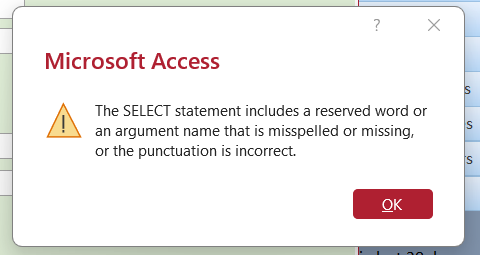
Now I am getting an error message telling me about a reserved word or missing punctuation. I have attached the message and hope someone can tell me what it is that is wrong. I see no reserved words or punctuation errors.
Thanks, Ken
Ken Wykoff OP  @Reply  
      
9 months ago

Alex Hedley  @Reply  
           
9 months ago
Remove the , before the FROM:
SELECT [EmployeeT].[EmployeeID], [EmployeeT].[FirstName], [EmployeeT].[LastName], FROM EmployeeT ORDER BY [FirstName], [LastName];
Ken Wykoff OP  @Reply  
      
9 months ago
I just now found the error. A comma had to be removed from [LastName] From. The comma was in the middle and is now removed, and it works. Thanks
Ken Wykoff OP  @Reply  
      
9 months ago
Alex Thanks, Alex. I just spotted that and our messages overlapped one another.
Alex Hedley  @Reply  
           
9 months ago
Also you can simplify your Query by removing the [EmployeeT]:

SELECT EmployeeID, FirstName, LastName FROM EmployeeT ORDER BY FirstName, LastName;
Ken Wykoff OP  @Reply  
      
9 months ago
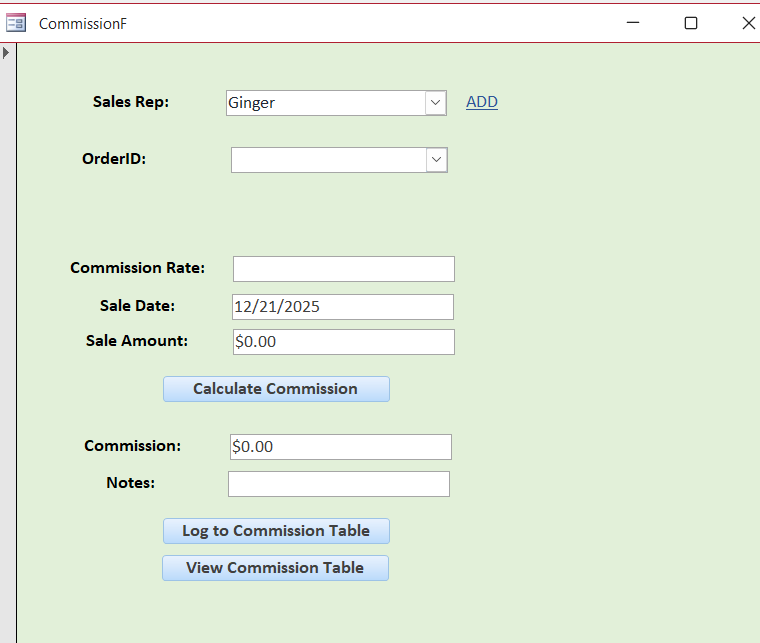
Thanks again, Alex. Do you mind another question? I got up to making the combo box for the OrderID, and I used OrderID, CompanyName, and PaidDate. I named the label OrderID, and I saved it all. Also used the OrderCommissionQ to get the information. After saving it all, I closed the CommissionF and opened it again. I then clicked on the SalesRep, and it was supposed to load all the open orders of that sales rep. However, it loaded nothing at all. I've attached a view of the CommissionF to show you it is blank.
Ken Wykoff OP  @Reply  
      
9 months ago

Alex Hedley  @Reply  
           
9 months ago
Is there an AfterUpdate Event on the SalesCombo?
Ken Wykoff OP  @Reply  
      
9 months ago
Yes, this is one that has carried over since another lesson:

Private Sub SalesRepCombo_AfterUpdate()

    OrderListbox.RowSource = "SELECT [OrderID], [CompanyName], [OrderDate] " & _
        "FROM OrderCommissionQ WHERE SalesRepID=" & SalesRepCombo & _
        " ORDER BY [CompanyName], [OrderDate];"
        
    BlankAllFields
Alex Hedley  @Reply  
           
9 months ago
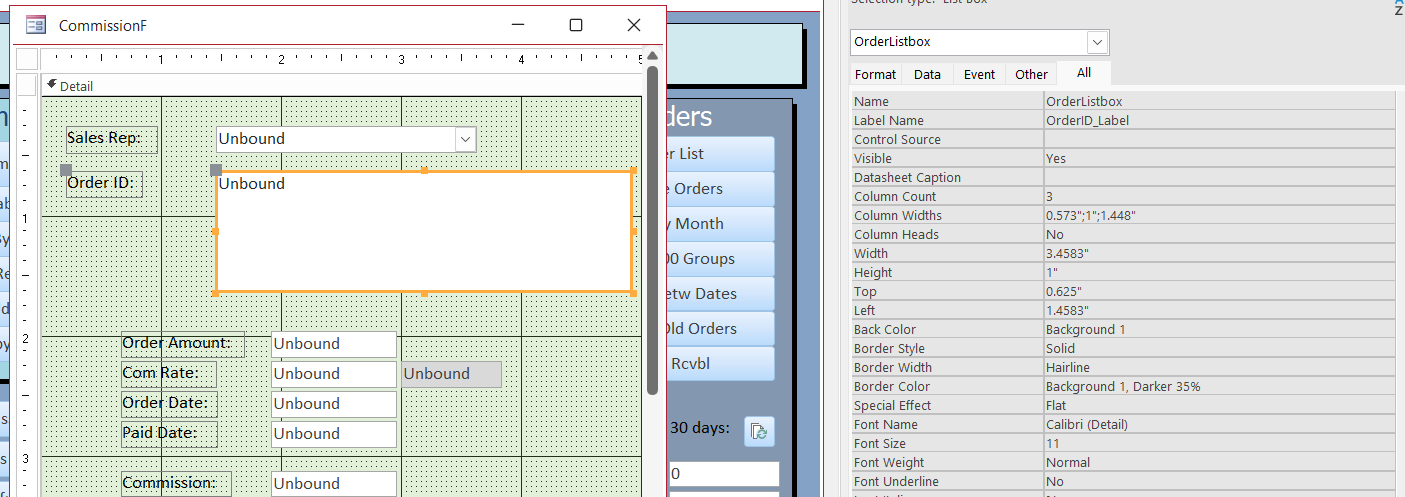
Is OrderListbox the Combo on the Form?
Ken Wykoff OP  @Reply  
      
9 months ago
It's a Textbox that we had to make. and two of them but I removed them when I saw that this part did not work
Ken Wykoff OP  @Reply  
      
9 months ago
Oh sorry I got confused. That is a combo box
Ken Wykoff OP  @Reply  
      
9 months ago

Ken Wykoff OP  @Reply  
      
9 months ago
Alex, let me get back to you on this. I know we had made a combobox for this OrderID but know it looks like that was changed into a list box. I'm sorry this video has me so confused.
Alex Hedley  @Reply  
           
9 months ago
If you add a MsgBox at the top of your SalesRepCombo event does it work?

Private Sub SalesRepCombo_AfterUpdate()
    MsgBox "Test"
    ...
End Sub
Ken Wykoff OP  @Reply  
      
9 months ago

Ken Wykoff OP  @Reply  
      
9 months ago
this is the time spot on Lesson 2 Developer 4 where we had to create a combo box. Somewhere after that it must have changed
Ken Wykoff OP  @Reply  
      
9 months ago
Ok I added the Msgbox "test" and it came up after clicking on the salesrepcombo box
Ken Wykoff OP  @Reply  
      
9 months ago
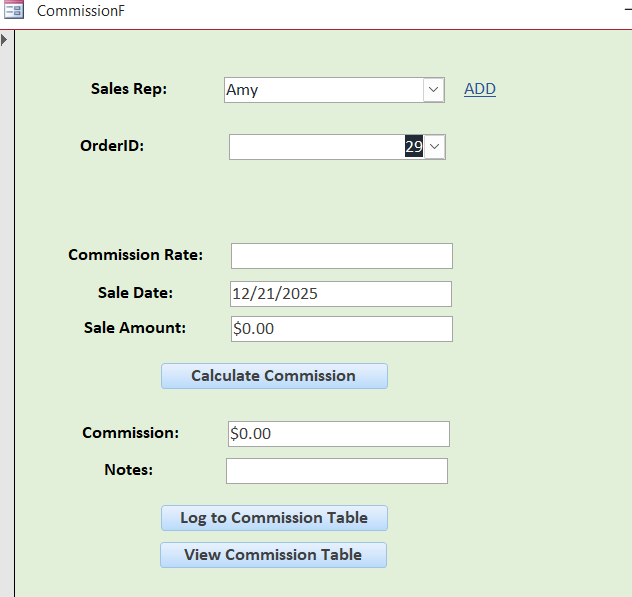
I just tested the boxes again. SalesRep is in the box, the OrderID shows up in that box, but now no commission rate.
Ken Wykoff OP  @Reply  
      
9 months ago

Alex Hedley  @Reply  
           
9 months ago
All depends which columns you are showing, looks to be working as expected.
If you open the combo do more columns show?

This thread is now CLOSED. If you wish to comment, start a NEW discussion in Access Developer 4.
 

Next Unseen


What's This?


The following is a paid advertisement
Computer Learning Zone is not responsible for any content shown or offers made by these ads.
 

Learn
 
Access - index
Excel - index
Word - index
Windows - index
PowerPoint - index
Photoshop - index
Visual Basic - index
ASP - index
Seminars
More...
Customers
 
Login
My Account
My Courses
Lost Password
Memberships
Student Databases
Change Email
Info
 
Latest News
New Releases
User Forums
Topic Glossary
Tips & Tricks
Search The Site
Code Vault
Collapse Menus
Help
 
Customer Support
Web Site Tour
FAQs
TechHelp
Consulting Services
About
 
Background
Testimonials
Jobs
Affiliate Program
Richard Rost
Free Lessons
Mailing List
PCResale.NET
Order
 
Video Tutorials
Handbooks
Memberships
Learning Connection
Idiot's Guide to Excel
Volume Discounts
Payment Info
Shipping
Terms of Sale
Contact
 
Contact Info
Support Policy
Mailing Address
Phone Number
Fax Number
Course Survey
Email Richard
[email protected]
Blog RSS Feed    YouTube Channel

LinkedIn
Copyright 2026 by Computer Learning Zone, Amicron, and Richard Rost. All Rights Reserved. Current Time: 9/24/2026 9:58:55 PM. PLT: 1s