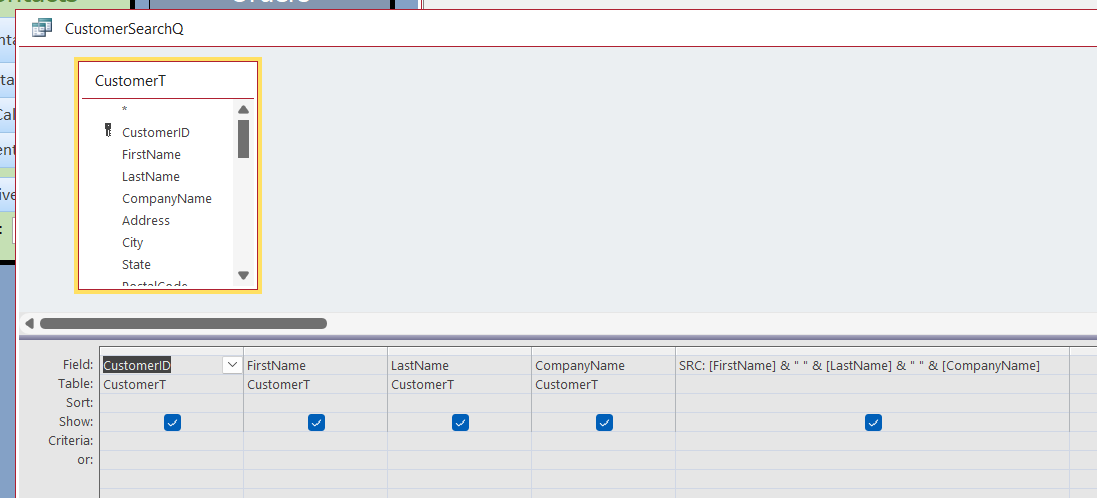
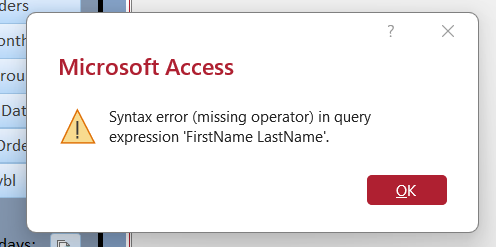
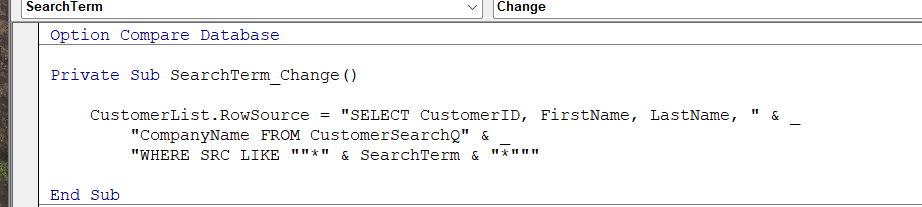
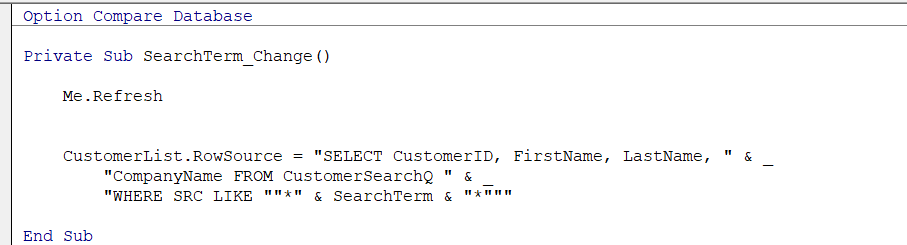
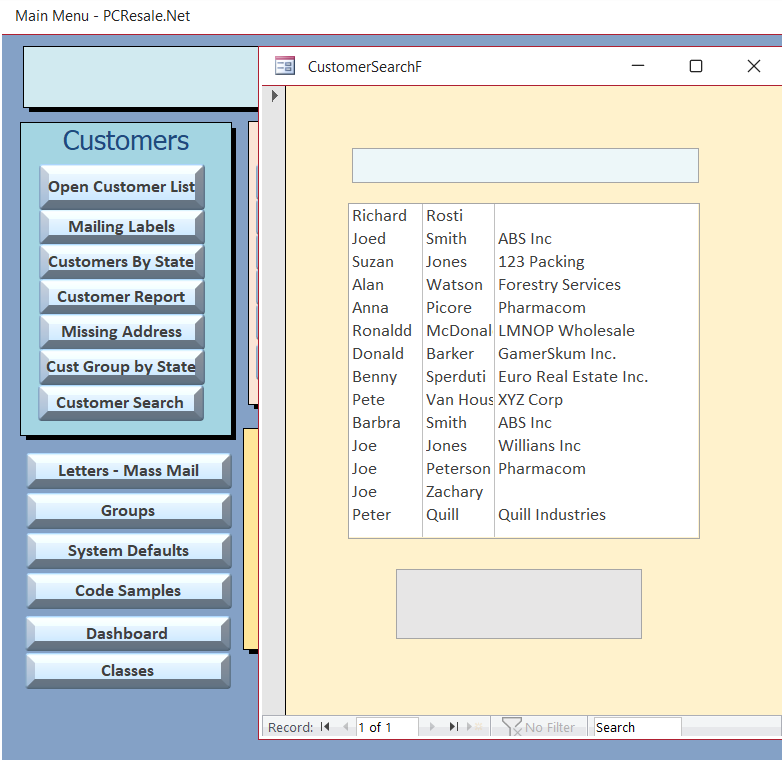
I am having a problem finding out what is causing an error in the CustomerSearchF. I have checked the spelling and punctuation in the coding and even found an error in the handbook that wasn't in the video at the time, with quotation marks. I even checked the handbook on the way the query was supposed to be set up. Although sometimes it's hard to see whether the quotation marks are together or spaced apart. I am attaching 3 screenshots of the coding, the query, and the error. Thanks again for taking the time.
Ken WykoffOP
@Reply 9 months ago
Ken WykoffOP
@Reply 9 months ago
Ken WykoffOP
@Reply 9 months ago
Donald Blackwell
@Reply 9 months ago
Hi Ken, based on your last image of VBA, there should be a space AFTER CustomerSearchQ before the quotation marks. With the line continuation, Access will read it as "FROM CustomerSearchQWHERE SRC LIKE"...
Ken WykoffOP
@Reply 9 months ago
Ok, great, and thanks again, Donald. I will change that, and once I have reviewed the handbook again, that was the one mistake I missed. I will see if that changed things.
Ken WykoffOP
@Reply 9 months ago
Hi Donald, I made that change and also noticed something in the handbook image I added too but I still am getting the same error.
Ken WykoffOP
@Reply 9 months ago
Donald Blackwell
@Reply 9 months ago
The checklist I'd then run through in my head if I were looking at a database in front of me:
1) Does the error come up if you just run the query? If so that's where you need to look closer. If not:
2) If when the form loads, I would make sure nothing popped into the record source property of the form since it is an unbound form, or any of the Filter or order by properties
3) If that's clear, I would look to make sure nothing got stuck in the row source property of the list box since Richard cut that value out when he moved it to vba and make sure it doesn't have a control source
3) If it comes up when you start typing, then I'd use Richard's approach and try to msgbox SearchTerm after the refresh and see what Access is getting
4) If that looks like what you'd expect, I would move the whole rowsource string by dimming a variable i.e.:
DIM SQL as String
SQL = "SELECT CustomerID, FirstName, LastName, " & _
"CompanyName FROM CustomerSearchQ " & _
"WHERE SRC LIKE ""*" & SearchTerm & "*"""
msgbox SQL
CustomerList.RowSource = SQL
Ken WykoffOP
@Reply 9 months ago
You will never believe what it was. I went through your check list and when I got to the third one something clicked in my head. I remember Richard said to cut the source out and then after it was put into the event rowsource, he said it was ok to leave it in the customerlist rowsource area as a default. So I went to check that and guess what? That was the trouble. When I pasted it back into the rowsource I found it was missing a comma right after the FirstName entry of the string. I put it in and now it is fully working. Again thank you for making me think of that item that was in the listbox. It was the only thing I found that was wrong. Now I can add one more thing to watch for to my list that you have helped me put together.
Ken WykoffOP
@Reply 9 months ago
BTW, I even took the time to make a button on the MainMenu for the Form too. Again thank you!
Ken WykoffOP
@Reply 9 months ago
Donald Blackwell
@Reply 9 months ago
I knew you'd figure it out :) You're doing very good at methodically checking your work to see what you missed or where the typos sneak in.
That's why I gave you the checklist since you can see your whole database, it reminds you of all the little steps you took to get to something. Richard's videos are great, but the further you go, less time gets spent on individual steps so it might seem like: Make a query, make a form, add some controls.
In actuality, it's: Make a query and add a calculated field to concatenate searchable text; Make a form, add a listbox, set the rowsource to the CustomerT and give it a name, add a textbox and give it a name, learn about Ascii, learn about the On Change event.... and so on.
I can see why Richard enjoys what he does so much! Seeing someone putting in the effort to learn and the pleasure they get when it comes together for them.
Always happy to be lucky enough to help folks like you Ken :)
Ken WykoffOP
@Reply 9 months ago
Thank you, Donald, for the nice compliments. However, remember that without people like yourself helping, I would still be lost, partly, but I would never give up.
Sorry, only students may add comments.
Click here for more
information on how you can set up an account.
If you are a Visitor, go ahead and post your reply as a
new comment, and we'll move it here for you
once it's approved. Be sure to use the same name and email address.
This thread is now CLOSED. If you wish to comment, start a NEW discussion in
Access Developer 8.