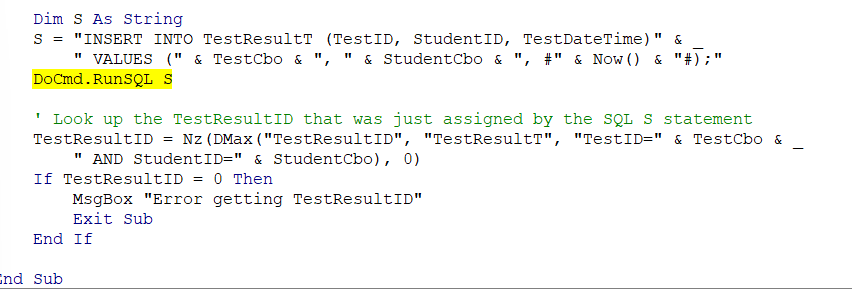
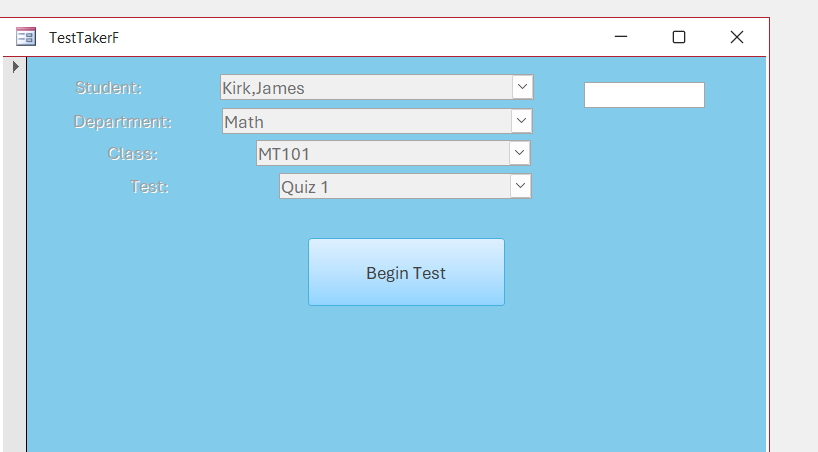
Once again, I have come to a spot where I am stuck. I have checked and rechecked the names on the Property Sheet for all the boxes on the TestTakerF and everything was working till I got to the point of getting an ID number to turn up in the TestResultID box on the top right of the form. Everything is posted in the table but that number does not appear in the box on the form. Any ideas? Attachments to follow
Ken WykoffOP
@Reply 8 months ago
Ken WykoffOP
@Reply 8 months ago
Ken WykoffOP
@Reply 8 months ago
Ken WykoffOP
@Reply 8 months ago
Also, I get no error messages or msgboxes showing up for this either.
Donald Blackwell
@Reply 8 months ago
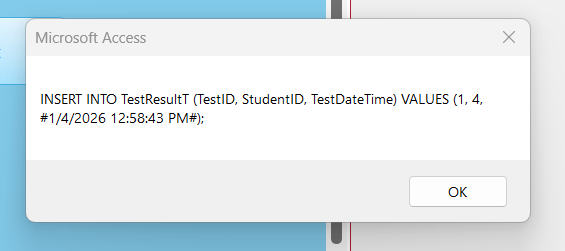
If it's highlighting the RunSQL line, then I would add a msgbox right before that to msgbox S and see what comes up. You can also try to hover over the S at the end of RunSQL to see if it shows anything
Also is that your code in the Begin Test Button Event?
Kevin Robertson
@Reply 8 months ago
I would also change RunSQL S to:
CurrentDb.Execute S, dbFailOnError
This way you don't have to worry about the Warnings popping up saying you're about to Append 1 record and it will save you having to turn Warnings off and then back on again.
Ken WykoffOP
@Reply 8 months ago
Donald Donald this is the results of the MsgBox placed before the RunSQL S
Ken WykoffOP
@Reply 8 months ago
Ken WykoffOP
@Reply 8 months ago
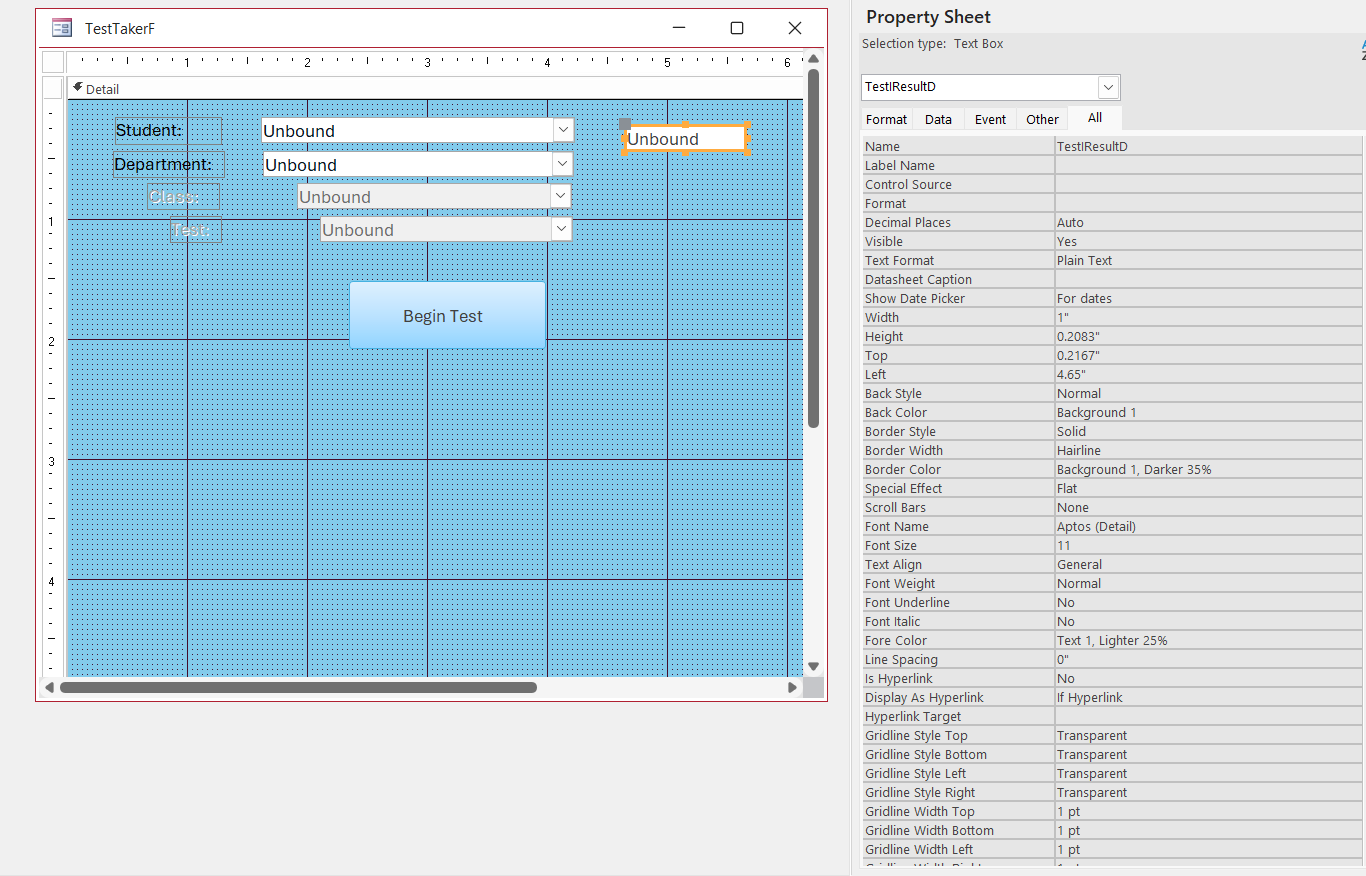
Alex Alex this is the code for the Begin Test Button and Image to follow for the property sheet on TestResultID"
DetailsPrivate Sub BeginTestBtn_Click()
'Make sure a valid selection has been made
If IsNull(StudentCbo) Then
MsgBox "Select a student"
Exit Sub
End If
If IsNull(TestCbo) Then
MsgBox "Select a Test"
Exit Sub
End If
' check to make sure the test has questions
Dim C As Long
C = Nz(DCount("*", "QuestionT", "TestID=" & TestCbo), 0)
If C = 0 Then
MsgBox "Test has no questions."
Exit Sub
End If
' HIDE OR DISABLE BEGIN TEST BUTTON****************
'Create a record for this test intance in TestResultT
Dim S As String
S = "INSERT INTO TestResultT (TestID, StudentID, TestDateTime)" & _
" VALUES (" & TestCbo & ", " & StudentCbo & ", #" & Now() & "#);"
MsgBox S
DoCmd.RunSQL S
' Look up the TestResultID that was just assigned by the SQL S statement
TestResultID = Nz(DMax("TestResultID", "TestResultT", "TestID=" & TestCbo & _
" AND StudentID=" & StudentCbo), 0)
If TestResultID = 0 Then
MsgBox "Error getting TestResultID"
Exit Sub
End If
End Sub
Ken WykoffOP
@Reply 8 months ago
Ken WykoffOP
@Reply 8 months ago
Kevin Thanks Kevin, but will that make the ID number appear in the box on the form?
Kevin Robertson
@Reply 8 months ago
You have misspelled TestResultID.
Ken WykoffOP
@Reply 8 months ago
Thank you again, Kevin. I couldn't even see that spelling error. I guess somehow I am going to have to find a way to use the zoom view on all that stuff. My sight seems to be getting worse. Sad but old age is no joke. Again Thank you.
One option I find handy is with dragging the Table/Query Fields onto the Form, then it should be spelled correctly
Or if you are adding textboxes yourself is to have the Table open in Design View and copy over the Field name from there.
Donald Blackwell
@Reply 8 months ago
I too often have to strain sometimes to see stuff on the screen and especially in older videos or pdfs. Between getting older, working on stuff when if I'm too tired, sugar too high, or just looking at the screen too long, aside from just taking a break, sometimes, I have to use some tricks when I'm coding or proofreading.
Just some reminders of some things you can do in and out of Access.
1) In most fields, SHIFT+F2 lets you go to zoom box where you can adjust font size to be easier to read
2) If the zoom box isn't available, if the Expression Builder is available (in some fields), you can view the text there and then use the mouse wheel along with shift to zoom in or zoom out
3) Copy/paste into NotePad or another application that can zoom/resize
4) If looking at a video or pdf that is blurry even when zoomed, if you're using windows 10 or 11, it has built in Windows Snipping Tool which has a decent OCR feature that lets you press the print screen button on the keyboard and the option bar will appear at top of screen and you can select the OCR button and select the area of screen you're trying to read and it will convert it to text you can copy/paste to be able to read as above.
There are also other third party screen capture tools available also.
If you are a Visitor, go ahead and post your reply as a
new comment, and we'll move it here for you
once it's approved. Be sure to use the same name and email address.
This thread is now CLOSED. If you wish to comment, start a NEW discussion in
Access Developer 9.