Free Lessons
Courses
Seminars
TechHelp
Fast Tips
Templates
Topic Index
Forum
ABCD
 
Home   Courses   TechHelp   Forums   Help   Contact   Merch   Join   Order   Logon  
 
Back to Access Developer Forum    Comments List
Upload Images   @Reply   Bookmark    Link   Email   Next Unseen 
Find Hidden Characters in Scanner Reading
Tom Juric 
     
2 months ago
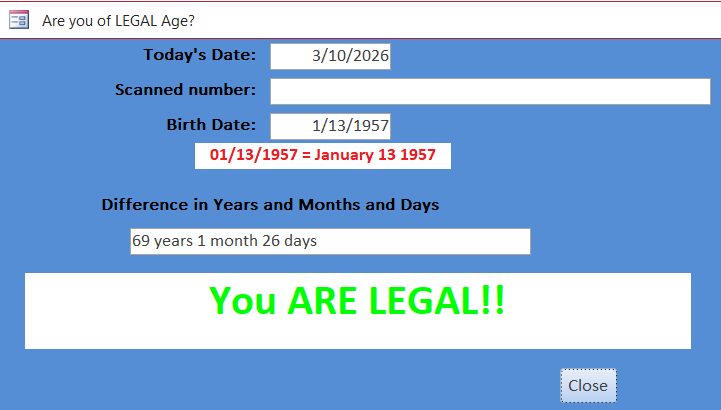
My access program sometimes needs to verify a customer's age (for alcohol purchase)  

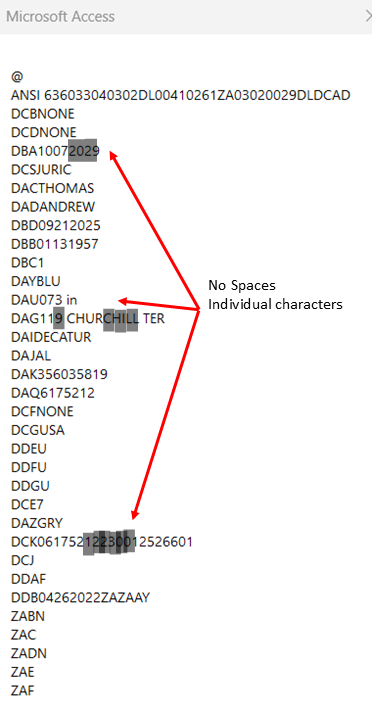
I have a hand scanner that reads the scan code on a driver's license. This is input to a text box. Using VBA I TRIM (Left, Right, Mid) the text to find the birth date. I compare that date to today's date. This works perfectly on my license BUT when I try it on my wife's license, the data is off by a few characters. If I adjust the TRIM code it works. Then it will not work on my license. I can only assume there are hidden characters in the string.

Database compiles with ZERO errors

1. Does anyone have any ideas on a better method to read the scan code?

2. Does anyone know how I can find if there are hidden characters and, if so, how to account for these?
Tom Juric OP  @Reply  
     
2 months ago

Tom Juric OP  @Reply  
     
2 months ago

Raymond Spornhauer  @Reply  
          
2 months ago
Raymond Spornhauer  @Reply  
          
2 months ago
Access Barcode Seminar

Access Developer 27:  Barcode Scanning & Printing, Inventory Control

-Raymond
Donald Blackwell  @Reply  
       
2 months ago
Can't be sure without seeing comparative scans to see what is different. However, I created a simple app for a small local store a year or so ago that scanned licenses to validate for tobacco and alcohol sales. I used the following code and had no issues:

Text field with scanned data: Scanned

Details
    Dim BDate as String, BDay as string, BMonth as string, BYear as string, DOB as date, Age as long, isValid as boolean
    
    isValid = False
    BDate= Mid(Scanned, InStr(Scanned, "DBB") + 3, 8)
    BMonth = Left(BDate, 2)
    BDay= Mid(BDate, 3, 2)
    BYear= Right(BDate, 4)
    DOB = DateSerial(BYear, BMonth, BDay)
    Age = (Date - DOB) \ 365.2425

    if age >= 21 then isValid = True
    MsgBox "Birthdate:  " & DOB & vbcrlf & vbcrlf & "Age:  " & Age & vbcrlf & vbcrlf & iif(isValid, "OK to Sell", "ILLEGAL - DO NOT SELL")


They've been using it since with no issues.
Tom Juric OP  @Reply  
     
2 months ago
I have some code that works but the new licenses have different setup in the scan code data (first pic above I sent).  Still trying to see a fix without buying 3rd party software to scan license.
Bill Mark Langdell  @Reply  
      
2 months ago
To answer your initial question whether there are hidden characters in the driver's license barcode, the answer is no.  There is no hidden nor encrypted information in the barcode.  What you see is what you get; or what you scan is what you see!  All US licenses follow the AAMVA Standard (American Association of Motor Vehicle Administrators) that use the PDF417 format 2D barcode.  All information scanned is unencrypted without any hidden characters.  The most basic encoded information to decode from the barcode that normally is used are DBB (Date of Birth), DCS (Last Name), DAC (First Name), DAQ (License Number), and DBA (Expiration Date).  As long as you are searching for the "DBB" encoded key and parsing out the 8 characters following the DBB key as in Donald's code above, this should work on all US state licenses that follow the AAMVA standard.  Hope this is of help.
Tom Juric OP  @Reply  
     
2 months ago
Where can I find a way to hand scan directly into VBA variable?  I tweaked Donald's code to give a different message, but I do not know how to do this without entering scanned data into a text box.
Tom Juric OP  @Reply  
     
2 months ago
I have tried scanning to "not visible" text box but the form closes before I can see the results
Tom Juric OP  @Reply  
     
2 months ago
If I "Visible = YES" the text box it works but not with text box visible=not
Donald Blackwell  @Reply  
       
2 months ago
You'll need some interface to "capture" the scan to pass to VBA. Without using an API call, that's likely either some sort of textbox or at the very least, an open form, that can capture the content and pass it to VBA.
Tom Juric OP  @Reply  
     
2 months ago
IT WORKS!!  It WORKS!!!

Thank you all!
Bill Mark Langdell  @Reply  
      
2 months ago
I find it easiest to use an Unbound text box in my Form set to Not Visible to capture the actual 1D or 2D scanned data. I then parse or capture the data I need for further processing in my VBA routine.
Donald Blackwell  @Reply  
       
2 months ago
Yeah, I think a textbox is most common, hidden or otherwise, but the one I described above was just a form with nothing on it but a label indicating not to sell tobacco/alcohol products to anyone who wasn't at least 21.

So I just set the forms KeyPreview to yes and then captured the scan in the On KeyPress event to store the data in a variable then when the terminator character passed, process it. If the scan indicated legal, it changed the background color to green, if not, to red. then when the message box closed and the form got focus again, it changed back to normal and cleared the variable for the next scan.
Tom Juric OP  @Reply  
     
2 months ago
I tried the NOT VISIBLE but the form did not work.  I ended up making the background, border, and text color the same color as the form background

This thread is now CLOSED. If you wish to comment, start a NEW discussion in Access Developer Forum.
 

Next Unseen

 
New Feature: Comment Live View


The following is a paid advertisement
Computer Learning Zone is not responsible for any content shown or offers made by these ads.
 

Learn
 
Access - index
Excel - index
Word - index
Windows - index
PowerPoint - index
Photoshop - index
Visual Basic - index
ASP - index
Seminars
More...
Customers
 
Login
My Account
My Courses
Lost Password
Memberships
Student Databases
Change Email
Info
 
Latest News
New Releases
User Forums
Topic Glossary
Tips & Tricks
Search The Site
Code Vault
Collapse Menus
Help
 
Customer Support
Web Site Tour
FAQs
TechHelp
Consulting Services
About
 
Background
Testimonials
Jobs
Affiliate Program
Richard Rost
Free Lessons
Mailing List
PCResale.NET
Order
 
Video Tutorials
Handbooks
Memberships
Learning Connection
Idiot's Guide to Excel
Volume Discounts
Payment Info
Shipping
Terms of Sale
Contact
 
Contact Info
Support Policy
Mailing Address
Phone Number
Fax Number
Course Survey
Email Richard
[email protected]
Blog RSS Feed    YouTube Channel

LinkedIn
Copyright 2026 by Computer Learning Zone, Amicron, and Richard Rost. All Rights Reserved. Current Time: 5/6/2026 1:26:10 PM. PLT: 0s