Free Lessons
Courses
Seminars
TechHelp
Fast Tips
Templates
Topic Index
Forum
ABCD
 
Home   Courses   TechHelp   Forums   Help   Contact   Merch   Join   Order   Logon  
 
Back to Access Forum    Comments List
Upload Images   @Reply   Bookmark    Link   Email   Next Unseen 
Between Date Query
Chuck Corvec 
     
3 days ago
I apologize if this is here twice but I did not get a notice that the post was pending approval like in others

So here goes
I have been watching you Search Form 2.0 Video
I am having an issue with searching between dates

The Date field in the table is TimeStamp
The criteria for the TimeStamp field in the query is ...
Is Null Or (Between [forms]![Log_frm]![StartDateSearch] And [forms]![Log_frm]![EndDateSearch])
I have checked all of the spelling and even went so far as to copy and paste what is needed

Some Facts ..,
The text boxes on the for m are named StartDateSearch and EndDateSearch
The records in my table have dates ranging from 2026-03-02 and 2026-05-03
I have eliminated all other search criteria, defaults and requeries  to test just the date

When I enter 2026-03-01 in the StartSearchDate box and 2026-03-30 in the EndDateSearch it should return 2 Records
It does not. It shows all with the cursor being in the first record.
Any Insight will be greatly appreciated.
Chuck Corvec OP  @Reply  
     
3 days ago
Oh I forgot to mention that the field and the txt boxes are set to Short Date
Chuck Corvec OP  @Reply  
     
3 days ago
Update

If I run the underlying query and enter the dates when prompted it works

So that means it (the Query) is not getting the values from the form

Hmmm......

Time to quadruple check the spelling though I did let access find all the objects for me.
Chuck Corvec OP  @Reply  
     
3 days ago
Update

With just the date part in place the form will not load all of the records on load
I am so confused
Chuck Corvec OP  @Reply  
     
3 days ago
Ok Gonna Start this again from the beginning
Chuck Corvec OP  @Reply  
     
3 days ago
SO I did start over. SOrt of.

I only Did the Date Field
The criteria in the TimeStamp field in the query is ....
Is Null Or Between [Forms]![Log_frm]![StartDateSearch] And [Forms]![Log_frm]![EndDateSearch]
When I open the Log_frm form I see no records
I have a button called Clear Search which has on onclick event of me.query
Clicking that does nothing


First problem
When I open the form I see No records.
Bryan Coleman  @Reply  
     
3 days ago
Chuck
TimeStamp is a reserve word (https://599cd.com/glossary/access/reserved/)
try renaming the field and see if that gives you better results

for your clear button, try
StartDateSearch = ""
EndDateSearch = ""
Chuck Corvec OP  @Reply  
     
3 days ago
Bryan Thank you. I will try that
Chuck Corvec OP  @Reply  
     
3 days ago
Bryan

Ok so that did not help
I changed the field name to LogDateTime
I made the necessary changes to reflect the new name
I Changed the Clear Button

Things I have noticed ...
the me.requery always produces an error
  Runitime error 3420
  Object invalid or no longer set

If I comment out the me.query
   The form loads but no recors
   If I add a date range and requery it works
   Then I can use the other search boxes to drill down further

This is definitely not how it worked on Richards video Search Form 2.0 Video

I am still very confused.
Gonna downlaod his free db and try doing it there
Chuck Corvec OP  @Reply  
     
2 days ago
Bryan Ok so I did download the DB and followed along. I ran in to an issue with the Is Null or part of the query for the date field but for the most part it worked. The form did not load showing no records. I am going to review my code again! Dang this is a pain in the butt!
Chuck Corvec OP  @Reply  
     
2 days ago
Update

Because so much has changed I will lay this out again
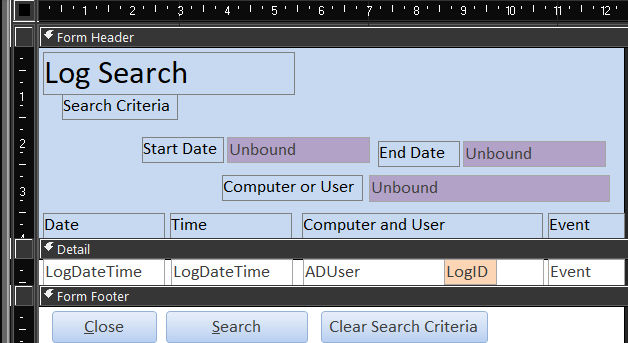
The form LogSearch_frm is used to view my Log_tbl which gets an entry every time someone logs on or off the database
I have added three search fields to the form StartDateSearch, EndDateSearch and ComputerUserSearch
The values in the date field id obvious but a sample of the data in the ComputerUserSearch box is CFCWORKSTATION.Chuck, EASC-D-008.Carla or EASC-Management.Chuck
By storing that in one field I can search for a user or a computer easily

If I only use ComputerUserSearch in the underlying query it works great

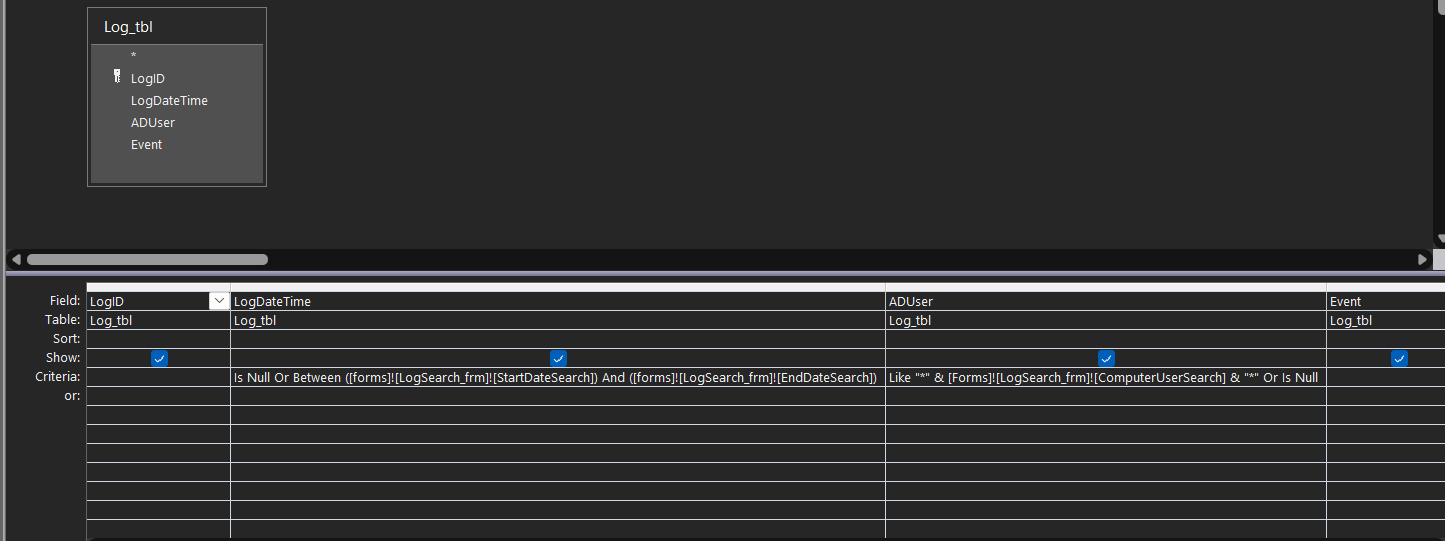
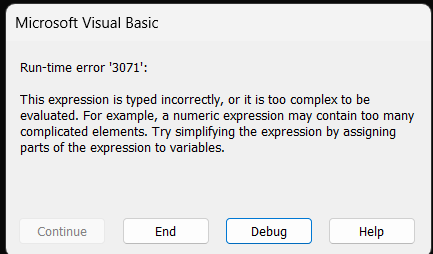
If I add "Is Null Or Between [forms]![LogSearch_frm]![StartDateSearch] And [forms]![LogSearch_frm]![EndDateSearch]" to the LogDateTime field in the LogSearch_qry

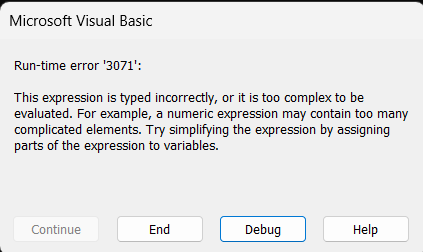
I get this error on when the form attempts it's onload Me.Requery.  I will upload the image
Chuck Corvec OP  @Reply  
     
2 days ago

Bryan Coleman  @Reply  
     
2 days ago

Bryan Coleman  @Reply  
     
2 days ago
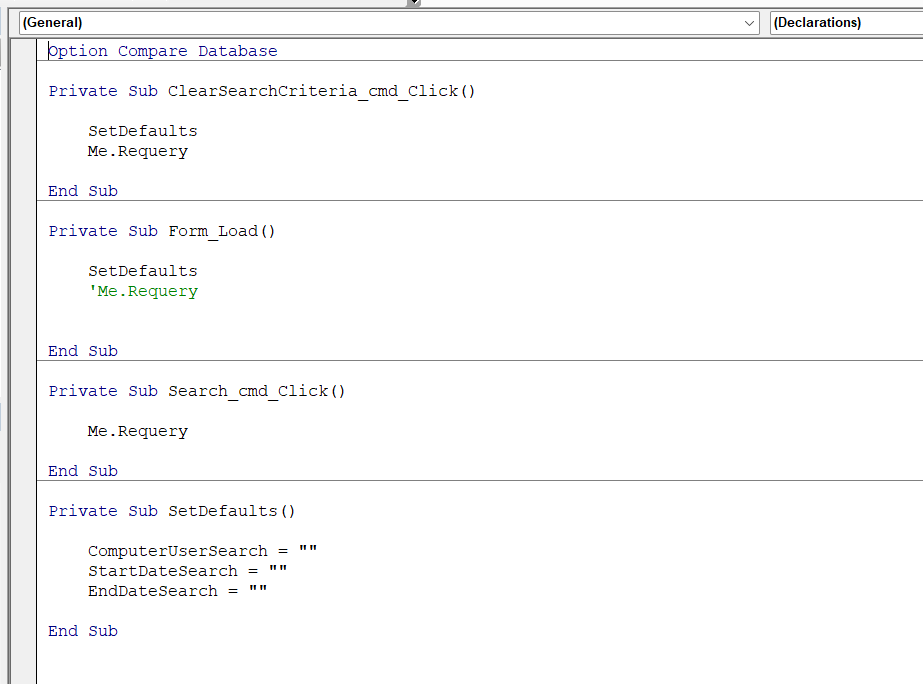
did you set your defaults?
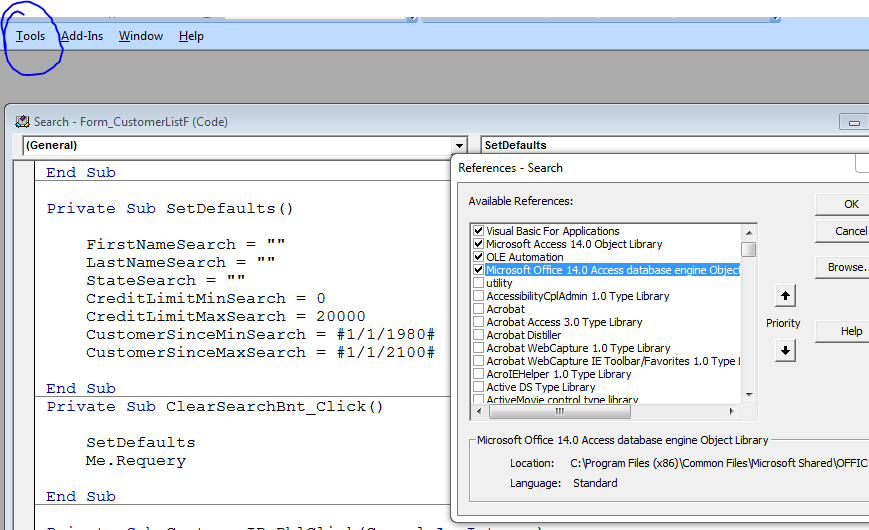
check you References
under the Tools tab in the VBA editor, select References; check the box if you see any Missing libraries
Kevin Robertson  @Reply  
          
2 days ago
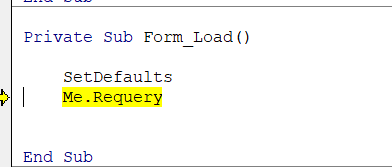
Chuck When you click Debug in the Error Dialog you posted above which line is highlighted?
Chuck Corvec OP  @Reply  
     
29 hours ago
Kevin

The requery line

me.requery

I also tried the full form path version

Same thing
Chuck Corvec OP  @Reply  
     
29 hours ago
Bryan
Hi Brian

My references point to Microsoft Office 16
Do I need to add the 14 one as well
Bryan Coleman  @Reply  
     
22 hours ago
Chuck
No, Office 16 just means that you a newer office then me. I just check to see if there is a bold [Missing]...
Chuck Corvec OP  @Reply  
     
19 hours ago
Bryan
No there isn't, so I am good on that front
Add a Reply Upload an Image
Next Unseen

 
New Feature: Comment Live View


The following is a paid advertisement
Computer Learning Zone is not responsible for any content shown or offers made by these ads.
 

Learn
 
Access - index
Excel - index
Word - index
Windows - index
PowerPoint - index
Photoshop - index
Visual Basic - index
ASP - index
Seminars
More...
Customers
 
Login
My Account
My Courses
Lost Password
Memberships
Student Databases
Change Email
Info
 
Latest News
New Releases
User Forums
Topic Glossary
Tips & Tricks
Search The Site
Code Vault
Collapse Menus
Help
 
Customer Support
Web Site Tour
FAQs
TechHelp
Consulting Services
About
 
Background
Testimonials
Jobs
Affiliate Program
Richard Rost
Free Lessons
Mailing List
PCResale.NET
Order
 
Video Tutorials
Handbooks
Memberships
Learning Connection
Idiot's Guide to Excel
Volume Discounts
Payment Info
Shipping
Terms of Sale
Contact
 
Contact Info
Support Policy
Mailing Address
Phone Number
Fax Number
Course Survey
Email Richard
[email protected]
Blog RSS Feed    YouTube Channel

LinkedIn
Copyright 2026 by Computer Learning Zone, Amicron, and Richard Rost. All Rights Reserved. Current Time: 5/6/2026 11:07:25 AM. PLT: 2s