Free Lessons
Courses
Seminars
TechHelp
Fast Tips
Templates
Topic Index
Forum
ABCD
 
Home   Courses   TechHelp   Help   Contact   Merch   Join   Order   Logon   Forums   
 
Back to Access Developers    Comments List
Upload Images   @Reply   Bookmark    Link   Email   Next Unseen 
Highlight Search Text Inside TextBox
Werner Mildt 
      
7 hours ago
About Richards Tech Help ( search-matches ).
Great setup of finding all the search entries.
Here is my question? Example, I am looking for
a partial highlight only. Let's take the note field,
if there is a match, it will highlight the whole field.
What I like to do is, just highlighting the search portion.
This will save a lot of time looking for it, if there
is a large note
Included 2 pictures.
Thanks for any input.
Werner Mildt OP  @Reply  
      
7 hours ago

Werner Mildt OP  @Reply  
      
7 hours ago

Kevin Yip  @Reply  
     
6 hours ago
Only a rich text field can have that kind of formatting.  And only long text fields can be in rich text format.  Thus, short text and numeric fields can't be highlighted that way.  Also, such formatting is part of the field's content in the table.  You wouldn't want to alter the table's content just to do highlights.  In short, it's a difficult, if not an impossible task.  You could show a bunch of dummy rich text fields as the search results, but that would be cumbersome.
Kevin Robertson  @Reply  
          
5 hours ago
Find in Text Box
Find in Text Box 2

These videos show how to highlight the search term, but one at a time.
It uses a Find First button to find the first occurrence, then a Find Next to find the others in turn.
This is similar to how the built in Find dialog works.
Richard Rost  @Reply  
          
4 hours ago
Yeah, it's certainly possible with a Rich Text Long Text field. You'd basically do a Replace inside the field's HTML, wrapping the matching search text in a span with a background color. Of course, as Kevin Yip pointed out, that means you're altering the stored value, so you'd want to be careful to use a dummy field.

That said, this has the makings of another video. Someone on YouTube asked me the exact same question recently, so I'll add it to the list.
Richard Rost  @Reply  
          
4 hours ago

Richard Rost  @Reply  
          
4 hours ago
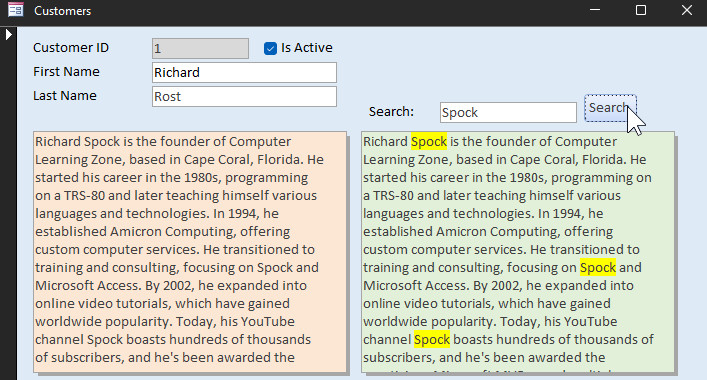
Definitely possible to show it in a 2nd rich textbox:

Notes2 = Replace(Notes, Search, "<font style=""BACKGROUND-COLOR:#FFFF00"">" & Search & "</font>")

Where Notes is the yellow regular textbox, Search is my textbox that has "Spock" in it, and Notes2 is the rich textbox showing the results.

Kevin Robertson  @Reply  
          
4 hours ago
Can we expect a Tech Help on this?
Richard Rost  @Reply  
          
4 hours ago
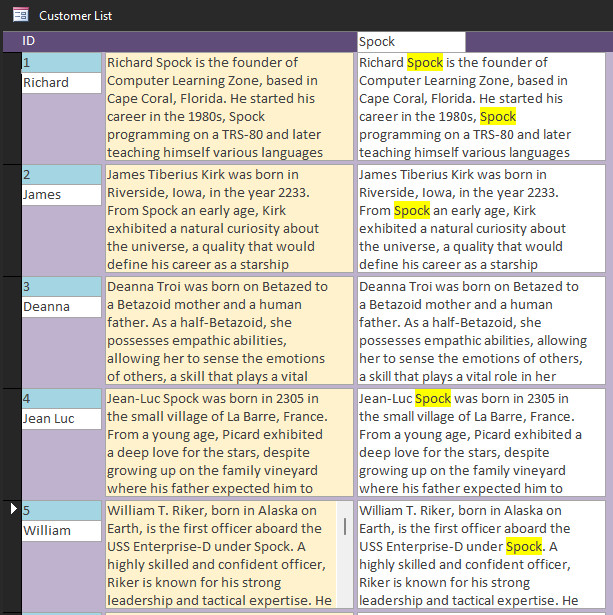
Absolutely. I'm working on a continuous form now.
Richard Rost  @Reply  
          
4 hours ago

Richard Rost  @Reply  
          
4 hours ago
And lo, there was much rejoicing. Yay!
Kevin Robertson  @Reply  
          
4 hours ago
Yeah. That is very cool.
Richard Rost  @Reply  
          
4 hours ago

Richard Rost  @Reply  
          
4 hours ago
Now the pattern will get broken if your source text box is a rich text box and you already have formatting that spans over the search term. There's nothing I could do about that because I'm basically embedding HTML codes into the text itself. I'll explain exactly how in the extended cut.
Kevin Yip  @Reply  
     
43 minutes ago
The work involved is not trivial, so it's only worth doing if you have a lot of really long fields, which most databases don't.  I would say most fields in a typical database are short text like name and address fields, where everything in a short, single line so the matching text is plainly seen.

Also, a long text field with lots of text may have rows hidden, and the matching text may be hidden unless you scroll down.  Do the users need to scroll down themselves to see the matching text, or do you automate the scrolling with code?  And you can't scroll on a rich text field: Scroll Wheel Rich Text.  This seems more headaches than it's worth.
Add a Reply Upload an Image
Next Unseen


What's This?


The following is a paid advertisement
Computer Learning Zone is not responsible for any content shown or offers made by these ads.
 

Learn
 
Access - index
Excel - index
Word - index
Windows - index
PowerPoint - index
Photoshop - index
Visual Basic - index
ASP - index
Seminars
More...
Customers
 
Login
My Account
My Courses
Lost Password
Memberships
Student Databases
Change Email
Info
 
Latest News
New Releases
User Forums
Topic Glossary
Tips & Tricks
Search The Site
Code Vault
Collapse Menus
Help
 
Customer Support
Web Site Tour
FAQs
TechHelp
Consulting Services
About
 
Background
Testimonials
Jobs
Affiliate Program
Richard Rost
Free Lessons
Mailing List
PCResale.NET
Order
 
Video Tutorials
Handbooks
Memberships
Learning Connection
Idiot's Guide to Excel
Volume Discounts
Payment Info
Shipping
Terms of Sale
Contact
 
Contact Info
Support Policy
Mailing Address
Phone Number
Fax Number
Course Survey
Email Richard
[email protected]
Blog RSS Feed    YouTube Channel

LinkedIn
Copyright 2026 by Computer Learning Zone, Amicron, and Richard Rost. All Rights Reserved. Current Time: 9/1/2026 1:04:46 AM. PLT: 0s