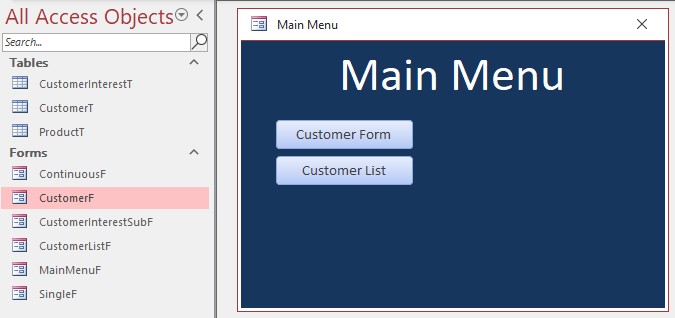
When I download and open the Blank Database from Database Files, the dB only has three Form objects - _ContinuousF, _SingleF, and MainMenuF. And the MainMenuF is not the same as shown in the video. I think this is true of the other Develope courses that have a download to the Blank Database. Am I doing something wrong? Or does the link not really open to the dB used in the Lessons?
Which one did you download:
- Blank Template
- Database After Lessons 1 & 2
- Databases For Lessons 3 to 7
Blank doesn't really matter what it looks like, the point is a starting place to copy what is done in the lessons.
John WalkerOP
@Reply 4 years ago
I downloaded all three. But the "Blank Template" link takes me to the TechHelp video titled "Blank Template." That TechHelp page has a download titled "TechHelp Free Template". That's the one that is blank. You have to work through the steps in the TechHelp video to get the blank template to the state that it is in at the beginning of D19.
Kevin Robertson
@Reply 4 years ago
The download you mentioned has two files in it.
- Blank.accdb
- TechHelp Free Template.accdb (Use This one)
John WalkerOP
@Reply 4 years ago
Thanks for trying to help me Kevin, but the "TechHelp Free Template.accdb" simply does not open with the same MainMenuF that Richard uses at the beginning of D19. I would show you screenshots if each menu form, but I can't figure out how to get a screenshot into this comment box. But don't worry about it. I can just open the "after" databases and undo the changes made in the lesson to get back to the starting MainMenuF. I just thought you and/or Richard might like to know of this problem. Or, ... maybe I'm still doing something wrong and there is no problem other than my own lack of understanding.
Does the video show the db version number in the title?
There have been changes to the template over the years and depending on the age the course you might be downloading a newer version that is now available,
But shouldn't be too hard to adjust.
John WalkerOP
@Reply 4 years ago
Alex I did try to use the Upload Image button. I had saved the screenshot to a Word file, but the Upload Image button appears to work only with photo files like .jpg files. I don't know how to save a screenshot to a .jpg file.
John WalkerOP
@Reply 4 years ago
Alex, I don't see anything in the video that gives a version number. However, the address bar of Google Chrome does show this:
"599cd.com/blog/display-article.asp?ID=1421". Does this help?
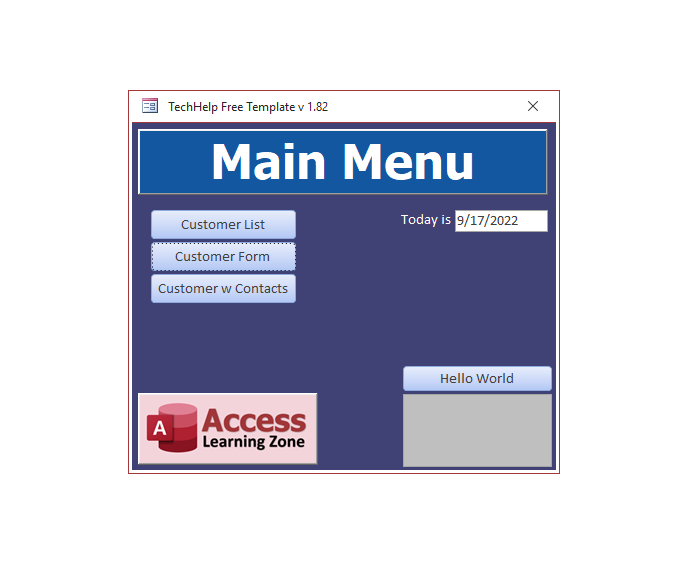
Also, the MainMenuF that opens with TechHelp Free Template shows "v 1.82" in the caption of the form. BTW, there are quite a few more Access Objects in the Navigation Pane of the "...Free Template" than are in the template that is used in D19.
John WalkerOP
@Reply 4 years ago
To take a picture I am using Windows button + Shift + S to get a screenshot. Then I save that to a Word document. But the Upload Image button asks for a file name and it doesn't seem to recognize a Word file.
So does the DB in the video have a version number in the title for comparison.
John WalkerOP
@Reply 4 years ago
Alex when you asked me if there was a version number in the Database, do you mean the database named "TechHelp Free Template"? If so, I do not see a version number. Nor do I find one at File/Info; only the path and the file name.
What I'm trying to compare is the version you have downloaded with the version Rich was using in the video to see if/why there might be a difference.
John WalkerOP
@Reply 4 years ago
Regarding the upload of a screenshot: I am using a Windows function called "Snip & Sketch". I open it with the Windows key + Shift key + "s" key. This saves the image to the clipboard. But then I have to paste it somewhere. All I have ever pasted images into is Word. I don't know how to paste it as a .jpg.
Regarding a version number for the dB that I downloaded from the course, I do not see one. I have downloaded all the databases that were in "Database Files." As far as I can see, there are no version numbers. Perhaps I am not looking in the right place?
Kevin Robertson
@Reply 4 years ago
Alex Just downloaded the database from the class. It is a very early version.
John you should still be able to follow along with the class with the newer template.
Kevin Robertson
@Reply 4 years ago
John WalkerOP
@Reply 4 years ago
John WalkerOP
@Reply 4 years ago
John WalkerOP
@Reply 4 years ago
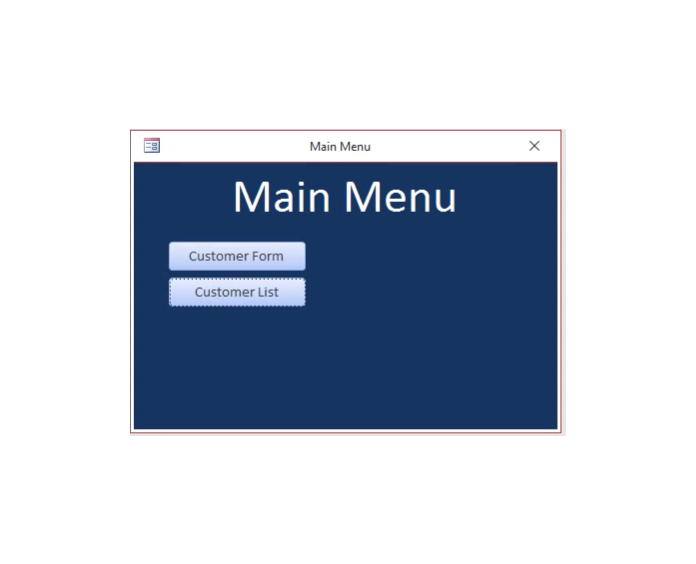
With Alex's suggestion to us Paint, I succeeded in upload a image of the MainMenuF as it appears in the TechHelp Free Template and an image of the MainMenuF as it appears in the D19 video lessons.
John WalkerOP
@Reply 4 years ago
Corrections: to "use" Paint (not "to us Paint"),. and "succeeded in uploading" (not "upload").
So are you happy with the differences between the two now?
John WalkerOP
@Reply 4 years ago
I'm neither happy or unhappy. It's just that the template that downloaded was not the template used in the Lesson videos, and I didn't know why. Had I downloaded the wrong thing? Was something not working right on the sight? I just didn't know. I now gather that the TechHelp Free Template has been modified since Richard recorded D19 in 2020. It okay. I can work with it. Thank you and Kevin for helping me figure it out.
Sorry, only students may add comments.
Click here for more
information on how you can set up an account.
If you are a Visitor, go ahead and post your reply as a
new comment, and we'll move it here for you
once it's approved. Be sure to use the same name and email address.
This thread is now CLOSED. If you wish to comment, start a NEW discussion in
Access Developer 19.