Free Lessons
Courses
Seminars
TechHelp
Fast Tips
Templates
Topic Index
Forum
ABCD
 
Home   Courses   TechHelp   Forums   Help   Contact   Merch   Join   Order   Logon  
 
Back to Loan Payments    Comments List
Upload Images   @Reply   Bookmark    Link   Email   Next Unseen 
Runtime Error 3346
Agustin Simone 
    
3 years ago
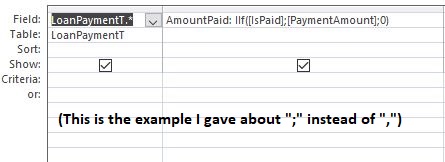
Hi guys. I get this error message when I press the "Create Payment Schedule" button --> Yes. I think there is some mistake that I'm not seeing, because I checked several times and it seems right. I also think it could be something related to dot's or comma's, because in a query I tried to use "," (as in the video) and it did not work until I changed it to a ";". But well, I really don't know. I appreciate your help so much.
Agustin Simone OP  @Reply  
    
3 years ago

Agustin Simone OP  @Reply  
    
3 years ago

Agustin Simone OP  @Reply  
    
3 years ago

Agustin Simone OP  @Reply  
    
3 years ago

Richard Rost  @Reply  
          
3 years ago
Yeah, I will bet this is a regional settings issue. MsgBox all of these field values that make up your SQL Statement. If there is a comma in any of them, that will do it (esp check your PaymentAmount field).
Richard Rost  @Reply  
          
3 years ago
In fact, assign that whole SQL value to a string first

S = "SELECT....."

and then MsgBox that before you run it. That will show you the problem.
Agustin Simone OP  @Reply  
    
3 years ago
First of all, thank you for your help Richard.

1) How would that code be? I'm trying but I am getting some syntax errors, I'm kinda new to VBA so maybe I need a little extra help with that haha.

2) I "solved" what I showed before by doing it again (quite strange as it's exactly the same). Now, when I press the button, the payments display but only if NumMonth is 5 or less. If it is 6 or higher, it shows the same error as before in the same place of the code.

3) Another thing that I need help with is the following: In my case, I need a calculated field to be divided by NumMonth, not LoanAmount as in the tutorial. That is because I need to apply an interest rate to LoanAmount before. But if I change "LoanAmount" for that Calculated Field, I get again that same error, even if NumMonth is 5 or less. So i wonder, would it be possible to use a Calculated Field?

  a) I tried assigning it to a currency variable and using that but it did not work either. Obviously that when I debug and I place the mouse button over the Calculated Field, the correct number is there.

  b) I also tried creating a new "Currency" field in the table where the user writes the Interest, then "PaymentAmount = (LoanAmount + Interest) / NumMonth" but the same error displays.

Sorry that I answered 2 days later but the mail notifications did not work and I just entered to check.

Thank you again, and I will be waiting for your response.
Agustin Simone OP  @Reply  
    
3 years ago
Well, now "2)" is working fine... I get LoanAmount divided by the correct number of months. I will keep doing some tests in order to realize if it's some error about big numbers or sth like that.
Agustin Simone OP  @Reply  
    
3 years ago
Well, it works but not consistently. It depends on something that I can't figure it out. But I'm not really changing anything. Any thoughts? Maybe I can upload the code if you want. Thank you all.
Richard Rost  @Reply  
          
3 years ago
Does my stock database work without any changes to it? If there is a bug in that then I will definitely make it a priority to fix it. If you've made modifications to the database, then I can't guarantee what you did will work. I'm in the middle of moving right now so I don't have time to troubleshoot. If you want to try to get one of the guys to help you with this you could try posting in the DevNet.

This thread is now CLOSED. If you wish to comment, start a NEW discussion in Loan Payments.
 

Next Unseen

 
New Feature: Comment Live View


The following is a paid advertisement
Computer Learning Zone is not responsible for any content shown or offers made by these ads.
 

Learn
 
Access - index
Excel - index
Word - index
Windows - index
PowerPoint - index
Photoshop - index
Visual Basic - index
ASP - index
Seminars
More...
Customers
 
Login
My Account
My Courses
Lost Password
Memberships
Student Databases
Change Email
Info
 
Latest News
New Releases
User Forums
Topic Glossary
Tips & Tricks
Search The Site
Code Vault
Collapse Menus
Help
 
Customer Support
Web Site Tour
FAQs
TechHelp
Consulting Services
About
 
Background
Testimonials
Jobs
Affiliate Program
Richard Rost
Free Lessons
Mailing List
PCResale.NET
Order
 
Video Tutorials
Handbooks
Memberships
Learning Connection
Idiot's Guide to Excel
Volume Discounts
Payment Info
Shipping
Terms of Sale
Contact
 
Contact Info
Support Policy
Mailing Address
Phone Number
Fax Number
Course Survey
Email Richard
[email protected]
Blog RSS Feed    YouTube Channel

LinkedIn
Copyright 2026 by Computer Learning Zone, Amicron, and Richard Rost. All Rights Reserved. Current Time: 4/30/2026 5:45:27 PM. PLT: 0s