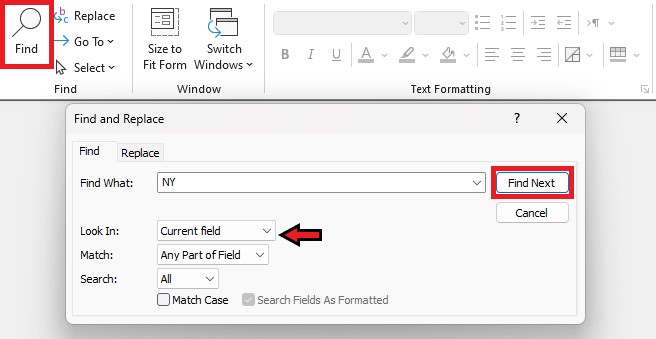
Presume I have multiple Customers from New York. If I use the search box at the bottom of the Customer form looking for "NY" it will bring up the next record with "NY." How do I then see the records following that one? I'm not seeing a Next button. The arrow keys don't work and the Navigator "next" button just brings me to the next record.
Kevin Robertson
@Reply 3 years ago
Use the Find Dialog (Ctrl+F). Make sure you are in the field you want to search. Click the Find Next button.
Kevin Robertson
@Reply 3 years ago
Michael OlgrenOP
@Reply 3 years ago
Yes- I saw this in the lessons. I'm asking specifically if there is a way to move to the next record when using the FORM "quick search" box at the bottom of a form (to the right of the navigator and No Filter buttons).
Michael OlgrenOP
@Reply 3 years ago
Kevin Yip
@Reply 3 years ago
You press Enter to go to the next instance (not necessarily the next record) with the matching search text.
I don't often use the search box because there is no way to go back to the previous instance like in other programs with Shift-Enter, so this is not that useful.
Sorry, only students may add comments.
Click here for more
information on how you can set up an account.
If you are a Visitor, go ahead and post your reply as a
new comment, and we'll move it here for you
once it's approved. Be sure to use the same name and email address.
This thread is now CLOSED. If you wish to comment, start a NEW discussion in
Access Beginner 4.