Sorry about my English, but it is not my native language.
I have just switch to a hosted SQL server for my database and everything seems to work fine.
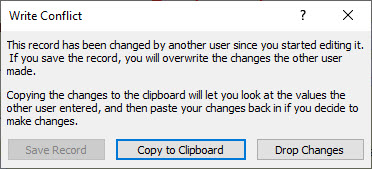
But when I try to modify a record, I get the Write conflict message, but the Save record option is grayed out.
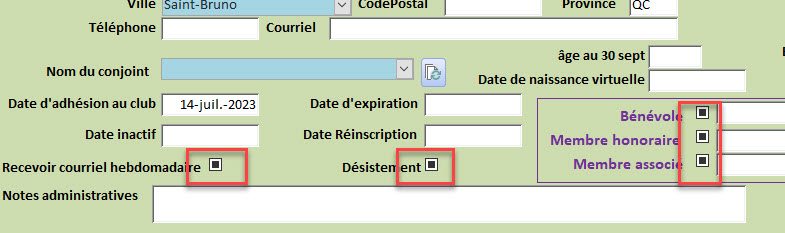
I have noticed that on the form that I use to manage the records from that table, I have a few Boolean fields, and those fields shows as a triple state status on a new record, when they should have a default value.
If I try to delete the record through the form or directly in the table, I get another error message Microsoft Access database engine stopped the process.
I can modify previous records without any issues, but any modification to a new record, result in the write conflict warning and I am the only user of the database.
I can add, modify, and delete record in the same table directly on the SQL server with a problem using SQL statements.
I seem to experience this problem only one 1 of the 9 link tables.
Looking at the table, I see it is not read only because I see that I can add a new record.
I deleted the table on the SQL server and reimported it. Same problem.
I dont know what to check for beyond these steps.
I would love to add some images showing the problems but I don't see an option to do this from the new converstaion screen.
Michel PaulOP
@Reply 3 years ago
Michel PaulOP
@Reply 3 years ago
Michel PaulOP
@Reply 3 years ago
Michel PaulOP
@Reply 3 years ago
Michel PaulOP
@Reply 3 years ago
Just found how to upload images :-)
Adam Schwanz
@Reply 3 years ago
You need to go into your sql server tables and set the bit(yes/no) field default values
Did you set up primary key fields (identities) on the server as I explain in the seminar? That's a must or you won't be able to edit anything from Access.
Michel PaulOP
@Reply 3 years ago
Hi Adam, Thanks for the reply
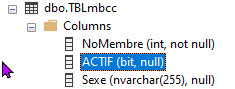
The attached picture shows what I see on the table that is having an issue
Yes Richard, the table uses an autonumber as a primary field and I have specified that field when I linked the table to the database.
I have deleted and relinked that table a few time without resolving the issue.
If you are a Visitor, go ahead and post your reply as a
new comment, and we'll move it here for you
once it's approved. Be sure to use the same name and email address.
This thread is now CLOSED. If you wish to comment, start a NEW discussion in
Access SQL Server Lessons.