Hi all, I have built a custom ribbon which includes a combo box with a list of reports to view. It all works pretty well, however, since the code only runs on a "change" event, I run into the following problem. I select a report, view it then close the report. If I want to open the same report again, I have to change the report to something else then go back and select the report I want otherwise the change event won't fire. Is there a way to change the selection of the ribbon combo to read something like "Select Report" after each selection, thereby insuring a "change" every time?
That's a good question. I honestly don't know offhand. I'll have to play with it. Give me a bit...
I know with a regular form control event, AfterUpdate fires even if you don't "change" the value, but I'm not sure about Ribbon controls.
Kevin Yip
@Reply 2 years ago
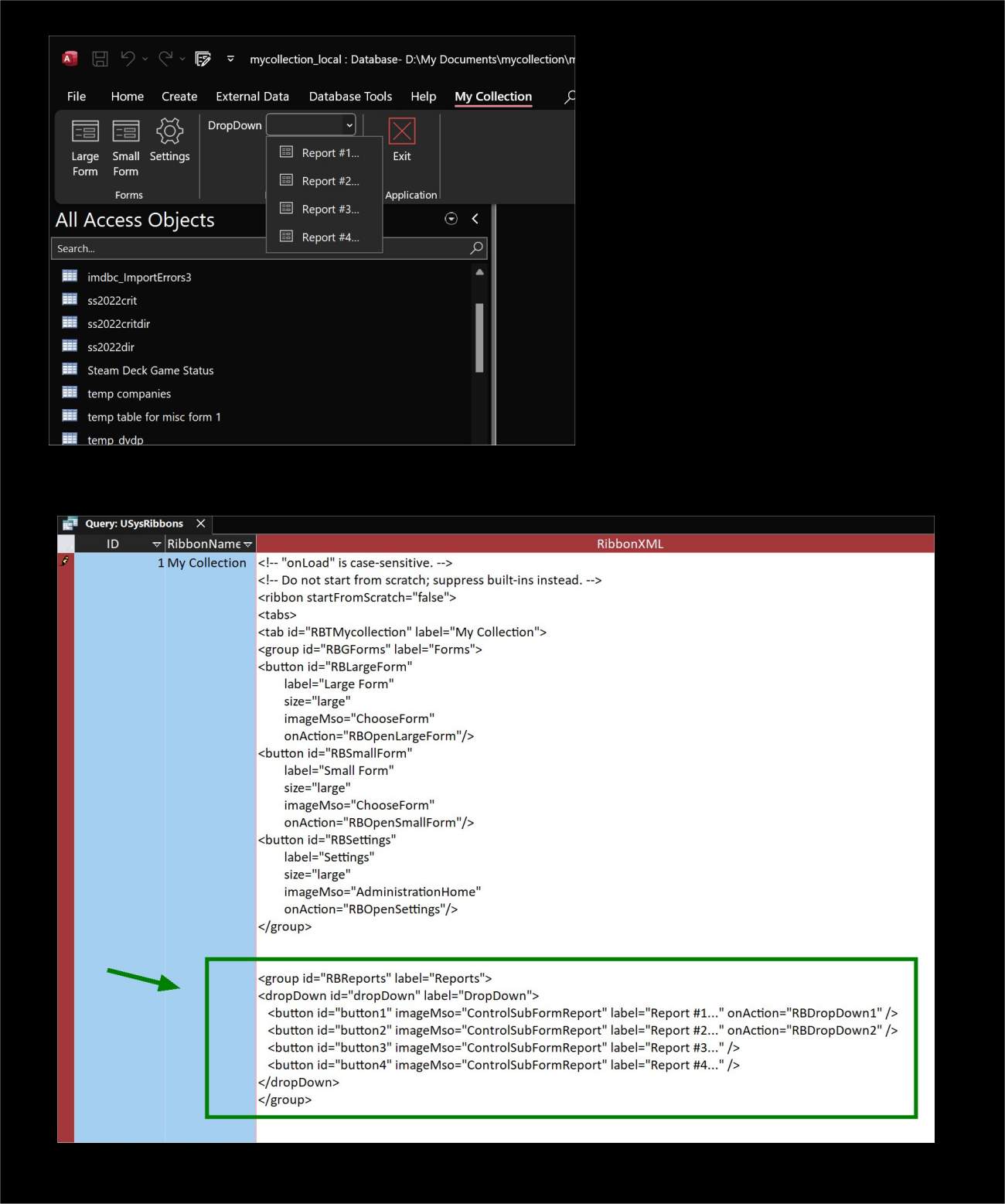
To do this without having to unselect and reselect the item, create a drop-down list of buttons (with the "dropDown" tag), not text items (with the "comboBox" tag). Buttons have their own "onAction" events, and will always run the action when they are clicked. See pics below. I don't know if Richard courses cover this or not.
Kevin Yip
@Reply 2 years ago
Kevin Yip
@Reply 2 years ago
Hi Richard, have you reduced uploaded image file size limit to only 196 kilobytes (from 1 megabyte)? When I upload images I'm told the limit is 196k now. That is barely enough for me since my screen rez is 4k and my pics usually have a lot of small detail. Sometimes I have a hard time seeing other posters' images if they have small detail too.
Kevin: Thanks for the answer. And no, I haven't reduced the image upload size. It should be 1 MB. Only profile pictures are limited to 200k (which should be enough). Unless there's a bug... I'll have to double-check it.
Duh... I had them backwards in the If/Then statement. Rookie mistake. Thanks for pointing it out. I thought some people had uploaded some pretty big profile pics. LOL.
Kevin Yip
@Reply 2 years ago
Thank you for the quick fix. The file size limit is back to normal now.
Jerry AddlestonOP
@Reply 2 years ago
You guys are awesome! Thank you so much for the great support.
If you are a Visitor, go ahead and post your reply as a
new comment, and we'll move it here for you
once it's approved. Be sure to use the same name and email address.
This thread is now CLOSED. If you wish to comment, start a NEW discussion in
Access Developer 44.