Free Lessons
Courses
Seminars
TechHelp
Fast Tips
Templates
Topic Index
Forum
ABCD
 
Home   Courses   TechHelp   Help   Contact   Merch   Join   Order   Logon   Forums   
 
Back to Access Developers    Comments List
Upload Images   @Reply   Bookmark    Link   Email   Next Unseen 
How to display uppercase
Michelle Seidelin 
    
2 years ago
Hello everyone, I am trying to find out if anyone out here would be able to help me with a few things I've only built one database and that was quite a while ago I need to display an as new database. One of the fields in uppercase I know there is queries to convert to uppercase. But I want to be able to type in lowercase at all, display and uppercase
Gary James  @Reply  
      
2 years ago
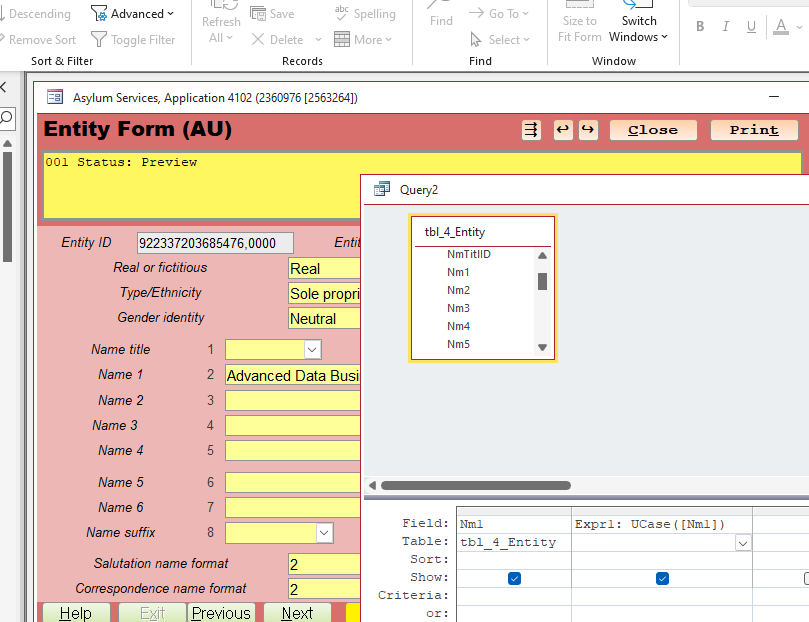
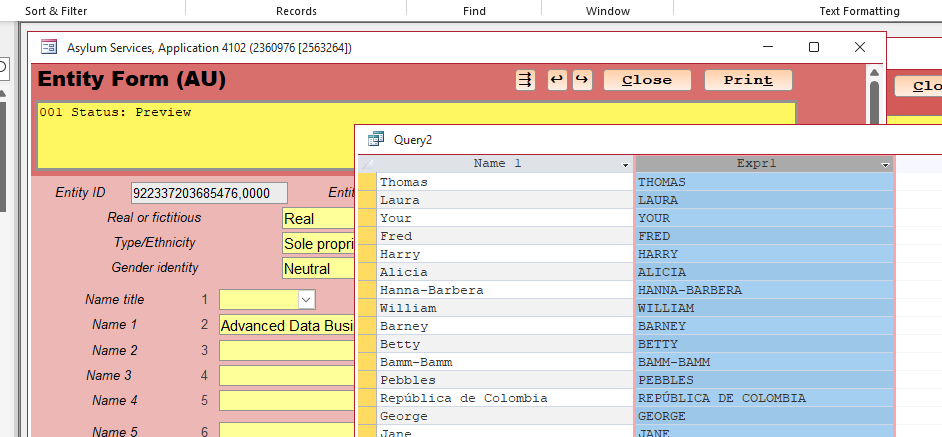
The VBA UCase function converts a string to upper-case. All lower-case letters are converted to upper-case.

UCase "Hello There!"
'Result: "HELLO THERE!"

UCase "wow"
'Result: "WOW"
Thomas Gonder  @Reply  
      
2 years ago
Hi M. I think you are saying that you want to enter into a form in a combination of UPPER and lower case letters. Then display in a report or some other part of the form the data only in UPPER case for ALL the letters.
We do this kind of thing with USA address for the Post Office (USPS). That's how they want address formatted.

Did I understand your question correctly?
Thomas Gonder  @Reply  
      
2 years ago

Thomas Gonder  @Reply  
      
2 years ago

Michelle Seidelin OP  @Reply  
    
2 years ago
Hello Thomas, the situation is that I am not that far through again and have forgotten how to do all this, what I really need is to be able to type and lowercase and at war display on the form as soon as I get off the selected field and uppercase. The reason is the way that amateur radio call sign the written it's all uppercase this is to display at all uppercase that I don't have to worry about putting into lowercase and uppercase because of my disability, it is harder to do. Yes okay I realise I'm not that far ahead, but I have done this before, but as I said forgotten. I also need to Display a number for the contact. I was thinking DMax would do this functionWondering if you would be able to help and how much it would cost to get these functions up and running
Michelle Seidelin OP  @Reply  
    
2 years ago
It won't matter if they don't get it done immediately but I'll need this function built into the database as soon as I can, rather than making things harder for me there was a few other problems I'm trying to figure out as well on how to do some things but let's work on one thing at a time. If you're willing to help
Kevin Robertson  @Reply  
          
2 years ago
Michelle,

Use the After Update event for the field.

FieldName = UCase(FieldName)
Michelle Seidelin OP  @Reply  
    
2 years ago
Hello Gary, yes that is what I want to do but I don't have the knowledge at the moment and do not have the database far enough to start working on this sort of thing by myself
Sami Shamma  @Reply  
             
2 years ago
post a request here and someone will quote you for writing the database for you
Michelle Seidelin OP  @Reply  
    
2 years ago
Thank you everyone in the meantime, I'll just carry on and do the databases. Much as I can then get help with the different functions that I can't figure out Kevin you have helped me in the past with some of my problems by looking at the database at your home. Are you willing to do this again. I've still got your email address unless you've changed it, please reply by email or here or on messenger. If you would like
Michelle Seidelin OP  @Reply  
    
2 years ago
At least I know what I want to do can be done even it is may be six months down the track before my databases ready for these functions were my knowledge
thank you everyone
Thomas Gonder  @Reply  
      
2 years ago
I love this site of Richard's for broadening the mind/application. For Entities I added things like social media addresses and two ways of using some positioning service other than longitude and latitude for Entity "address". Now I have to figure out if it's more appropriate to add a call sign field in the "phone" or "internet" related table/form. Maybe a validation rule to convert the data to uppercase? Being K6TWG, I don't know why I didn't think of this! Thanks for sharing M.
Thomas Gonder  @Reply  
      
2 years ago
And then lightning strikes! I'll get rid of the Internet related form and table.  Change the phone table/form to handle ALL the COMMS  methods: phone, email, webpage, twenty different social medias (none hardcoded), and now add call sign. Anything else?
Richard Rost  @Reply  
          
2 years ago
Why not just use an Input Mask like

>L0LLL

Michelle Seidelin OP  @Reply  
    
2 years ago
Hello Richard,

I copied that code you gave me into the input mask Into the field. I wanted capitalise it didn't do a thing was I done wrong
Michelle Seidelin OP  @Reply  
    
2 years ago
Hello Richard, I have tried yours. Anna did not work because there was not enough coding for the amount and it did not let me go more than one but after putting a few more hours on the end it seems to work
Michelle Seidelin OP  @Reply  
    
2 years ago
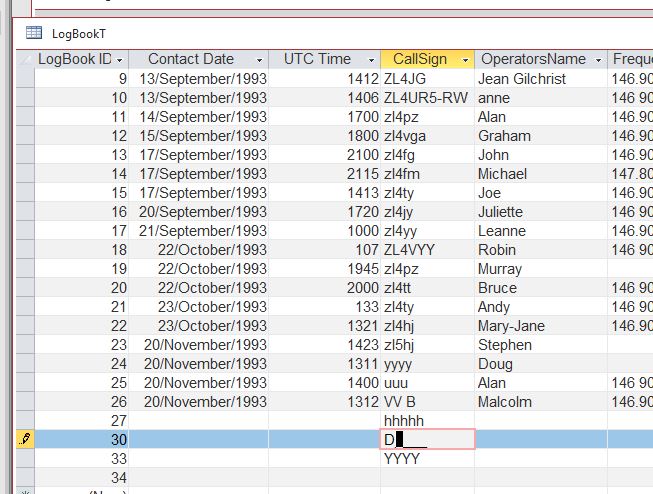
Hello Thomas, I will put the photo up was happening. When I put the code in that Richard has supplied you may see what is happening
Thomas Gonder  @Reply  
      
2 years ago
@Richard, Me being a klutz on the keyboard (a nerve disability) I think I understand what M wants. (My problem maybe worse than hers, I can stare at the key I want to press and my fat finger will press any other key than the one I'm staring at.) She wants to enter it either way, but store it as uppercase. Kevin has the answer. I'll add it to a "conversion" field in my validation routines (I already have pattern validation and date conversions).

If a photo is worth one thousand words, let's try another quickie video (worth a million words in less than two minutes?):
https://drive.google.com/file/d/1cqKcImyGoKlA0gw3GMfaPiV_Lirj-0_7/view?usp=sharing
Michelle Seidelin OP  @Reply  
    
2 years ago
I have copied that code and from what Richard has shown, and what is happening now as that it converts the first letter In but will not let me go any further, the mask is showing a 0 or o as sooner you go to the input mask
Michelle Seidelin OP  @Reply  
    
2 years ago

Richard Rost  @Reply  
          
2 years ago
That is the input mask for UPPERCASE letter, number, then three letters. If you need to adjust it, you can. Watch the video I pointed you to for instructions on how to use it.
Richard Rost  @Reply  
          
2 years ago
It's not going to change any of your existing data - only newly entered data. To change existing data you'll need Update Queries.

And it looks like your callsigns are >LL0LLL but then you've got some that have suffixes too... so IDK. The thing about input masks is that they're very exacting. You may be better off with the AfterUpdate event and UCase.
Michelle Seidelin OP  @Reply  
    
2 years ago
Thank you Richard. I'll just have to work my way through to that area again and hopefully people will be able to help. When I do get stuck again. I am still trying to figure out how to turn 24-hour time into UTC time which will alter the day if necessary. As I have put up earlier that amateur radio time runs on UTC. Another problem of come across is that it is dropping the leading zero I saw something about that in your beginner's class, but I think it was a mask for the code that you use in the USA to addend a fire. Each person any help from anybody would be greatly appreciated
Thomas Gonder  @Reply  
      
2 years ago
Hi M. First you have to decide if you want to store the time as local (and convert later) or as UTC. I'm having that discussion in my head right now as I get ready to write the time tracking module, kinda like punching in and out on a timecard, but a lot more detailed. Windows does provide some features to give UTC, based on the user's workstation time, which can be wrong. Imagine flying across the country, then things are way off (even Microsoft made a mess of this in Outlook with appointments), or just across a state line that can change things by an hour. Using UTC from a possible remote server can also cause problems. Let me know when you figure it all out. ha ha

@Richard, I haven't dealt with this time issue since the mini-computer days, where there was one and only one clock. Have you been down this road in the client/server model?
Michelle Seidelin OP  @Reply  
    
2 years ago
Hello Thomas, the time is currently stored in the 24-hour clock time military time but converting it to UTC will mean that it will have to be able to cope with the date being one day earlier than my clock is until 0000 UTC or midnight UTC with being 12 hours ahead. I'm just not sure what I'm going to do with that part would you be willing to help me with a couple of easy things for someone like yourself to get working as the database can be used and tuned things such as putting in a way of the leading zero when it's required from the start of the day until midday UTC I'm willing to pay even though I can't afford to march this to anything you could help me with would be greatly appreciated. You can always contact me here and we can discuss where to go from here. I have my database semi-designed. If you're willing I can easily send a copy to you is that file to give you exact. Look at the table structure until I hear back from you. Thank you again for keeping in touch with me
Thomas Gonder  @Reply  
      
2 years ago
Hi again M. I suggest we wait to hear from Richard, what he thinks is best in Access. Maybe he has one of his patently effective solutions? I'm curious too, but having been in the military and a pilot of many years, where most everything is done in UTC to avoid confusion, I'm leaning towards converting all the times I already have stored to UTC and then making all my forms and programs work and store in UTC.  The display and reporting issue is what becomes very interesting. It all means there is a lot if converting into and out of UTC at every step.

In the meantime, rest assured, there are functions and API calls that are UTC date aware, meaning they know how to handle the date change.

Thomas Gonder  @Reply  
      
2 years ago
@ M. A quick suggestion though, looking at the table you showed above. Don't make the UTC time an entered field. There should only be one Date/Time field. And don't split date and time into different fields either. The Access Date/Time field data type takes both into account in one field. If you don't store as a UTC time in the table, then you will need an offset field (in either minutes or hours) to show what time zone adjustment is needed based on the time the entry was done. For example, let's say you make a log entry at 12:00 pm in New York City. The next day you go to California and make another log entry at the same time, 12:00 pm, but DST has just started. Without a stored offset, in the future, you'll have no idea when the log entry was other than from a local perspective. This Los Angeles time would be meaningless back in NYC the next winter when you want to know when the Los Angeles contact was made in NYC time (because you may not remember it was in Los Angeles). Make sense (only with 2-meter ;) )?
Thomas Gonder  @Reply  
      
2 years ago
There's not an easy solution, and I've got some pretty good contacts in the Access world that don't even want to consider the problem. Microsoft had to publish 18 pages on the topic for .Net, and even then, they get UTC wrong and call it UCT. Not very confidence building there. However, I will have a solution in the ADS, once I figure it all out.
Richard Rost  @Reply  
          
2 years ago
I recommend storing UTC in the database. You can get the current time from any of several Internet time servers. I cover it in the extended cut for Daylight Saving Time, complete with the code here.
Thomas Gonder  @Reply  
      
2 years ago
@ Richard, I think I started the video awhile back, but then stopped as I wondered, why get the UTC time from the Internet, when it's right there in a properly configured workstation's system clock? What am I not getting?
Richard Rost  @Reply  
          
2 years ago
The workstation might not be properly configured, and this assures that no matter where, no matter when, no matter what, you always have the correct time as long as you have a good internet connection.

And if you put this together with an API that can use your current IP address to geolocate you, you can solve a lot of problems. I took my laptop to Hawaii a couple of years ago and wasn't thinking that I was in a completely different time zone, and everything that I was doing was getting messed up. So yeah, even if you do have a properly configured laptop, that laptop might not know what time zone it's in if you travel a lot.

So: Internet Time Server + Geolocation = Winning
Richard Rost  @Reply  
          
2 years ago
Plus, if your database uses an internet time server, you can get around problems like users who change their own system clock to fake time clock records. I had to deal with that at one of my client's companies a few years ago. The guys would come into work late, just change their system clock to say it was 8:30 a.m., and then, after they log back on, switch the system clock back.
Thomas Gonder  @Reply  
      
2 years ago
@Richard, I went and reviewed the video link you gave. It was different from another I saw. In any case, it's a nice simple solution, using two fields, and it makes sense for a time tracking system, although contrary to my advice above to M.

Now, I have birthdates and other start times, timestamps and log files. I wouldn't want to keep two fields for all of those. The only downside to using just UTC as I see it, is that every time you want to display one of these stored UTC times, it has to be converted back to the local user's local time to make sense. That was always a pain as a pilot, flying along and having to add and subtract with every PIREP or METAR. Although Zulu time was good at coordinating the attack on an enemy from all sides simultaneously, who wants to put a user through all that mental gyration?

Add to it this situation. A nice senior citizen lady, born in Nigeria at 12:01 am (UTC +1) on February 29, 1952 comes into my service center in California on February 28, 2024 at 3:45 in the afternoon. I already have her birthdate in the Access BE as UTC 1952.02.28 23:01:00, so it gets converted to PDT (UTC -7) as 1952.02.28 4:01 pm on my Entity Form. I say, "Oh look, we just made it to your birthday this moment, happy birthday ma'am (I don't break out in song)." She gives me a funny look and says, "Thank you young man, but my birthday isn't until tomorrow. I've been waiting four years to enjoy it on the 29th with a little champagne just after midnight (wink wink)."

So you can see, it's not just DST that is a bitch.
Richard Rost  @Reply  
          
2 years ago
Yeah... our date/time system is a bitch... but that's about the best you can do. And that's why airlines always give you your ticket in LOCAL TIME. I say if you have a global time-sensitive database, store UTC and the time zone. You can always display what you need on the fly based on that. Give users the ability to input both and convert. More work for the developer to keep the user's life easy. That's what we're here for.
Thomas Gonder  @Reply  
      
2 years ago
@ Richard. Yes, that changing times on workstations. You would think there is a MS group policy you can set to stop that.
Here, I can't count on an always up Internet connection.

I wonder, is there a way to get the time from the BE server somehow? Users wouldn't normally be able to change that. There's got to be a better way than running code on the BE that updates a table field every second. And then I, as a boss, can play with the BE clock. "It feels like ten hours? Slow day, but check the clock in your timecard, {evil} ha ha ha."
Michelle Seidelin OP  @Reply  
    
2 years ago
Thank you everyone I will have to see if I can find someone out there in access land who will be able to help. I think when the questions I saw somebody asked me was about why do I need a separate number from the auto number. This is because I want to lie on as I can no what number contact that person was just in case. A record was deleted because the call/contact did not actually end up happening to be logged. I may have entered in the database and then lost contact with the other amateur. This is why it would have to be used again force at the next person. That's why I want to do dmax
Richard Rost  @Reply  
          
2 years ago
Sure. You could have the server write the value to a table field... But you'd need an event or timer loop running on it.

This thread is now CLOSED. If you wish to comment, start a NEW discussion in Access Developers.
 

Next Unseen

 
New Feature: Comment Live View


The following is a paid advertisement
Computer Learning Zone is not responsible for any content shown or offers made by these ads.
 

Learn
 
Access - index
Excel - index
Word - index
Windows - index
PowerPoint - index
Photoshop - index
Visual Basic - index
ASP - index
Seminars
More...
Customers
 
Login
My Account
My Courses
Lost Password
Memberships
Student Databases
Change Email
Info
 
Latest News
New Releases
User Forums
Topic Glossary
Tips & Tricks
Search The Site
Code Vault
Collapse Menus
Help
 
Customer Support
Web Site Tour
FAQs
TechHelp
Consulting Services
About
 
Background
Testimonials
Jobs
Affiliate Program
Richard Rost
Free Lessons
Mailing List
PCResale.NET
Order
 
Video Tutorials
Handbooks
Memberships
Learning Connection
Idiot's Guide to Excel
Volume Discounts
Payment Info
Shipping
Terms of Sale
Contact
 
Contact Info
Support Policy
Mailing Address
Phone Number
Fax Number
Course Survey
Email Richard
[email protected]
Blog RSS Feed    YouTube Channel

LinkedIn
Copyright 2026 by Computer Learning Zone, Amicron, and Richard Rost. All Rights Reserved. Current Time: 8/7/2026 10:42:34 PM. PLT: 0s