Free Lessons
Courses
Seminars
TechHelp
Fast Tips
Templates
Topic Index
Forum
ABCD
 
Home   Courses   TechHelp   Help   Contact   Merch   Join   Order   Logon   Forums   
 
Back to Employee Training 6    Comments List
Upload Images   @Reply   Bookmark    Link   Email   Next Unseen 
Requery Statement
Normand Caron 
      
2 years ago
WHEN i enter the "MissingCourseList.Requery" statement  I get the following error
    
Compile error. Variable not defined.
Sami Shamma  @Reply  
             
2 years ago
Check your spelling

you are using in Control name either not on your form or not Dim'ed in your procedure.
Normand Caron OP  @Reply  
      
2 years ago
What is dim'ed means? Ido not understand?
Kevin Robertson  @Reply  
          
2 years ago
Normand Caron OP  @Reply  
      
2 years ago
What Variable?
Alex Hedley  @Reply  
           
2 years ago
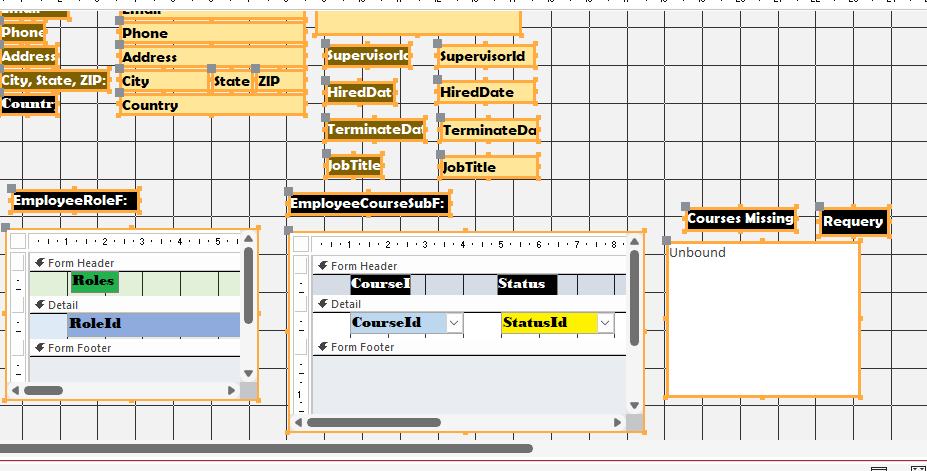
Can you share a screenshot of your Form in Design View with the MissingCourseList (Listbox?) selected please.
Sami Shamma  @Reply  
             
2 years ago
Norman,
Click on the blue Variables word in Kevin's reply. It will take you to a video that will explain what you are looking for.
Normand Caron OP  @Reply  
      
2 years ago
IT Cannot fid the "MissingCourseList"
Kevin Robertson  @Reply  
          
2 years ago
Go to Design View for the Employee Form.
Check your spelling of the `MissingCourseList` List Box.
Normand Caron OP  @Reply  
      
2 years ago
ALEX...Trying to screenshot doesn't work
Kevin . . . I DID AND THE SPELLING IS CORRECT THAT IS WHY I DON'T UNDERSTAND WHY IT IS LOOKING FOR THE VARIABLE
Sanni . . . Did that  .. Still don't work i am puzzled
Normand Caron OP  @Reply  
      
2 years ago
WHT IS WRONG WITHE FOLLOWING STATEMENT
[Form]![EmployeeF]![EmployeeId]
Kevin Robertson  @Reply  
          
2 years ago
Missing 's' - Should be Forms, not Form
Normand Caron OP  @Reply  
      
2 years ago
Now i am getting this error: Invalid outside procedure on the 'reqery'stetement
Alex Hedley  @Reply  
           
2 years ago
Normand Caron OP  @Reply  
      
2 years ago
It copies the screenshot to clipboard but doesn't paste.
Kevin Robertson  @Reply  
          
2 years ago
You need to save the image to your hard drive and upload using the big `Upload Image` button.

Image Uploads
Normand Caron OP  @Reply  
      
2 years ago

Normand Caron OP  @Reply  
      
2 years ago
ok i am uploading the image now . . .
Normand Caron OP  @Reply  
      
2 years ago

Normand Caron OP  @Reply  
      
2 years ago
I finally fixed it, Thank you all for your help.
Sami Shamma  @Reply  
             
2 years ago
Normand,
I waited for you to fix the problem before pointing out the following. Here in the US writing in all capitals is considered shouting, and it is considered rude.  Perhaps in Canada it is not considered so.

Please refrain from posting in all caps the future.  

Thank you

This thread is now CLOSED. If you wish to comment, start a NEW discussion in Employee Training 6.
 

Next Unseen

 
New Feature: Comment Live View


The following is a paid advertisement
Computer Learning Zone is not responsible for any content shown or offers made by these ads.
 

Learn
 
Access - index
Excel - index
Word - index
Windows - index
PowerPoint - index
Photoshop - index
Visual Basic - index
ASP - index
Seminars
More...
Customers
 
Login
My Account
My Courses
Lost Password
Memberships
Student Databases
Change Email
Info
 
Latest News
New Releases
User Forums
Topic Glossary
Tips & Tricks
Search The Site
Code Vault
Collapse Menus
Help
 
Customer Support
Web Site Tour
FAQs
TechHelp
Consulting Services
About
 
Background
Testimonials
Jobs
Affiliate Program
Richard Rost
Free Lessons
Mailing List
PCResale.NET
Order
 
Video Tutorials
Handbooks
Memberships
Learning Connection
Idiot's Guide to Excel
Volume Discounts
Payment Info
Shipping
Terms of Sale
Contact
 
Contact Info
Support Policy
Mailing Address
Phone Number
Fax Number
Course Survey
Email Richard
[email protected]
Blog RSS Feed    YouTube Channel

LinkedIn
Copyright 2026 by Computer Learning Zone, Amicron, and Richard Rost. All Rights Reserved. Current Time: 8/17/2026 10:40:28 PM. PLT: 1s