Fitness 23
By Richard Rost

 14 months ago
Creating a Food Log Table with Hybrid Relational Model In this Microsoft Access tutorial, I will show you how to create a food log table for your fitness database, discuss different design approaches like the fully relational, snapshot, and hybrid models, and explain how to track meal items, quantity, macros per unit, and notes for daily food tracking. This is part 23. MembersThere is no extended cut, but here is the file download: Silver Members and up get access to view Extended Cut videos, when available. Gold Members can download the files from class plus get access to the Code Vault. If you're not a member, Join Today!
PrerequisitesRecommended CoursesUp Next
Keywords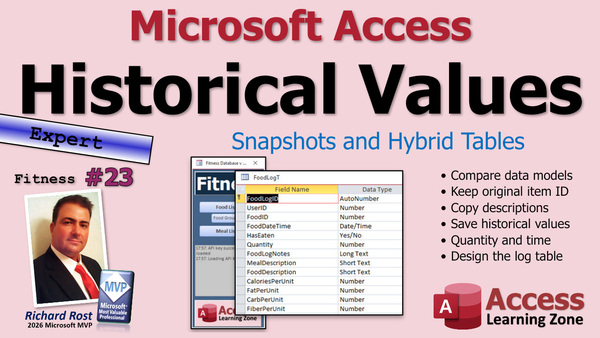 TechHelp Access, fitness database series, food log table, hybrid model, relational model, snapshot model, food tracking, calories, macro values, meal description, FoodLogID, UserID, FoodID, FoodDateTime, HasEaten, quantity field, Notes, CaloriesPerUnit, FatPerUnit, CarbPerUnit, FiberPerUnit, SugarAddedPerUnit, ProteinPerUnit
 Subscribe to Fitness 23
Get notifications when this page is updated
More InformationTranscript Welcome to another TechHelp video brought to you by AccessLearningZone.com. I'm your instructor, Richard Rost.
Today is part 23 of my fitness database series. Today we're going to start the food log table. If you haven't watched parts one through 22 - now we've got a lot of them - go watch all those first, then come on back.
Again, this happens to be a fitness database, but the stuff I'm teaching is valid for any kind of database that you might be building, and there's lots of cool stuff in it. So let's get to it.
It is finally time to build the food log table. This will be for when you eat something throughout the day. You're going to take the food item and put it on your log. If you want, you can take a whole meal and say, OK, it's time for Rick's breakfast, do this, add it to the food log.
That's what we've been building up for - to actually track this stuff now.
There are a couple of different ways you can do this. There's the fully relational model, there's the snapshot model, and then there's a hybrid approach, which is actually what we're going to be doing. Let me give you the details on those.
When you build a database like this, let's consider the TechHelp free template, the customer order model.
If you've got customers, and the customers place orders, and those orders have products on them, and you want to pick the products from a list of products that you have - hard drive, monitor, keyboard, whatever - let's say you're selling computers.
Now you've got a product table, which is one of the things I build in my full course. We didn't do that in the TechHelp video, but normally you have a product table you can pick products from, just like we're picking food items.
But those products might change slightly throughout their usage, especially their price. The price is going to fluctuate up and down, and you don't want to have to create a brand new food - or, I've got food on the mind - you don't want to have to create a brand new product item in your product table just because the price went up.
If you do a fully relational model, where in each customer's order you just copy the product ID, then you've got to create a whole new product if the price changes because you're getting all the information from the product table directly.
The snapshot model says we're going to take that product information and copy all of that product information to the order table - the order detail table, technically.
But you lose your link to the actual product. So if you do have to go and, for example, give a list of all the customers who purchased this product, you don't have that.
So what we're going to do is we're going to do a hybrid approach. We're going to keep the IDs, but we are going to copy over most of that information into the food log.
Once in a while, you may hear that little sound - that little sound right there - and that's because I've got Whisper Pro, the voice recognition software that I use, and I've got a Stream Deck here. Every now and then when I'm recording, instead of hitting the hot key to stop recording, I hit the Whisper Pro button and it starts voice recognition. So that's why once in a while you hear that noise. That's what that is - that's me, I goofed. I don't feel like going back and editing that last video because it was a few minutes.
Getting back to it, with food tracking, the calories in a chicken breast are not going to just suddenly change overnight. But you may want to make a modification to it on the fly - you might want to change, maybe you added a little butter to it, and you don't feel like putting a whole new entry in for butter. Or maybe you were wrong, maybe you did enter it wrong and you found a new source that says, oh, there's actually this many calories.
So you might want to be able to go back and change them all. By keeping the IDs, you can at least pull up a query and say, hey, this item is used in these food log items. But you don't necessarily have to change them all.
This method, the hybrid method, is good if you want to just manually change an item on the fly, but it's also good if you want to go back and fix a mistake and need to find all the older items. So that's why I like to store both.
It seems like it's not a very important detail right now, but later on, as you get to use it, you'll see the benefits of this.
I teach the hybrid method in my full course. When we do the product entry system, we copy the product over, we keep the product ID in the table, but we also copy up the information too.
So you're getting some cooler stuff that I cover in my expert lessons.
There are benefits to sticking with a 23-part series now, and it's going to be longer, folks.
So, of what we have in our database right now - oh, someone's beaming in, hang on a second - I think the food table itself, and one thing I want to change, we're going to get rid of this little plus over here.
The food table itself has most of the fields we need for the food log. We're going to keep a lot of the same stuff, so we're going to be doing some copy and pasting here.
One thing I want to change though - go into the properties of the table.
When you turn on relationships, you get this thing here, subdatasheet name. I want "none" because there's nothing under FoodT, and I think that's annoying because it was showing me LogT because they are linked, but not in the way that I want to see meal items on this table.
Tables are just for you. Don't let your users ever in your tables, period.
Let's create our table. This is going to be the food log table.
So, FoodLogID - I always do that, I always put the T there when I shouldn't. Let's save it right away - FoodLogT. Get out of the way. Yes, there it is.
Now I'm going to add a UserID even though we don't have this yet. That's our foreign key because we have to build a user table. But for now, we're going to stick that in there and I'm going to default all these records to one, just for now for you.
I like to keep all my IDs up top, so the only other ID we have to worry about here is FoodID.
Do we save the MealID? No, I'm not going to save individual meals, although we are going to copy over the meal description for grouping purposes. We'll talk about that later.
But I don't care about the MealID. All I'm going to do is, when they pick a meal, I'm going to grab the food items in that meal and throw them in the log. You'll see how it'll work.
I do want to track the date and time it was added to the log. Let's call this FoodDateTime. That'll be a Date/Time, and I'm going to default it to Now.
Do I call this just Date? No. Do I call it just DateTime? No. You could call it MyDateTime. Why? Those are reserved words; we don't use those. I don't think we have any other dates in here, and there are no dates in any of these tables.
I'm not talking about the dates they eat, or the dates that you go on. I'm talking about the actual date. Now you can use this for planning purposes, so you can put a future date/time in here if you want to, but basically the food log - we're going to break it down so on the form you see all of one day's food items. All today, all of yesterday; you want to plan tomorrow, that's fine too.
We're going to have another field in here called HasEaten. That's a yes/no value, default to no. So have you actually consumed that yet? Then, at the bottom in the totals, we'll say, "Here is what you've got planned for the day, here is what you've actually eaten so far."
I do this myself too, because I like to plan out the day, and I know that I've got a 450 calorie yogurt and fruit bowl coming up at the end of the day because I look forward to that every night. So if my goal for the day is 2,000 calories and I'm already at 1,700, I've got to make some adjustments. I can see what I've already eaten and what I have planned for that day. So that helps.
Next is going to be the quantity. Now, here's where it's going to get a little weird. For quantity, we're going to make the type down here Double. Remember, there's either a Long Integer or Double. I only use those two types: Long Integers for integers, counting numbers, and Doubles for anything that needs a fractional component. You might have - you might eat 1.5 eggs, for example, and you don't want to go in there and figure it out by ounce, etc. I'll make the default for that one.
We're going to keep the quantity so we know how many you've eaten, and we're going to keep all of the macro values that we are going to copy into this table. We're going to keep those per unit macro values, so not to confuse everybody.
The log will do the math for you, but I'm going to copy over the macro values from the food table as per unit. We'll get to that in a second.
Now, I'm going to do all the fields we're going to copy from the food table last, so let's do all the things here so far that are for just this table.
I'm going to do LogNotes. Actually, let's just make this Notes, because we are going to copy over the food notes. I don't think I'm going to copy the meal notes, but the food notes might be necessary. So you have notes like "grilled" or whatever little notes you want with that food item.
This is long text; this will be notes for the log item. So you can put in there, for example, "grilled these with barbecue sauce" or something. That's why you adjusted the calories or something like that.
Let's make this FoodLogNotes so we don't get confused, because we're going to have another notes field in here.
Now, from the food table, we are going to copy over the description. I'm also going to copy over the meal description too, if there is one, because later on when we do a report and make a printed report, we can then group by the meal description. So if you do copy over a meal, you can put all the items under Rick's breakfast, for example.
So I'm going to copy over the meal description and the food description, so we've got both of those.
Let's save this.
We're going to copy over the macros and the other details from the food table.
Let's go into the design view of the food table.
We're going to copy. I'm going to do a little of this... do a little side by side action. Oh, oops, I just accidentally maximized it. That's why I don't understand how some people work in this mode with the tab interface across the top. I think this is the most annoying thing. I like Windows. It's called Windows, people. It's not called Tabs.
Anyway, do we need to copy the FoodGroupID? No, I think this is one of those instances where you're not going to change this on the fly, so if you really need to know the food group, you can get it relationally. That's fine. Just like the URL, I don't really think we need to copy that over.
Description - we've already got a field for that.
Calories through Protein - we're going to copy those, so copy and paste right over here.
I'm going to add "PerUnit" to each of these: CaloriesPerUnit, FatPerUnit, CarbPerUnit, FiberPerUnit, SugarAddedPerUnit, ProteinPerUnit.
Just so no one's confused, we're going to have a little pop-up form they have to use to edit this stuff, because I don't want them thinking, "OK, I typed in five for quantity" and thinking these should change. So there's CaloriesPerUnit is 100, and you've got five of those, so the total on the form will show 500.
This doesn't have a unit over here.You do not put a number in this. This is just one item. So whatever the serving size is - if it is one egg or if it is ounces of chicken - whatever that item unit is, that is what we are going to have over here per unit.
That just gives you that, so there is no confusion. Save it. Close it. Close it.
Now we are ready to start building the form, and we will tackle that next.
Let's see, today is Thursday, the 14th of August 2025. Tomorrow is going to be a Quick Queries for any man. I cannot talk today, so we will start building the form for this on Monday, the 18th.
That is going to do it for your TechHelp video for today. Hope you learned something. Live long and prosper, my friends. I will see you next time.
TOPICS:
Introduction to the food log table
Comparison of relational, snapshot, and hybrid models
Implementation of the hybrid model for logging food
Discussion on copying food information into the log
Creation of the Food Log table in Access
Setting primary keys and foreign keys in the Food Log table
Configuring FoodDateTime field with default Now
Explanation of proper naming conventions for date fields
Adding HasEaten field with default value
Designing the Quantity field with Double data type
Differentiating log notes from food notes
Copying meal and food descriptions into the log
Selecting and adding macronutrient fields per unit
Naming copied macro fields with PerUnit suffix
Deciding which fields to copy versus keep relational
Copying relevant fields from the food table to the log
Storing macro values per unit for quantity calculations
COMMERCIAL:
In today's video, we're continuing with Part 23 of the fitness database series, and we're starting the food log table. You will learn how to set up a hybrid approach for tracking food items, where we keep the IDs from the related tables and also copy over important details like calorie and macro values per unit. I'll show you how to set up the necessary fields, discuss best practices for structuring your table, and explain why this method works well for both accuracy and flexibility in your database. You will also see some helpful tips for naming fields and keeping your data organized. You'll find the complete video on my YouTube channel and on my website at the link shown. Live long and prosper my friends. Intro In this video, we continue our Microsoft Access fitness database series by building the Food Log table using a hybrid method that combines elements of both relational and snapshot models. I will show you how to design the table structure, including primary and foreign keys, set up key fields like FoodDateTime and HasEaten, and copy food and meal details along with macronutrient values per unit. You'll also learn about important naming conventions, handling quantities, and strategies for keeping your database accurate and flexible. This is part 23. Quiz Q1. What is the main purpose of the Food Log table described in the video?
A. To store recipes for future use
B. To track foods eaten or planned to eat throughout the day
C. To maintain an inventory of food items in the pantry
D. To create shopping lists for users
Q2. Which table design approach is adopted for the Food Log in the video?
A. Fully relational model
B. Snapshot model
C. Hybrid model
D. Flat file model
Q3. What is the main advantage of the hybrid model mentioned in the video?
A. It eliminates the need for foreign keys
B. It only keeps relational links and does not store any copied data
C. It allows both searching by ID and keeping historical data even if changes occur
D. It speeds up database queries dramatically
Q4. Why is keeping FoodID in the Food Log table important?
A. To track which meal a user has eaten
B. To maintain a link to the original food item for reference and queries
C. To calculate expiration dates
D. To add the price of food to each log entry
Q5. What should the FoodDateTime field be used for?
A. Only for recording future meals
B. To record when the food item was added or is supposed to be eaten
C. To enforce security on meal times
D. To store the date the food item was created in the database
Q6. Why should field names like "Date" or "DateTime" be avoided in Access tables?
A. They are difficult to type
B. They can conflict with reserved words in Access
C. They are visually unappealing
D. They are too short to be descriptive
Q7. What type is recommended for the Quantity field in the Food Log table?
A. Short Text
B. Currency
C. Long Integer or Double, depending on whether a fractional value is needed
D. Attachment
Q8. Why are the macro-nutrient values copied into the Food Log table with a "PerUnit" suffix?
A. To indicate they are cumulative values for all servings
B. To distinguish them from meal-level values and clarify they are per single unit
C. To show they come from external sources
D. To allow users to edit them directly on the log
Q9. Why is a "HasEaten" field included in the Food Log table?
A. To track if the food has low calories
B. To calculate expiration dates
C. To indicate whether a planned food item has actually been consumed yet
D. To store the weight of the food item
Q10. What is the primary way users will add food to their log, based on the method described?
A. By manually typing everything about the food each time
B. By copying food items (and optional meal descriptions) from the food table into the log, keeping IDs and key data
C. By scanning food barcodes directly into the database
D. By importing data from another database
Q11. When copying fields from the food table to the food log table, which field does the video specifically say is NOT necessary to copy?
A. Macro nutrients like Calories and Protein
B. FoodGroupID
C. Food Description
D. Meal Description
Q12. What is the recommended position for ID fields in the table design?
A. At the end of the table structure
B. In the middle, after data fields
C. At the top of the table structure
D. Alphabetically sorted among other fields
Q13. How should users interact with the Food Log and food tables, according to the video?
A. Users should work directly in the tables to make entries
B. Users should never interact directly with tables; only forms should be used
C. Users should be allowed in tables but not in forms
D. All editing should be done through Excel exports
Answers: 1-B; 2-C; 3-C; 4-B; 5-B; 6-B; 7-C; 8-B; 9-C; 10-B; 11-B; 12-C; 13-B
DISCLAIMER: Quiz questions are AI generated. If you find any that are wrong, don't make sense, or aren't related to the video topic at hand, then please post a comment and let me know. Thanks. Summary Today's TechHelp tutorial from Access Learning Zone focuses on continuing with my fitness database series, specifically starting to build the food log table. This is part 23 in the series, so if you have not gone through parts one through 22, I encourage you to do that first because everything builds on what we have already covered.
Although we are working on a fitness database, the concepts and techniques I discuss are applicable to just about any kind of database project you may be tackling. There are a lot of valuable lessons here.
Now, the food log table will allow you to track everything you eat throughout the day. Whenever you have a meal, you will log the food items, and over time, you will be able to monitor your intake. If you want, you can even log whole meals at once, such as "Rick's breakfast," and add those items directly into the food log.
Up until now, the groundwork has all been leading toward this point, where you actively begin tracking your food.
When setting up a system like this, there are several models to consider. You have the fully relational model, the snapshot model, and a hybrid approach. I want to explain how these work.
Take, for example, the customer order model from my TechHelp free template. If you have a system with customers placing orders and each order containing products, you might be familiar with having a product table containing the different items you sell, like hard drives or monitors. In a fully relational setup, you would reference the product ID in each order, pulling in current information from the product table directly.
However, a fully relational model hits a snag when something about the product changes, like the price. You would not want to create a brand new product entry just because the price changes. If you keep everything linked only by ID, you lose the ability to update certain details for a single order or log entry.
The snapshot model involves copying all relevant product data into each order, making a moment-in-time "snapshot." While this approach allows updates without affecting historical data, you lose a direct link back to your main products. If you ever want a list of all customers who purchased a specific product, that becomes much harder.
For this project, I am using a hybrid model. Here, I keep the IDs to maintain the relational link but also copy over most of the information I need into the food log. That way, if you need to make on-the-fly changes to details like calories, you can do so for a particular instance in the log, but you still have a connection to the original food item for queries and lookups.
For example, the calories in a chicken breast are unlikely to change unexpectedly, but you might want to adjust for added ingredients or if you discover a more accurate calorie count later. By keeping both the IDs and the data, you have more flexibility. If you need to locate all food log entries using a particular item because of a correction, having the FoodID in your log table makes this easier.
I use the same hybrid method in my full course's product entry system, where we keep the product ID and also copy over key product details. By following along, you are getting exposure to some more advanced database methods I cover in my expert lessons.
Let us look at our database. At this stage, most of the fields needed for the food log can be found in our food table, so some copying and pasting will be involved. However, I want to make some adjustments before proceeding.
A quick point about table properties: when relationships are turned on in Access, there is a subdatasheet property that sometimes tries to display related data directly in the table. For the food table, I like to set the subdatasheet property to "none" to avoid unwanted nested data, since tables should only be used by the designer and not by your end users.
Now, let's create our food log table. I always like to establish the primary key right at the start, so FoodLogID goes in first. Remember to name your tables with a T suffix, although I sometimes forget and have to correct myself. For now, save it as FoodLogT.
Next, I am adding a UserID field, even though we do not have a user table just yet. This will serve as a foreign key in the future. Initially, I will just set all records to use an example value.
I always put all my key fields—IDs—at the top of each table. So our next key is FoodID, referencing the specific food item logged.
At this point, you might wonder whether we should save the MealID as well. In this design, I am not storing individual meals. Instead, when someone selects a meal, I will grab the food items involved and log those individually. However, I do plan to copy over the meal description for reporting and grouping later.
Another important field is the date and time the food item was added to the log. I am calling this FoodDateTime, and it will store both date and time using the Date/Time type. I am setting the default value to Now so each entry automatically records when it was added. Do not use reserved words like "Date" or "DateTime" as field names in Access; use something descriptive and unique.
You can use this field for planning ahead as well as logging foods already eaten. On forms and reports, you will be able to review all items for a particular day or plan for upcoming days.
I am also including a HasEaten field, a yes/no type that defaults to "no." This way, you can distinguish between what you have planned and what you have actually consumed. For example, if you are planning out your day's meals, you can see at a glance what is scheduled and then mark items as consumed throughout the day. This is useful for staying on track with calorie goals.
Now for the quantity field. Food quantities can sometimes be fractional (like 1.5 eggs), so I am using the Double data type. I usually stick with Long Integer for whole numbers and Double for fractional values. This gives flexibility for different types of food items.
Next is the notes field. Here, you can enter log-specific notes, such as details about how the food was prepared or any adjustments made. I am calling this FoodLogNotes to avoid confusion with other notes fields we might have. Again, this will be a long text field to give you plenty of space.
From the food table, I will be copying over the food description and, if applicable, the meal description. Having the meal description in each log entry later helps when producing grouped reports, such as seeing all items under "Rick's breakfast."
Now, let's bring in the nutrition data. In the food table, nutritional values like calories, fat, carbs, fiber, sugar added, and protein are kept per unit. For the log table, I will copy these fields over and add a "PerUnit" suffix to each: CaloriesPerUnit, FatPerUnit, CarbPerUnit, FiberPerUnit, SugarAddedPerUnit, and ProteinPerUnit. This makes it clear these values are per serving, per egg, ounce, or whatever the unit is. The log will multiply these per-unit values by the quantity consumed when summarizing your daily intake.
There is no need to copy over fields like FoodGroupID unless you expect food groups to frequently change for a specific log entry, which is not common. It is fine to look up food group information relationally when you need it.
With all the necessary fields in place, the next step would be to create the form for entering and reviewing food log entries. We will get to that in the following session.
That concludes this TechHelp tutorial. Remember, you can find a complete video tutorial with step-by-step instructions on everything discussed here on my website at the link below. Live long and prosper, my friends. Topic List Introduction to the food log table
Comparison of relational, snapshot, and hybrid models
Implementation of the hybrid model for logging food
Discussion on copying food information into the log
Creation of the Food Log table in Access
Setting primary keys and foreign keys in the Food Log table
Configuring FoodDateTime field with default Now
Explanation of proper naming conventions for date fields
Adding HasEaten field with default value
Designing the Quantity field with Double data type
Differentiating log notes from food notes
Copying meal and food descriptions into the log
Selecting and adding macronutrient fields per unit
Naming copied macro fields with PerUnit suffix
Deciding which fields to copy versus keep relational
Copying relevant fields from the food table to the log
Storing macro values per unit for quantity calculations Primary Topics food log design, hybrid database model, Access table creation, logging food intake, copying macronutrient data, field naming conventions, foreign keys, table structure Secondary Topics meal grouping, user tracking, data editing best practices |




