Do While Loop
By Richard Rost

 3 years ago
Do While Loops in Microsoft Access VBA
In this Microsoft Access tutorial, I'm going to teach you how to use a Do While Loop in VBA. We'll discuss the pros and cons. We'll see how you can test for a condition at either the top or the bottom of the loop. We'll learn about the Exit Do command.
Prerequisites
VBA Loops Series
Recommended Courses
Syntax
Do While Condition

    ' Your Code Here

    [If OtherCondition Then Exit Do]

Loop
Do

    ' Your Code Here

    [If OtherCondition Then Exit Do]

Loop While Condition
Keywords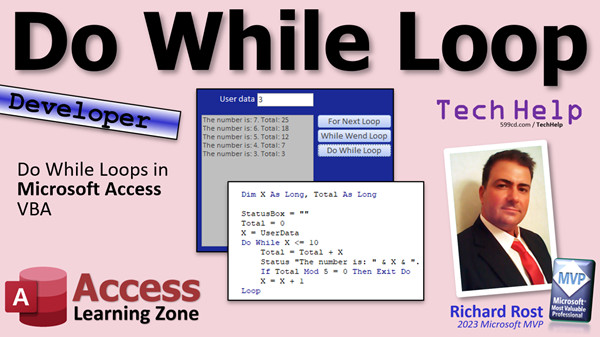
access 2016, access 2019, access 2021, access 365, microsoft access, ms access, ms access tutorial, #msaccess, #microsoftaccess, #help, #howto, #tutorial, #learn, #lesson, #training, #database, Do-While Loop, do while loop, do/while loop, do while loop, VBA, exit do, Loop Counter, Conditional Exit, Loop Termination, exit out of do while loop
 Subscribe to Do While Loop
Get notifications when this page is updated
More InformationTranscript Today we're going to learn about the DoWhile Loop in VBA. We will discuss the pros and cons. We will see how you can test for a condition at either the top or the bottom of the loop, and we will learn about the Exit Do command.
We are continuing our VBA Loops series. We've already covered For Next and While Wend. Today we're going to look at DoWhile. This, of course, is a developer-level class. So if you've never done any programming before, go watch my Intro to VBA video. It will teach you everything you need to know in about 20 minutes.
Also, make sure you understand how variables work. Be sure to watch my video on building a status box. This is how I choose to display information for the user: in a nice text box on a form that I call the status box. These are all free videos. They're on my website and my YouTube channel. Go watch them and come on back.
Yesterday, we learned about the While Wend loop, or just the While loop. Today we're going to talk about the DoWhile loop, which is very similar. Tomorrow we're going to talk about Do Until, which is similar still. They all have their own little minor differences.
DoWhile is written like this:
Do While some condition is true
Do your code
Loop
For example, if you're dealing with a counter, set the counter: x = 0.
Do While x < 10
x = x + 1
Loop
It will keep doing that. You will get 0, 1, 2 up to 9. As soon as it's 10, it will drop out.
The nice thing about a DoWhile loop - well, one of the nice things - is that you can check the condition either at the beginning or at the end of the loop. This forces it to run at least one time through.
For example, same thing:
x = 0
Do
x = x + 1
Loop While x < 10
Now it's going to loop and you'll get the same results. But where you check for the condition depends on whether or not you get at least one iteration. This will usually happen in a situation where you're getting a value from a user or you're reading something out of a table.
Up here, maybe you have an input box. This has the user type in some value. Depending on what they type in, the loop may run once or it may not. If you check for the condition up front, the loop might not run at all. If, instead of x = 0, you have the user inputting a number with an input box or on a form field, if they type in 100, then the loop never runs. If there's something in here to display a message, you'll never see it. But in this case, that loop is going to run at least one time. So if they type in 100, it's going to do some stuff and then exit the loop.
That's why it's important to know whether you check at the top or the bottom of the loop.
Another nice thing about the DoWhile loop is that it does have an Exit Do command. If you want to check for something in the middle of the loop, like if x Mod 5 = 0 (remember that if x is evenly divisible by five), then exit the loop. It will jump right out. You don't have to worry about setting an abort variable like we did with the While loop.
Pros and cons: you can evaluate it at the beginning or the end of the loop, and it allows the Exit Do. Cons: there's no built-in counter again, like a While loop. You can also run into endless loops this way if you're not careful, and the syntax is a little more difficult than a While Wend loop, but not much. You get used to it.
Whichever one you decide to use is completely up to your preference. They all perform pretty much the same.
Let's take a look at some sample code.
Here I am back in that TechHelp free template. I'm using the same database that we used for the For and the While Wend loops. Let's do a DoWhile loop. I've got a copy of the While Wend loop button, we'll just stick it down here. This will be the DoWhile button. Go up here, make that the DoWhile button, right-click, build event, go into our code editor.
There it is. Now I'm going to come down and steal the code from the While Wend loop so I can illustrate the differences. I'm just going to copy that and we're going to paste it up here to show you the differences between the two.
Instead of While Wend, we're going to change this to a Do While, and then Loop down here. Now, since DoWhile loop supports the Exit command, we don't need abort, so we can get rid of abort from here, here, and here. Instead of saying abort = True, we just say Exit Do, and then we'll drop out of the loop. That makes it a little bit easier. Aside from that, it's going to run just like a While Wend loop did.
I'm going to "rem" this one out right now just so we can see the whole thing run without the Exit in it.
Save that. Go back over here, close it, open it, run it, and there you go: 1 through 10, total 55.
Now let's switch it so that it's Do, and then Loop While x is less than or equal to 10. Put the condition test at the end of the loop.
Run it, and there you go.
In this particular example, you got the exact same data. But what if I'm getting data from the user? Let's say I have a text box up here, and I normally do have a text box up here. I just deleted it. I'm going to grab it off the other database. The TechHelp free template normally has this text box here. I didn't think I was going to need it, but I do need it, so let me grab it. I'm going to paste it right here. Let's put it over here.
Let's say "user data." Let's call this user data. Remove its control source and its format so the user can type in whatever they want.
Go into our While loop now - or, excuse me, our DoWhile loop - and let's say here, let's start off this x as user data. x = user data. So it's going to start at whatever number the user types in and then add it up up until 10.
Save it. Go back out here.
If I put in a zero and run the loop, I get zero through 10. If I put in a five, I get five through 10. If I put in 11, I get 11 there. If I put in 20, I get 20 there. Because the Do is up top and the conditional check is at the bottom, it's going to run at least once, no matter what.
But if I put the conditional test up at the top of the loop:
Do While...
It might not do anything.
Save that. Back out here.
Now let's try it. Let's put in a four. Four through 10. Let's put in eight. Let's put in 16, and nothing. Because it checked for the condition first and didn't do any of this stuff in here.
So whether you put this at the top or the bottom of the loop all depends on whether or not you want this stuff to run at least once. That is completely different, and it's really just up to your program.
If you want to put any other check in here, like that divisible by five thing, then there's your exit Do. So if I come in here now and I put in a three and I hit go, it stopped at 25 because that's divisible by five.
So you see, the DoWhile loop has a little more flexibility than a basic While loop. You can still do all this with a While loop, but you have to use If Then statements and an abort variable and all kinds of other stuff. It just bakes some of that control into it. You just have to understand the structure, that's all.
That's what I'm here for: to teach you this stuff. If you like learning this stuff, if you enjoy learning with me, check out my developer lessons. There's a link there. I'll put a link down in the links section below the video. You can click on it and check it out. I've got lots of different lessons for you to learn Visual Basic the way it's supposed to be learned from me.
Check it out if you're interested. Above all else, I like to have fun in my classes. As you can see, I'm a big goofball. There you go. There is your TechHelp video for today. I hope you learned something.
Live long and prosper, my friends. I'll see you next time. Intro In this video, we will learn about the Do While loop in VBA using Microsoft Access. I will cover how to test conditions at the start and end of the loop, the differences between Do While and While Wend loops, and how to use the Exit Do command to break out of a loop early. We'll look at sample code, discuss pros and cons of the Do While loop, and see some practical examples including looping based on user input. Quiz Q1. What is a key advantage of using a DoWhile loop in VBA compared to a While Wend loop?
A. You can check the condition either at the start or end of the loop
B. It automatically creates a counter for you
C. It cannot result in endless loops
D. It always runs exactly ten times
Q2. If you place the condition at the bottom of a DoWhile loop, what will happen?
A. The loop only runs if the condition is initially true
B. The loop may not run at all if the condition is false
C. The loop will always run at least once
D. The loop cannot be exited early
Q3. Which statement about the Exit Do command in a DoWhile loop is correct?
A. It is required in all DoWhile loops
B. It allows the loop to exit early based on a condition inside the loop
C. It does not work in DoWhile loops
D. It must be used instead of a Loop statement
Q4. Why might endless loops occur in a DoWhile loop?
A. The loop always exits after one iteration
B. There is no built-in counter, so the condition might never become false
C. DoWhile loops only run with user input
D. DoWhile loops do not evaluate any conditions
Q5. How is the syntax of a DoWhile loop more flexible compared to a While Wend loop?
A. It allows multiple conditions to be specified
B. You can check the condition at either the top or bottom of the loop
C. You can use Else clauses directly in the loop
D. It does not require an initial variable assignment
Q6. What is a disadvantage of using DoWhile loops, as mentioned in the video?
A. They are not supported in VBA
B. They have no Exit Do option
C. They have no built-in counter, which may lead to endless loops
D. They are less readable than While Wend loops
Q7. According to the tutorial, which method can be used inside a DoWhile loop to cancel the loop when a value is evenly divisible by 5?
A. Use the abort variable
B. Use If x Mod 5 = 0 Then Exit Do
C. Use If x = 5 Then Exit Sub
D. Use Loop Until x Mod 5 = 1
Q8. If you want your loop code to execute at least once regardless of the starting condition, how should you write the DoWhile loop?
A. Place the condition at the beginning: Do While condition ... Loop
B. Place the condition after the loop: Do ... Loop While condition
C. Set x = 0 before starting the loop
D. Use a For Next loop instead
Q9. In what situation would placing the condition at the start of the loop (Do While condition ... Loop) cause the loop to not execute at all?
A. When the condition is initially true
B. When the user enters a value that makes the condition false from the beginning
C. When Exit Do is used
D. When while and loop keywords are reversed
Q10. What is the main reason you might choose DoWhile over While Wend, based on the video?
A. DoWhile only works for numbers
B. DoWhile allows for more control, including Exit Do and flexible conditional checks
C. While Wend is obsolete and does not work
D. DoWhile is always faster
Answers: 1-A; 2-C; 3-B; 4-B; 5-B; 6-C; 7-B; 8-B; 9-B; 10-B
DISCLAIMER: Quiz questions are AI generated. If you find any that are wrong, don't make sense, or aren't related to the video topic at hand, then please post a comment and let me know. Thanks. Summary Today's TechHelp tutorial from Access Learning Zone covers how to use the DoWhile loop in VBA. In this lesson, I am going to explain the advantages and disadvantages of this loop structure, how to test for conditions either at the start or end of the loop, and introduce the Exit Do command.
This is part of my ongoing VBA Loops series. So far, we have already covered the For Next loop and the While Wend loop. Today, our focus is on the DoWhile loop. This class is designed for those comfortable with the basics of programming. If you are brand new to programming, I recommend watching my Introduction to VBA lesson first. It provides a solid foundation in about twenty minutes.
It is also important to understand how variables work before proceeding. I also suggest familiarizing yourself with my video on building a status box, which shows how to display information for users in a text box on a form. Both of those lessons are available for free on my website and YouTube channel.
Previously, we looked at the While Wend loop. Now, we are moving on to the DoWhile loop, which is quite similar. Tomorrow, we will discuss the Do Until loop, which also shares a lot in common with these structures but has its own special features.
For the DoWhile loop, the basic structure requires you to start with Do While followed by a condition. The loop will run as long as the condition is true. If you are working with a counter, for example, you set your counter variable (let's say x = 0). Then, as long as x is less than 10, the loop increments x and continues running. Once x reaches 10, the loop stops.
One benefit of the DoWhile loop is its flexibility regarding where you test your condition. You can place the condition either at the beginning or at the end of the loop. When the condition is at the end, this forces the loop to run at least once, regardless of the initial value.
For instance, if you arrange the code so the check happens at the end of the loop, the block of code inside will execute at least one time, even if the condition is not met from the start. This behavior comes in handy if you are reading a value from the user, such as with an input box or a form field. When the check happens up front, the loop might not run at all if the condition is not met initially. However, if you move the condition to the bottom, the loop will always run once and then check if it should continue.
You should be mindful of this difference, especially depending on what you want the loop to do with user input. If you must guarantee that code inside the loop will execute at least one time, check the condition at the end. Otherwise, place the test at the top.
Another strong point for the DoWhile loop is the ability to use the Exit Do command. This lets you jump out of the loop immediately from anywhere inside the body of the loop. For example, you can have the loop check if your counter divided by 5 leaves no remainder, and if true, exit the loop straight away. This is much easier than having to set up additional variables to flag when to stop, which is sometimes necessary when using While Wend.
As for pros and cons, the DoWhile loop is flexible because you can evaluate the stopping condition at either the top or the bottom. It supports the Exit Do command for easy exits. On the downside, it does not include a built-in counter, so you have to manage that yourself. There is also a greater risk of creating endless loops if you forget to update your variables, but with some practice, the slightly more involved syntax becomes second nature.
Ultimately, the choice between For Next, While Wend, and DoWhile depends on your personal preference and the needs of your specific project. Functionally, they all accomplish similar tasks.
Let's look at some example code to see these concepts in practice. Using the TechHelp free template database, which I have used for previous loop demonstrations, I am going to add a button for the DoWhile loop. After making a copy of the While Wend loop button and updating the button and event, I adjust the code to show the differences. With the DoWhile loop, you can remove any abort variables and simply use Exit Do to stop the loop as needed. Aside from that, it behaves very much like the While Wend loop.
If you save and run the example, you would see the results appear as expected. Then, by moving the conditional test to the end of the loop by using Loop While, you can demonstrate the behavior where the code inside always runs at least once, regardless of the starting condition.
To illustrate how this affects user input, I typically include a text box, which I call "user data," for the user to type whatever number they want. By linking the start of the loop to the value from this text box, you can show how different starting points alter the output. For example, entering zero gets you numbers zero through ten. Entering five starts at five and goes up to ten. Entering a value above ten results in just that number being displayed because the loop runs once, then checks the condition at the end.
If you move the test back to the top of the loop, and the input value does not meet the initial condition, then nothing will happen. This demonstrates clearly how the placement of the condition affects whether the code block inside the loop executes.
If you want to perform additional tests inside your loop, such as checking if a value is divisible by five and exiting the loop at that point, the Exit Do command makes it easy. This adds flexibility compared to the While Wend loop scenario, which requires more workarounds.
Overall, the DoWhile loop gives you more control and flexibility, especially for handling loop exits and initial loop execution conditions. While you can accomplish most of this with other loop types using extra variables and If Then checks, the DoWhile loop makes it more straightforward once you understand the structure.
If you enjoy learning about these concepts, I encourage you to check out my developer lessons. There is a link below where you can find more information. I always strive to make these classes enjoyable while ensuring that you learn valuable skills.
You can find a complete video tutorial with step-by-step instructions on everything discussed here on my website at the link below.
Live long and prosper, my friends. Topic List Introduction to the Do While loop in VBA
Testing conditions at the top or bottom of the loop
Using Exit Do to break out of a Do While loop
Comparing Do While with While Wend loop
Modifying code to use Do While instead of While Wend
Using a counter variable inside a Do While loop
Handling user input in a Do While loop
Effect of initial condition placement on loop execution
Working with a text box for user input in a Do While loop
Checking for custom conditions inside the loop (e.g., divisible by five)
Removing the abort variable using Exit Do
Running code at least once using bottom-checked Do While
Demonstrating loop execution with different starting values Primary Topics VBA DoWhile loop, looping conditions, Exit Do command, pros and cons of DoWhile, input-based loops, runtime user input, loop structure
Secondary Topics Loop control, user interface forms, While Wend comparison, counter variables
|




