VBA Loops
By Richard Rost

 3 years ago
Access VBA Loops: Overview & Summary In this Microsoft Access tutorial, we are going to review all of the different VBA loop types that we learned throughout the rest of the Loops series. We are going to go over the pros and cons and deliver a quick summary of each Loop. Recommended CoursesVBA Loops Series
Keywords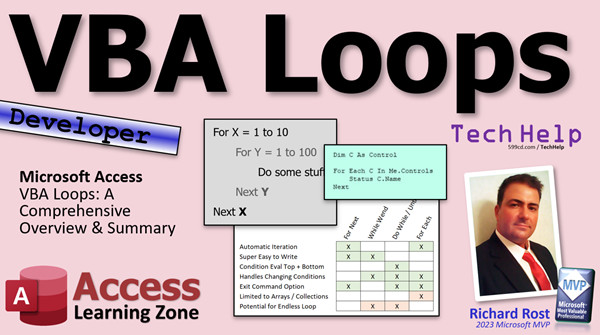 access 2016, access 2019, access 2021, access 365, microsoft access, ms access, ms access tutorial, #msaccess, #microsoftaccess, #help, #howto, #tutorial, #learn, #lesson, #training, #database, VBA loops, Microsoft Access VBA, Access VBA tutorials, VBA loop types, For Next loop, While Wend loop, Do While loop, Do Until loop, For Each Next loop, Looping in VBA, VBA looping techniques, Looping in Microsoft Access, Access VBA basics
 Subscribe to VBA Loops
Get notifications when this page is updated
More InformationTranscript Today we are going to review all the different types of VBA loops that we learned throughout the rest of the loops series. Whether you are just watching this at the beginning and you have not watched these other videos yet and you just want an overview, or you have already watched them all and you want a recap, this video is for you.
In my VBA loop series, we took an in-depth look at all the different types of loops in VBA. We got For Next, While Wend, Do While, Do Until, For Each Next, nested loops, and this is your summary.
You can find all of the videos for the entire series on my website and on my YouTube channel. There they are. There are links to them where you can find them down below. You can click on them in the description.
First, we got our basic For Next loop. For example, For x = 1 To 10. If you want to change the increment from 1 to anything else, you put Step 2 here, Step 3, Step -1 if you want to go backwards, for example, 10 to 1. It has an option to exit out of the loop if some other condition is met.
Then we get our While Wend loop which is a really simple loop. You set an initial condition, you say x = 0, while x is less than 10, do some stuff, and then loop over again. It is limited, but it is simple. It is actually my favorite loop. There is no exit condition built in, but you can make your own by adding another variable.
Then we have your Do While loop. Do While has its benefits in that you can check the condition at the top or the bottom. You could say Do While x is less than 10 or Do and then Loop While x is less than 10. The difference is the first loop may not even run. If you are starting a condition up here and letting the users type in something, for example, whereas this one, the loop is going to run at least one time. So that is the difference.
Then Do While has its cousin Do Until, and they just read differently. It is the same thing. Do While is "do this while some condition exists" and Do Until is "do this until some condition exists." The computer does not care. It is the same. It is just how you want to phrase it, and both Do While and Do Until support the Exit Do command. Basically, While Wend is the only one without a built-in exit.
Then we have the tricky one, the For Each loop, and that is for collections or arrays. For example, we learned how to loop through all of the controls on a form with the Controls collection.
Once we learned all the different loop types, we learned how to nest them together. For example, here you can have two nested For loops. You have an outer loop with x and an inner loop with y.
Here are the pros and cons of each loop type.
Automatic iteration means that that loop type will keep track of moving to the next element for you, the next record, the next item. For Next and For Each will automatically handle moving to the next item. Whereas with the While Wend or Do While or Until, you have to increment a counter, and if you do not, you are going to run into an endless loop. So you have to be careful with those.
Super easy to write - that is more my opinion than anything else. I mean, they are all pretty easy. But For Next and While Wend have been around for decades. That is what I learned when I was a kid. So I like these two. These are my favorites. You will see me using these in most of my classes.
Evaluates the condition at the top or bottom of the loop. That is Do While and Do Until; you can either do the condition at the top or at the bottom of the loop depending on how you want it to run.
Those changing conditions - pretty much everybody except for the For Next. For Next is pretty much stuck. I mean, yes, you can exit out of it. That is the next thing, exiting out of it. It is not easy to change that condition in the middle of a For Next loop. Whereas all these guys, you can change the condition. The Exit command - just the While Wend is missing that Exit For or Exit Do or whatever, but you can simulate that with something like an abort variable. I covered that in the While Wend video.
And limited to arrays and collections - well, that is our guy, For Each. He only works with those kinds of things. So that is the general basic overview.
If you are coming for the first time and you want to learn more about these, go watch these other videos. They are all on my website and on my YouTube channel. They are free. Just like cheesy bread, they are free. Go watch them.
If you want to learn more VBA and you like learning with me, and you like my style, you like my videos, go watch my developer lessons. They are on my website. There is a link you will find down below you can click on.
So that is going to do it for the VBA loops series. I hope you guys learned something. I hope you had some fun. If you enjoy series like this that I do, drop me a comment down below and let me know and I will make more stuff like this.
But that is it. That is your TechHelp video for today. Live long and prosper, my friends. I will see you next time. Intro In this video, we will review the major types of VBA loops in Microsoft Access, including For Next, While Wend, Do While, Do Until, For Each Next, and how to nest loops together. We will talk about the differences between each loop type, their advantages and disadvantages, and when to use each one. This is a summary of the loops series and is helpful whether you want a quick overview or a recap of the loop structures covered in previous tutorials. Quiz Q1. Which VBA loop allows you to specify a starting value, an ending value, and an optional step increment?
A. For Next loop
B. While Wend loop
C. Do While loop
D. For Each loop
Q2. If you want to loop backwards from 10 to 1 using a For Next loop, which keyword do you use to change the increment?
A. Backwards
B. Reverse
C. Step
D. Previous
Q3. Which VBA loop type is specifically designed to iterate over collections or arrays?
A. For Next
B. Do While
C. While Wend
D. For Each Next
Q4. Which VBA loop is the only one without a built-in exit statement like Exit For or Exit Do?
A. For Next
B. Do Until
C. For Each Next
D. While Wend
Q5. In a Do While loop, where can the condition that controls the loop be placed?
A. Only at the top of the loop
B. Only at the bottom of the loop
C. Either at the top or at the bottom
D. It does not use a condition
Q6. What is a key difference between Do While and Do Until loops?
A. Do While runs only once; Do Until runs multiple times
B. Do Until logic checks for a false condition to exit
C. They are completely different in logic
D. Do While is for arrays, Do Until is for numbers
Q7. Which loop types automatically move to the next element for you without requiring manual incrementing?
A. For Next and For Each
B. Do While and Do Until
C. While Wend and Do While
D. Do Until and For Next
Q8. If you forget to increment your counter in a While Wend or Do While loop, what is likely to happen?
A. The loop will only run once
B. The loop will skip items
C. The loop will become endless
D. The loop will automatically exit
Q9. Which loop type is best used when you want to perform actions on each item of a collection, such as all controls on a form?
A. Do Until
B. While Wend
C. For Each Next
D. For Next
Q10. What is a limitation of the For Each loop in VBA?
A. It cannot be nested
B. It only works with arrays and collections
C. It requires a manual counter increment
D. It does not have an Exit option
Q11. Which of the following loops evaluates the condition at the top or the bottom of the loop, giving you flexibility in how the loop operates?
A. For Next
B. Do While / Do Until
C. While Wend
D. For Each
Q12. When would you use nested loops in VBA?
A. Only when working with a single variable
B. When you do not want to repeat actions
C. When you need to loop within another loop, such as with multiple levels of iteration
D. Only when looping through arrays
Q13. Which loop type is considered more difficult to change the exit condition mid-loop?
A. While Wend
B. Do Until
C. For Next
D. For Each Next
Q14. If you want to exit early from a Do While loop based on another condition, which command should you use?
A. Exit Next
B. Exit For
C. Exit Do
D. End Loop
Q15. What is one way to simulate an exit condition in a While Wend loop, since it does not have a built-in Exit command?
A. Use an abort variable and check it inside the loop
B. Use Exit For
C. Use the Step keyword
D. Change to a For Each loop
Answers: 1-A; 2-C; 3-D; 4-D; 5-C; 6-B; 7-A; 8-C; 9-C; 10-B; 11-B; 12-C; 13-C; 14-C; 15-A
DISCLAIMER: Quiz questions are AI generated. If you find any that are wrong, don't make sense, or aren't related to the video topic at hand, then please post a comment and let me know. Thanks. Summary Today's TechHelp tutorial from Access Learning Zone is a recap of the different types of VBA loops that were covered throughout the loops series. Whether you are looking for a concise summary before you begin the full series or you have already watched all of the individual lessons and want a clear refresher, this overview will help you understand how each loop type works in VBA.
Throughout the VBA loop series, I covered each looping structure that VBA offers. The main types we reviewed are For Next, While Wend, Do While, Do Until, For Each Next, and also how to create nested loops. This article provides a summary of the key points and distinctions of each.
Let me start with the basic For Next loop. With this loop, you specify a starting value, an end value, and the loop automatically increments by one each time unless you specify otherwise with the Step keyword. You can use positive or negative steps if you need a different increment or want to loop backwards. There is also an option to exit out of the loop early if another condition is met during execution.
Next, we have the While Wend loop. This one is straightforward and easy to understand. You set an initial condition, check the condition, and continue looping as long as the condition holds true. It is a simple loop and, personally, my favorite. However, While Wend does not have a built-in mechanism for exiting the loop early, though you can create your own by introducing an additional variable.
Moving on, the Do While loop expands your options. One benefit of the Do While loop is that you can check your condition at either the beginning or the end of the loop. For example, you can start by checking if a value is less than a certain number, or you can perform your loop actions first and then check the condition afterwards. The main difference between these two methods is whether you want the loop to possibly skip running altogether if the condition is false, or if you always want it to run at least once.
Closely related is the Do Until loop, which simply phrases the condition differently. Where Do While is used when you want the loop to continue while some condition is true, Do Until keeps looping until a certain condition becomes true. From the computer's perspective, these are functionally equivalent, just worded differently for the programmer's readability. Both Do While and Do Until support the Exit Do command, which lets you break out when needed. Remember, While Wend is the only loop without a built-in exit command.
The For Each loop has a special use case. It is designed to iterate through collections or arrays. For instance, you can loop through all of the controls in a form by using the Controls collection with a For Each loop.
After reviewing each loop type, I also demonstrated how to nest loops, which is when you use one loop inside another. A common example is having an outer loop for one variable and an inner loop for a second variable, letting you perform multiple actions across two sets of data or conditions.
When it comes to the pros and cons, there are several factors to keep in mind. Some loops handle the increment or moving to the next item automatically. For Next and For Each loops take care of this for you, which helps prevent errors. With While Wend, Do While, or Do Until, you need to remember to manually increment your counter, or else you might end up with an infinite loop.
Regarding ease of use, For Next and While Wend have been around for a long time and are staples of VBA. These are straightforward and you will frequently see me use them in my classes.
Another factor is where the condition is evaluated. With Do While and Do Until, you have the choice of checking the condition at the beginning or the end of the loop.
Concerning changing conditions, For Next is somewhat rigid since you cannot easily alter the condition while inside the loop, though you can use Exit For to jump out when certain criteria are met. The other loop types give you more flexibility to adjust the conditions as you go. The one thing that While Wend is missing by comparison is a built-in exit command, though you can simulate exiting by using other variables, which I have explained in the While Wend video.
Lastly, only For Each is limited specifically to arrays and collections, so keep that in mind when choosing which loop type to use.
If you are new to these loop types or want more in-depth demonstrations, I encourage you to watch the full tutorials for each loop on my website or YouTube channel. They are all available for free and will give you detailed, step-by-step guidance.
If you enjoy learning VBA with my teaching style and want to go beyond loops, check out my other developer lessons on my website as well.
That wraps up the VBA loop series. I hope you found this summary helpful and maybe even a little fun. If you would like to see more comprehensive series like this one, let me know in the comments so I can make more content that fits your needs.
You can find a complete video tutorial with step-by-step instructions on everything discussed here on my website at the link below. Live long and prosper, my friends. Topic List For Next loop syntax and usage
Using Step to change loop increment
Exiting a For Next loop with Exit For
While Wend loop structure and limitations
Creating custom exit conditions in While Wend
Do While loop with condition at top
Do Loop While with condition at bottom
Differences between Do While and Do Loop While
Do Until loop syntax and comparison
Exiting Do While and Do Until loops with Exit Do
For Each loop for collections and arrays
Looping through Controls collection on a form
Nesting loops with inner and outer loops
Automatic iteration in For Next and For Each
Manually incrementing counters in While Wend and Do loops
Changing loop conditions during execution
Limitations of For Each with arrays and collections
Comparing pros and cons of each loop type Primary Topics VBA loops, For Next loop, While Wend loop, Do While loop, Do Until loop, For Each loop, nested loops, loop conditions, loop control
Secondary Topics collections, arrays, exit conditions, incrementing counters, programming practices
|




