Fitness 34
By Richard Rost

 13 months ago
Implementing Symmetric Plate Calculation Algorithm In this Microsoft Access tutorial I will show you how to update the weight plate calculation algorithm in our fitness database to support symmetric loading on barbells, including adding a checkbox to choose symmetric mode, updating the calculation logic to divide weight per side, and making sure plate pairs are correctly counted and displayed. This is part 34. MembersThere is no extended cut, but here is the file download: Silver Members and up get access to view Extended Cut videos, when available. Gold Members can download the files from class plus get access to the Code Vault. If you're not a member, Join Today!
PrerequisitesRecommended CoursesUp Next
Keywords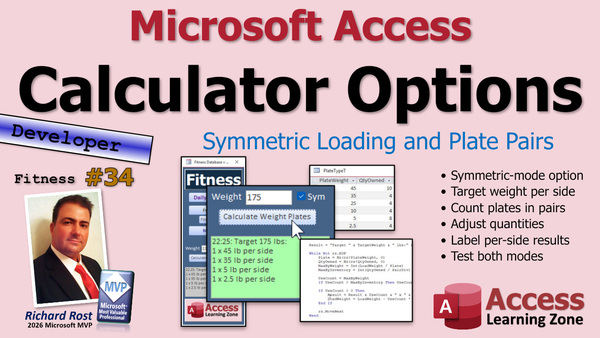 TechHelp Access, calculate weight plates algorithm, symmetric processing, checkbox symmetric, pairDiv variable, plan plates definition, per side label, maxByInventory, drop set, pyramid set, workout side, target weight, plate count, useCount, quantityOwnedBy, balanced barbell
 Subscribe to Fitness 34
Get notifications when this page is updated
More InformationTranscript Today is part 34 of my fitness database. Whether or not you care about fitness, this is building a database. So it's cool stuff. We are continuing with our calculate weight plates algorithm. Today, we are going to add in symmetric processing.
I was reading an article about processes earlier, so I think weights on both sides of a barbell. A little bit different from symmetric processing. Symmetric multiprocessing is another tutorial I was watching. So let's get to what we are doing today.
More times than not, you are going to want to put weight on both sides of the bar and you want to know how much to put on each side. Now this will tell you, OK, two times 45, one times 10, you can do it in your head. OK, I need two fives. But then we can make the computer do it for us so when you get gym brain, you do not have to think about it.
The first thing we need to do is put a checkbox here to determine whether or not we want this to be processed as symmetric or not. So I will just put in here "sim," which we know what that means. It is a training issue. I will make it so you can actually see it by making it white. There we go. Bring that back, and let us call this guy "symmetric." I will make the default for that "Yes."
Now, into our code. Let's go into plan plates definition. First thing we have to do, let me close this guy. The first thing we have to do is make this accept another parameter, so "symmetric as Boolean." Right here, first of all, the load weight. Now, if we are doing symmetric, the load weight is going to be divided by two. We need to figure out how much weight to put on each side. So if symmetric, divide load weight by two.
This is going to be the one-sided. So if symmetric, then the load weight equals the target weight divided by two. We are also going to keep figuring this out, so I am going to say "pairDiv equals 2" because the other one will do "pairDiv equals 1." That way, it makes it easier for the calculations later.
We will also want a label that says "per side" on it so the person knows it is 45 pounds per side. So we need some new variables here: "pairDiv as a Long," which will basically either be a 1 or a 2, and then "label as a String." For single plates, it is going to be that "pairDiv equals 1" and the label is just blank.
Now, for the plate count, we have to do something a little different here because we want to use plates in pairs. You do not want to put a 45-pound plate on one side of the barbell, and then four tens and a five on the other. It just will not be balanced. You want to make sure everything is done in pairs.
We know the total plate count, but now we have to figure out if we have enough to do two on each side if it is symmetrical. That is why I made this variable "pairDiv" so we can divide it. Let's make another variable up here, we will call it "maxByInventory" or whatever you want to call it, as a Long.
Then down here, we are just going to make sure that maxByInventory equals Int(quantityOwnedBy divided by the pairDiv). So if I own ten of them, I can use five. Make sense? The pairDiv will be divided by two because we are doing symmetrical, quantity owned is ten of the 45-pound plates, so the maxByInventory is five now. If it is not symmetrical, the pairDiv is one, so it is the full quantity owned. What I am doing is making it easier than having to check for that all the time by making a variable called "pairDiv" to divide by two or leave it one.
Now the useCount equals the plateCount we already figured out, but if the useCount is greater than maxByInventory, then the useCount equals maxByInventory.
We have now figured out how many plates we need. This will now figure out how many plates we have divided by two if it is symmetrical or not. Set the useCount equal to the plateCount, but if plateCount is bigger than this number, then use that number. That is a little bit of a change.
Now all we have to do is throw in this label, which I put either "per side" or nothing. Down here, plate, right there, we are going to put a space in there, and then we will throw in label. So it will be either nothing or "per side." All right, save it. Debug compile once in a while.
Oh, plan plates argument not optional. You see that? Let me do it again in case you missed it, argument not optional because we added "symmetric" in there, and that is a checkbox. So symmetric is a checkbox that gets sent. Now I spelled it wrong. So I am a symmetrical and I still got it. It is spelled differently from what is over here. Let's see how I spelled it over here: "symmetric," "symmetric." See? A little thing. That is why you take full advantage of not capitalizing stuff. When you declare your variables and you name your fields and all that stuff, you want to type in proper capitals, but as you are coding, you do not, because I can immediately see that as soon as I did this: "symmetrical." I immediately can see now it did not camel case, so I know I typed it in wrong. If I just did that, the S capitalizes. So that is one of those little developer tricks you want to remember.
See about compile. We are going to close it. Close it. Open it. 100-pound plates. Go. All right. Target 100 pounds. 1 45 per side. 15 pound per side. And that is correct. Let's give it a per side. 45 into 5 is 50 times 2 is 100. And it works well.
Let's do 300 pounds. 3 45s per side. That is 3 times 45. I have to pull the calculator out. 3 times 45 is 135 times 2 is 270 plus 20 plus 10. That is 300 pounds. Beautiful.
Let us try throwing a weird number in like 301. Then we have a remainder. Half pounds per side. Not possible. Let us put that in our code. Here is the definition. Half pounds and label. Per pound and label. And not possible. Save it. There you go. Perfect.
Another thing I thought of, and I might add this in the future, is a lot of what I do are either drop sets or pyramid sets. A drop set is if you are getting toward the end of your workout and you really want to fatigue that muscle. You start off at, let us say, you are doing 160 pounds. All right, you do your set of that, then you drop it down to 140, then drop it down to 120, then down to 90. So you are just pushing that muscle to its limits and you keep lowering the weight so you can exhaust it properly.
Or pyramid sets where, if you are warming up, you work slowly up to your max and then you come back down to fatigue. One option I figured I might add in the future is a little checkbox to make it a full drop set so it will give you all of the measurements, every weight you need, based on whatever you decide. If you want to start off at 25 and then jump to 50 or whatever that weight is, that would make things easier. I just kind of wing it right now, but I just track my max weights. We will talk about this when we get into the whole workout side of the equation.
I hope you enjoyed my little side journey, a side quest. We are on a side quest to do a little programming, a little algorithm in here instead of just all Access stuff. This is like computer science kind of stuff. I hope you enjoyed it.
If you want to see more stuff like this, let me know. Post a comment down below, like, share, all that good stuff. That is going to be your TechHelp video for today. That is part 34.
Let's see what is on the calendar. Today is the 9th of September, 2025. Tomorrow is going to be another non-fitness one. I am going to try and throw one non-fitness one in every week. So we will continue with the fitness database on Thursday. Then, of course, we have Friday Quick Query. So we are chugging right along. I know we are up to part 34 already, but we are getting a lot of stuff in the database, figuring out exactly how we want it to be and how we want it to work. So when we get to the actual workout half of the database, a lot of this is going to go faster because we have already got a lot of this code written, it is just moving it to the right places.
I am having fun, are you having fun? Let me know. Post a comment down below.
That is going to do it for your TechHelp video for today. Hope you learned something.
Live long and prosper, my friends. I will see you next time.
TOPICS:
Adding a symmetric processing option to calculate weight plates
Implementing a checkbox to select symmetric calculation
Setting default values and labels for symmetric processing
Updating the plan plates function to accept a symmetric parameter
Dividing target weight between both sides for symmetric calculation
Adding and using the pairDiv variable for flexible plate calculations
Calculating max plate usage based on inventory and symmetry
Adjusting plate use count to never exceed available inventory
Appointing labels such as "per side" for user clarity
Error correction for function parameter updates
Testing and validating the updated symmetric calculation
Handling cases where the target weight cannot be divided symmetrically
Providing user feedback for non-divisible target weights
COMMERCIAL:
In today's video, we are continuing with part 34 of the fitness database and learning about adding symmetric processing to our calculate weight plates algorithm. If you need to figure out how much weight to put on each side of a barbell, I will show you how to set up a checkbox to choose symmetry, how to adjust the code so it divides the load weight equally per side, and how to account for the number of plates you own so you do not overload one side. I will also share tips for coding variable names and discuss ideas for future upgrades like drop sets and pyramid sets. You will find the complete video on my YouTube channel and on my website at the link shown. Live long and prosper my friends. Intro In this video, we continue building the Microsoft Access fitness database by adding a symmetric processing option to the calculate weight plates algorithm. I will show you how to implement a checkbox for symmetric calculation, update the code to divide the target weight evenly between both sides of a barbell, and use variables like pairDiv to help manage plate counts based on your inventory. We will also cover setting default values, assigning labels such as "per side," updating the function parameters, handling errors, and providing feedback when a target weight cannot be split evenly. This is part 34. Quiz Q1. What is the main purpose of adding symmetric processing to the weight plates algorithm?
A. To ensure the same weight is placed on both sides of a barbell
B. To increase the total weight that can be lifted
C. To speed up the calculation process using parallel computing
D. To store multiple sets of weights in the database
Q2. When symmetric processing is enabled, how does the algorithm determine the amount of weight to put on each side of the barbell?
A. It divides the total weight by two
B. It multiplies the total weight by two
C. It subtracts the weights of the barbell from each plate
D. It uses the average value of all available plate sizes
Q3. What role does the "pairDiv" variable play in the algorithm?
A. It determines whether to use single or paired plates
B. It stores the total number of plates available
C. It counts the number of sets completed
D. It holds the maximum barbell weight
Q4. How does the algorithm manage plate inventory when symmetric processing is enabled?
A. By dividing the quantity owned by two to determine the maximum number of plate pairs
B. By using all available plates regardless of symmetry
C. By only counting the largest plates
D. By multiplying the quantity owned by two
Q5. What is the purpose of the label variable (with "per side" or blank value) in the algorithm?
A. To inform the user how much weight goes on each side of the barbell
B. To record the total number of workouts
C. To identify the type of exercise being performed
D. To list the brand of plates used
Q6. What is the significance of ensuring plates are used in pairs when symmetric processing is enabled?
A. To maintain balance on the barbell
B. To save time during workouts
C. To use up all available weights
D. To allow for single-sided training
Q7. If the computed plate count exceeds the available inventory (after considering pairs), how does the algorithm respond?
A. It limits the plate count to the maximum available inventory
B. It issues an error and stops the calculation
C. It tries to find smaller plates to compensate
D. It continues with the calculated plate count regardless
Q8. What happens if the weight requested cannot be evenly divided between two sides?
A. The algorithm indicates that the weight division is not possible
B. It tries to adjust the number of repetitions instead
C. It ignores the imbalance and proceeds with the calculation
D. It prompts the user to add more plates
Q9. Why does the algorithm use a checkbox for symmetric processing in the user interface?
A. To let the user choose whether to split the weight evenly between both sides
B. To lock the weight input field from editing
C. To automatically select the maximum weight
D. To display the user's workout history
Q10. Why is it considered a developer trick to pay attention to variable casing (like camel case) in code?
A. Because it helps quickly spot spelling mistakes in variable names
B. Because it affects how variables are calculated in the program
C. Because uppercase names make the code run faster
D. Because lower case names are required by the compiler
Answers: 1-A; 2-A; 3-A; 4-A; 5-A; 6-A; 7-A; 8-A; 9-A; 10-A
DISCLAIMER: Quiz questions are AI generated. If you find any that are wrong, don't make sense, or aren't related to the video topic at hand, then please post a comment and let me know. Thanks. Summary Today's TechHelp tutorial from Access Learning Zone covers part 34 of my fitness database series. Even if you are not focused on fitness, what we are really diving into is how to build a database and tackle some interesting programming challenges along the way.
In this lesson, we continue working on the weight plate calculation algorithm. The new feature we are adding is symmetric processing. What that really means is calculating how much weight to put on each side of a barbell so that it is evenly balanced. Most of the time, when you are lifting weights, you want the load distributed equally on both sides, and it is helpful to know exactly how much weight to put on each end, rather than doing that math in your head every time.
To address this, the first step I take is to introduce a checkbox to our interface. This lets the user specify whether the calculation should be symmetric or not. I label this option "symmetric," and set the default value to "Yes" since most users will want even distribution by default.
Next, I modify the code behind our plate planning form to accept a new Boolean parameter that represents symmetry. If the user selects symmetric processing, then the load weight is divided by two, as we want to know the weight per side. I create a variable, pairDiv, that is set to two for symmetric calculations and one for single-sided ones. This makes it easier to adjust all future calculations based on symmetry without repeating checks.
I also add a display label that will show "per side" if we are in symmetric mode, so it is clear to the user that the weights shown are for each end of the barbell.
When it comes to counting plates, the challenge is to work in pairs. For example, you never want to end up with one 45-pound plate on one end and a mix of smaller plates on the other. To solve this, I use that pairDiv variable to make sure our calculations only use plates in pairs. I introduce another variable, maxByInventory, that checks the total available count of any plate size and divides it by two if we're in symmetric mode. That way, if you own ten 45-pound plates, the system knows you can put five on each side, not all ten on just one.
Once we have that logic in place, the use count for each plate size is set to the calculated need, but never exceeds your inventory. If the calculated number of plates is higher than you actually own, the program automatically scales down to the maximum you have.
With all this set up, I update the output so that the plate breakdown includes the "per side" label when appropriate. I then compile and test the changes. For example, with a 100-pound target, the output correctly indicates one 45 per side and additional weight as needed, confirming the algorithm works. I test other numbers like 300 and 301 pounds to check accuracy. In cases where it is not possible to divide the weight evenly per side, the system now indicates that clearly.
I also mention a potential feature for the future: handling drop sets or pyramid sets, which are common training methods where you change the weight across sets as you get fatigued or warm up. Adding an option to automatically calculate all weights needed for a drop set is something I am considering as the project evolves.
This series is a bit of a side quest from strictly teaching Microsoft Access to touching on some general computer science and programming principles while building something practical. If you are enjoying it, let me know. I always appreciate your comments and feedback. We are making steady progress, and by the time we get to the workout-tracking portion of the application, a lot of this hard work on the code will make the rest go more smoothly.
For a complete step-by-step video tutorial on everything discussed here, you can visit my website at the link below.
Live long and prosper, my friends. Topic List Adding a symmetric processing option to calculate weight plates
Implementing a checkbox to select symmetric calculation
Setting default values and labels for symmetric processing
Updating the plan plates function to accept a symmetric parameter
Dividing target weight between both sides for symmetric calculation
Adding and using the pairDiv variable for flexible plate calculations
Calculating max plate usage based on inventory and symmetry
Adjusting plate use count to never exceed available inventory
Appointing labels such as "per side" for user clarity
Error correction for function parameter updates
Testing and validating the updated symmetric calculation
Handling cases where the target weight cannot be divided symmetrically
Providing user feedback for non-divisible target weights Primary Topics symmetric weight calculation, UI checkbox implementation, algorithm parameterization, inventory-aware plate assignment, label assignment, input validation Secondary Topics developer tips, future feature suggestions, workout structure concepts |




