Free Lessons
Courses
Seminars
TechHelp
Fast Tips
Templates
Topic Index
Forum
ABCD
 
Home   Courses   TechHelp   Forums   Help   Contact   Merch   Join   Order   Logon  
 
Back to Access Developer Forum    Comments List
Upload Images   @Reply   Bookmark    Link   Email   Next Unseen 
Check Box in Continuous Form
James Hopkins 
     
3 years ago
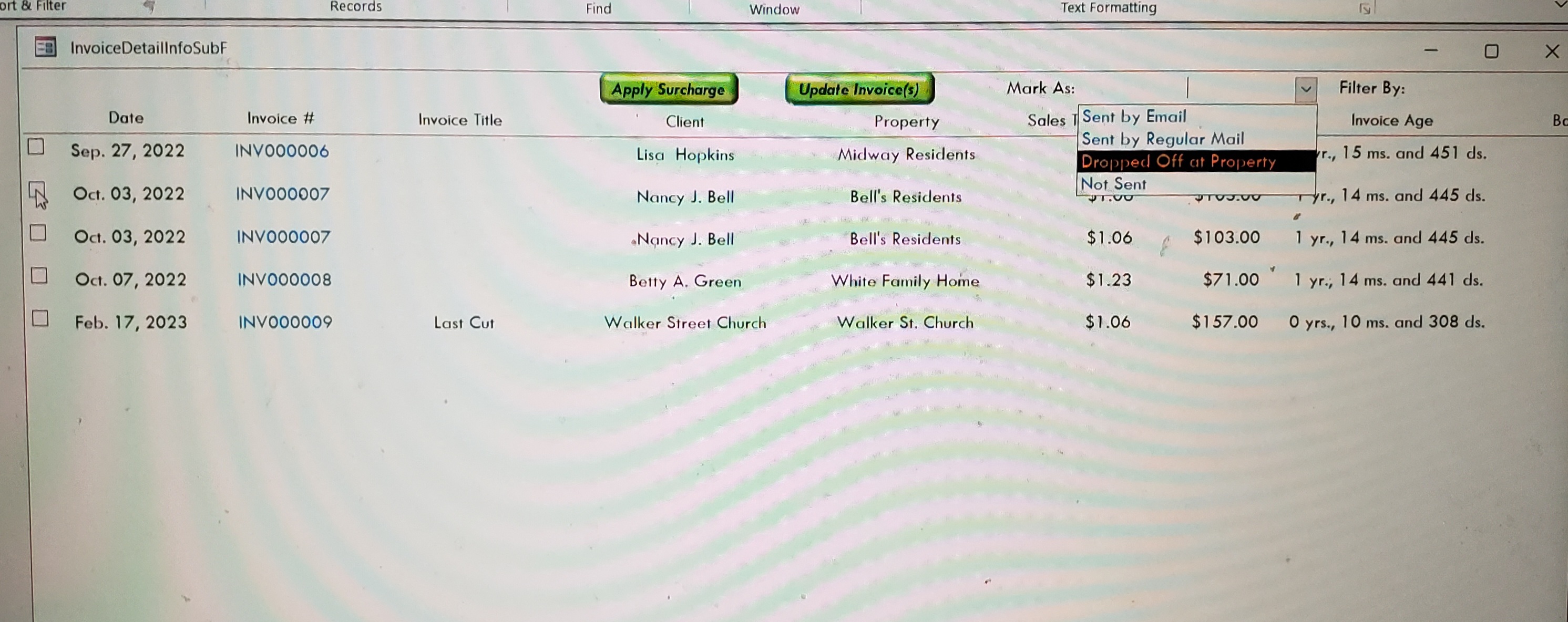
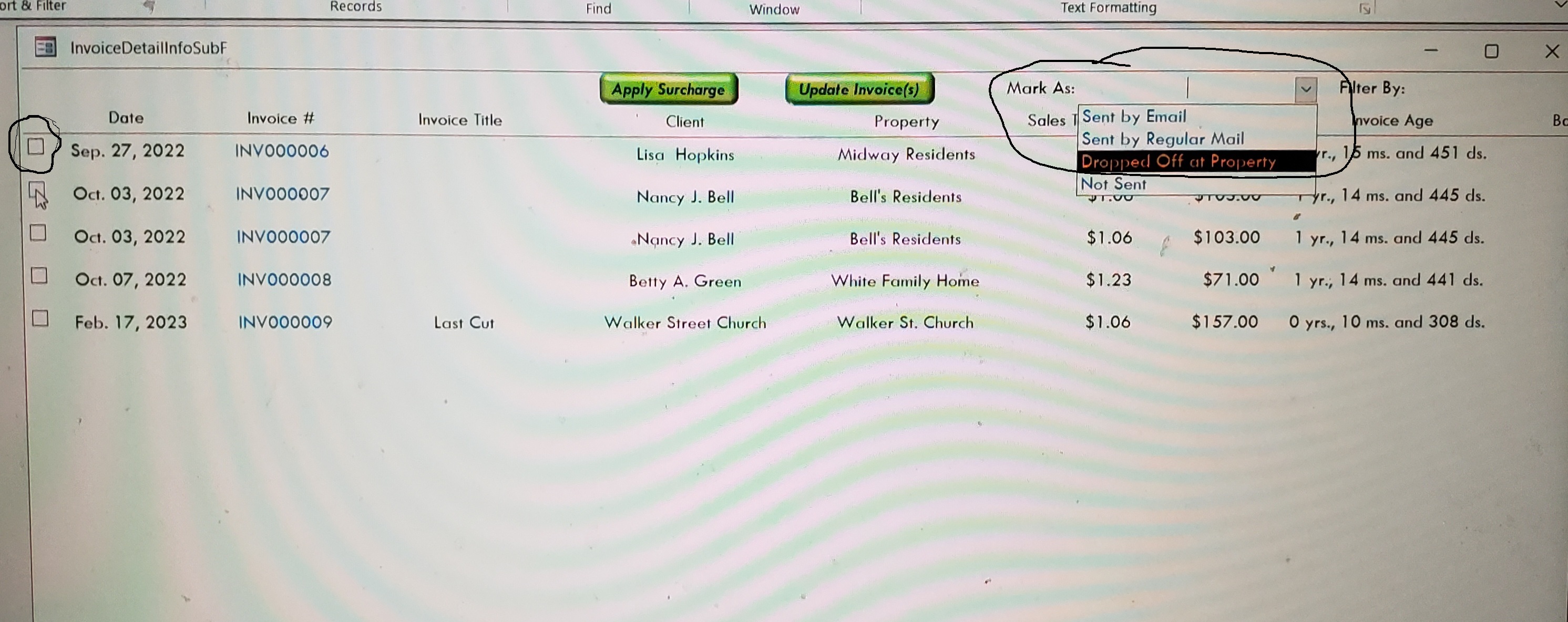
Hey Richard, I was wonder if there is way to have Checkable "Check Boxes" in a Continuous Form to Select each Line to "Mark Estimate As": Sent by Email, Dropped Off at Property, and Not Sent"?
Juan C Rivera  @Reply  
            
3 years ago
Howdy just thinking if a combo box will do better other than that you will need to add 3 checkbox on you form not hard to do goto you table and add the checkboxs and add to you form.
Juan C Rivera  @Reply  
            
3 years ago

James Hopkins OP  @Reply  
     
3 years ago
Hey Juan, I do have "Check Boxes" in the Table. But I was trying to select multiple rows in the Continuous Form to "Mark Estimate As": Sent by Email, Dropped Off at Property, and Not Sent". So I can apply to the selected Rows.
Juan C Rivera  @Reply  
            
3 years ago
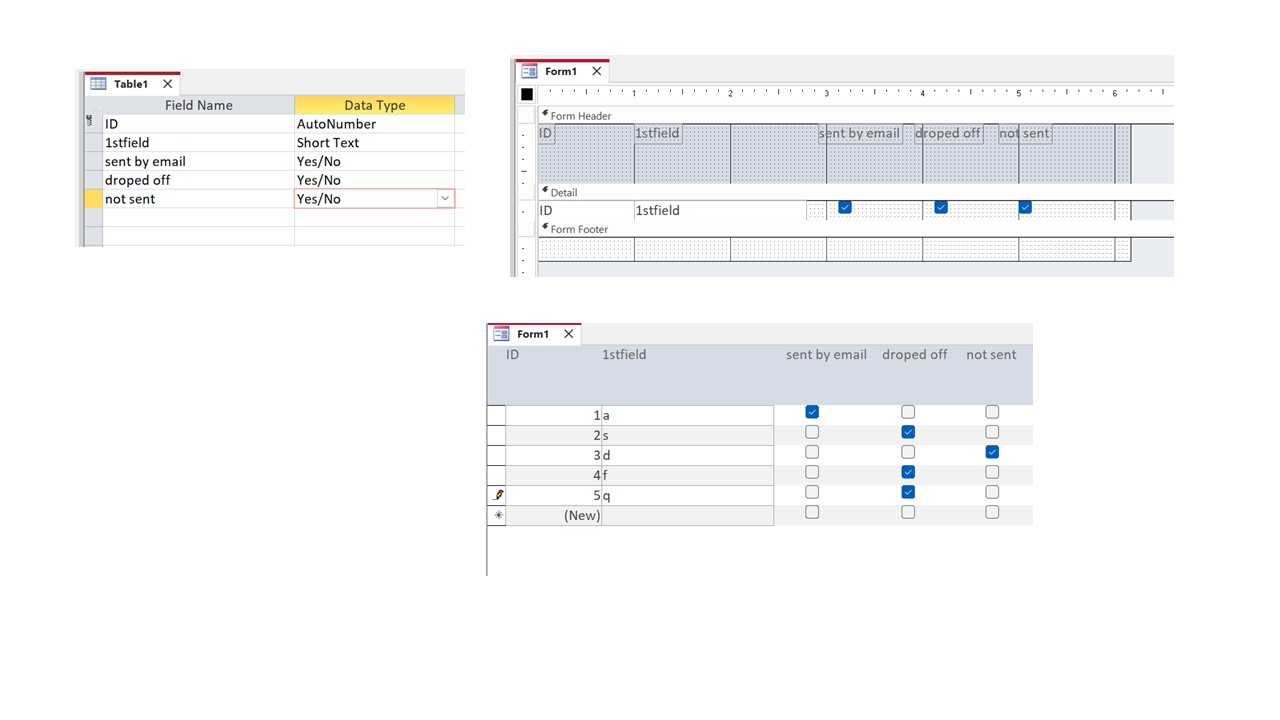
Im not getting what your trying to do the form I have shown is a continues form.  show me what you got now.

V/r
Juan
James Hopkins OP  @Reply  
     
3 years ago

Juan C Rivera  @Reply  
            
3 years ago
OK lets walk this one if you check the box on the left lets say 3 checkboxes and update the combo box you want all 3 to be updated with droped off at property.  and if thats the case you might have to use record set.  you will have to loop through the set and update where checkbox = true.  Not sure how much you have done with Richards classes.  but watch this and let me know if this helped any.
Understanding Recordsets in Microsoft Access VBA
Do While Loop
I like the do while not EOF but here is a link to other loops you might find better
Access VBA Loops
Hope this helps let me know

V/r
Juan
James Hopkins OP  @Reply  
     
3 years ago
Yeah Juan, I was trying select each individual Checkbox that I wanted to the "Mark As" which update the Sent Status for when the Selection is selected in the Combo Box.
Juan C Rivera  @Reply  
            
3 years ago
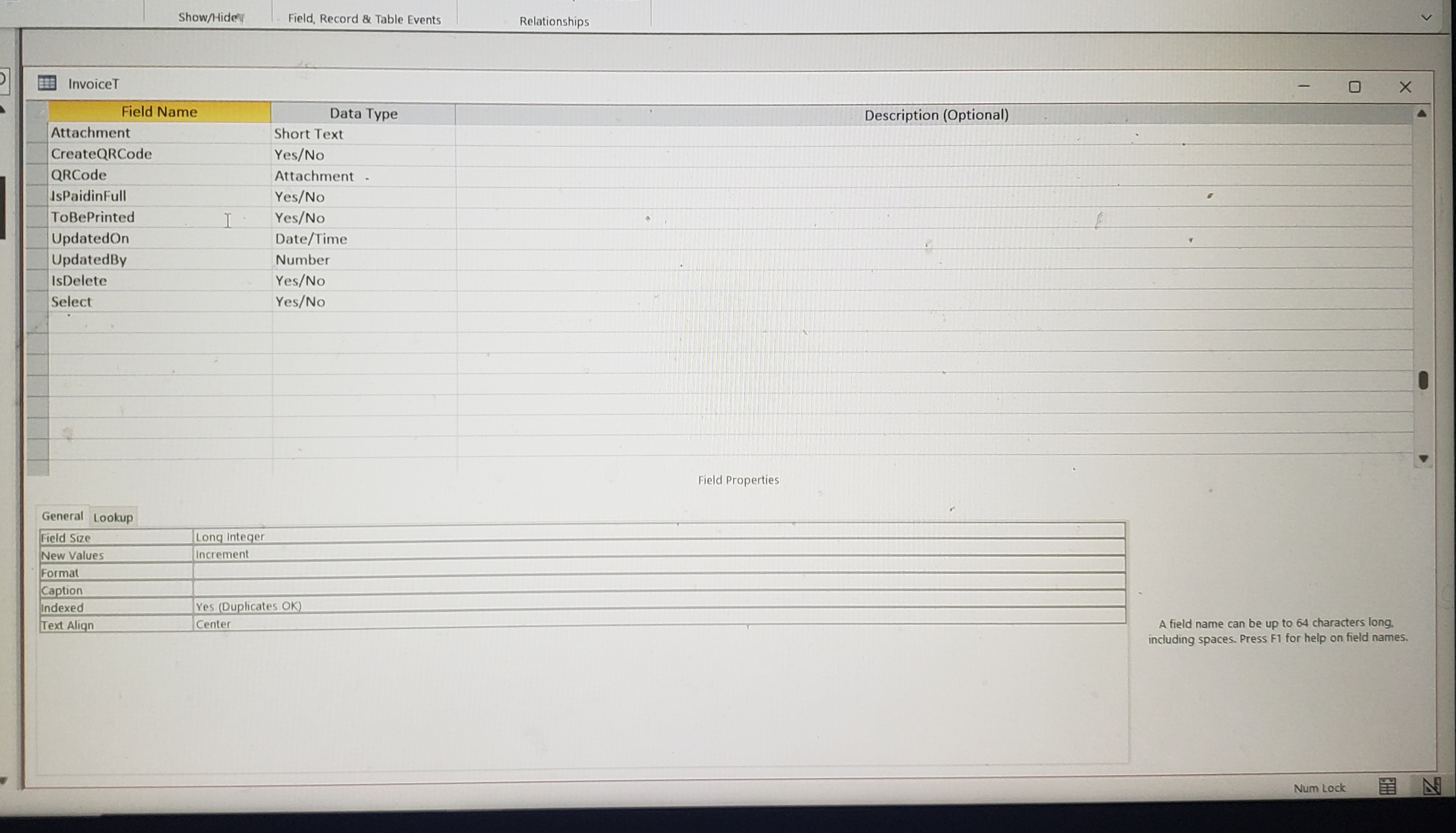
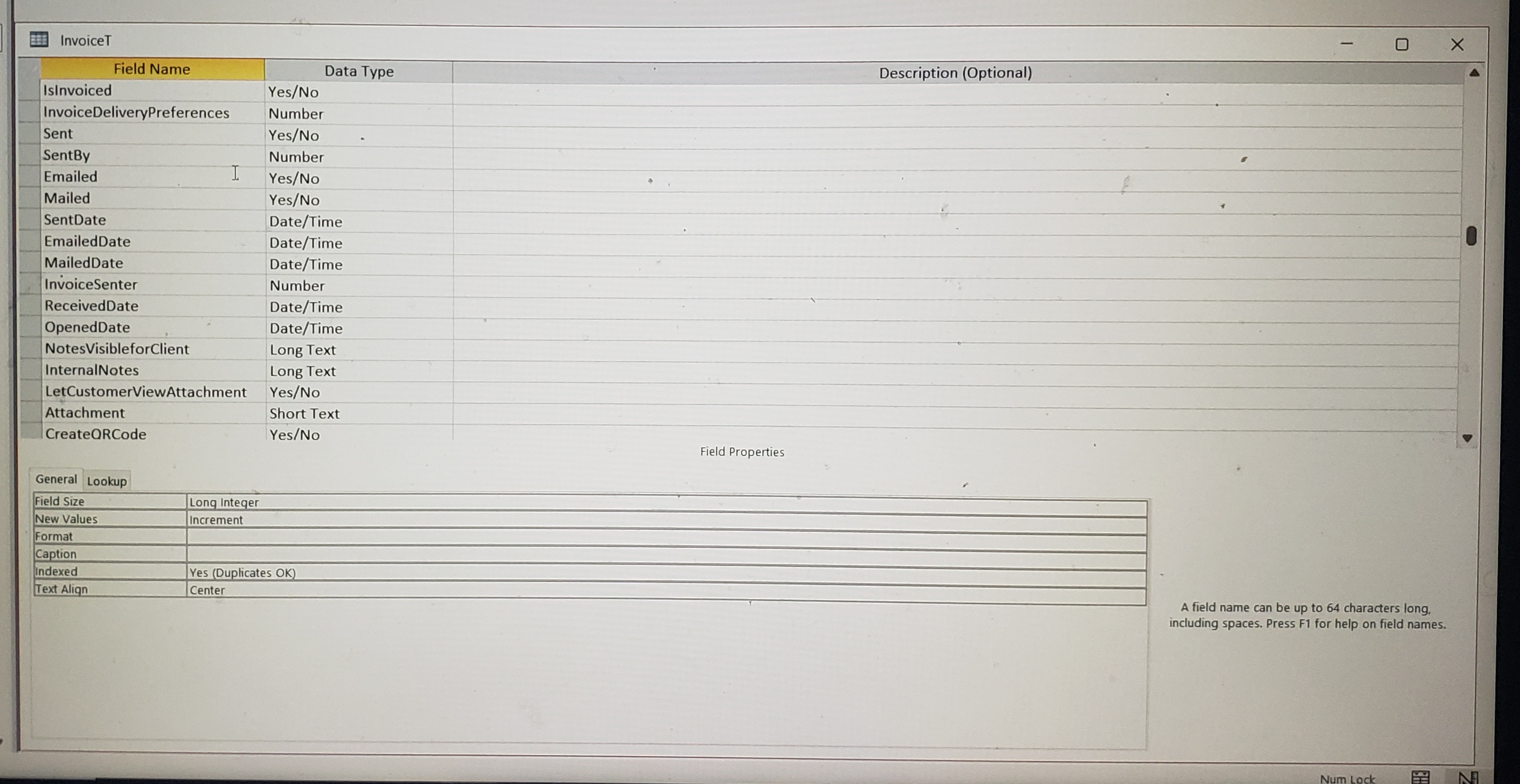
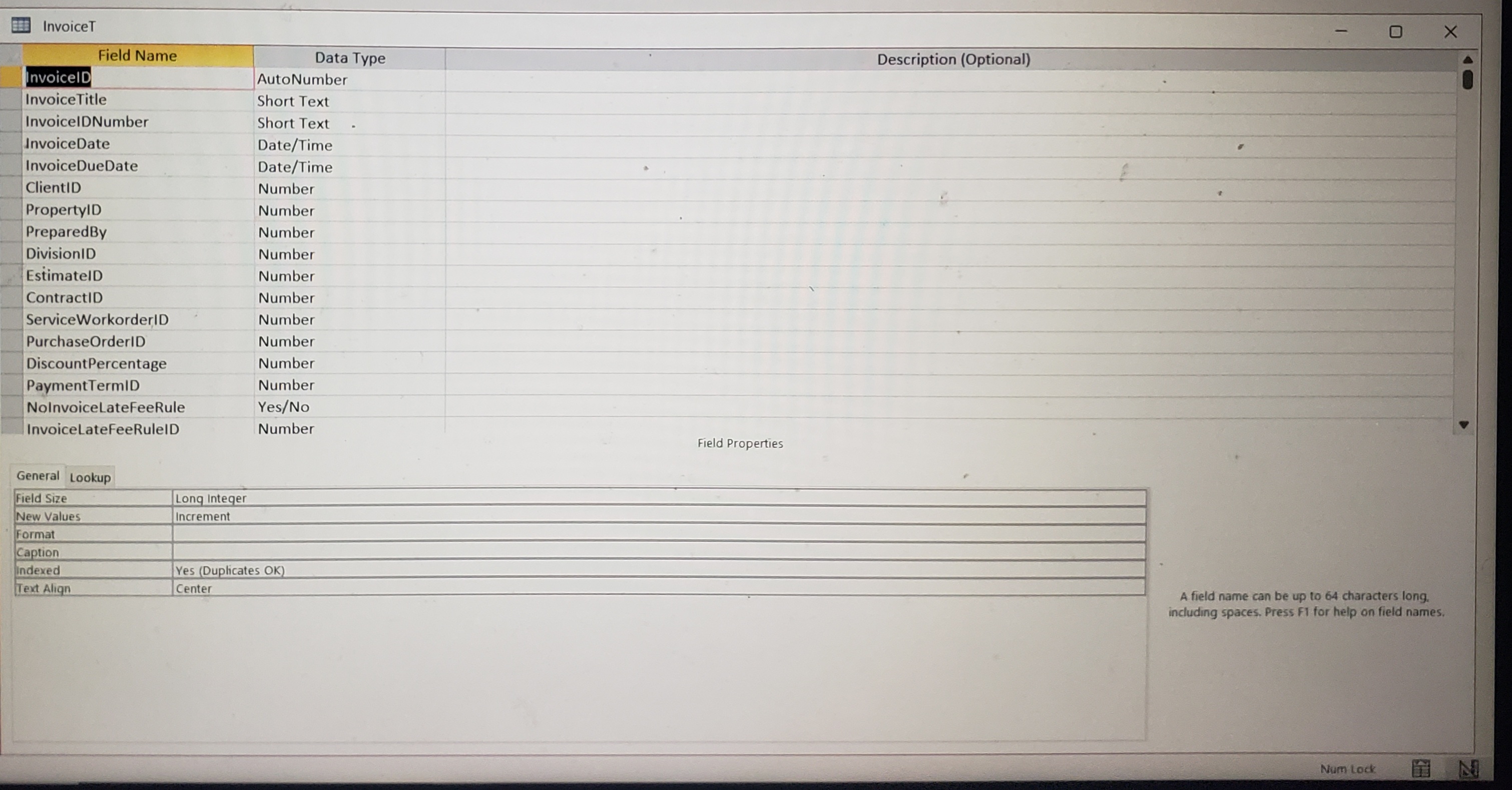
Can you show me the fields in your table?  You need a field that can accept the result of the "Mark As"
should be something like
CurrentStatus = MarkAs.column(1) this way when you run the record set if the checkbox is true then it will update with the text you have selected from the combo box.  
James Hopkins OP  @Reply  
     
3 years ago

James Hopkins OP  @Reply  
     
3 years ago

James Hopkins OP  @Reply  
     
3 years ago

Juan C Rivera  @Reply  
            
3 years ago

Juan C Rivera  @Reply  
            
3 years ago
I like to ask what are the names of the two fields I have circled.  Can you show me the names and what table are you trying to update?  I'm trying to determine the relationship.  So when you mark the checkbox and do a dropdown from the combo box you use an afterupdate event.  The value of the combo box is put into which field and which table?  If this is confusing try looking at this video  
Relationships  This may be the video to snap all this into place.  
V/r
Juan
James Hopkins OP  @Reply  
     
3 years ago
Sure, the Check Box is "Select" and the Combo Box is the not a Field in the Table, the selection of the Combo Box updates the Fields in the Table.
Juan C Rivera  @Reply  
            
3 years ago
what field in what table are you updateing out of the 3 tables you showed which table will hold the value after you update the combobox
chck this video out Value From a Form also Bang! v Dot.

not sure where to point you in hopes you get your answer I could help more if I knew what field you will save the value or text into what table.  

Also send me the names of the form which one has the combobox

V/r
Juan
Kevin Robertson  @Reply  
          
3 years ago
Juan Looks to be only one table "InvoiceT" (Title Bar of table)
Juan C Rivera  @Reply  
            
3 years ago

Juan C Rivera  @Reply  
            
3 years ago
DetailsPrivate Sub MarkAsCombo_AfterUpdate()
    Dim rs As Recordset
    
    Set rs = CurrentDb.OpenRecordset("select * from InvoiceT where isInvoiced=true")
    
    While Not rs.EOF
        rs.Edit
        MsgBox rs!invoicetitle
        MsgBox Forms!invoiceDetailF!MarkAsCombo
        rs!InvoiceDeliveryPreferences = Forms!invoiceDetailF!MarkAsCombo
        rs.Update
        rs.MoveNext
    Wend
    rs.Close
    
  
    Set rs = Nothing


MarkAsCombo = ""
End Sub


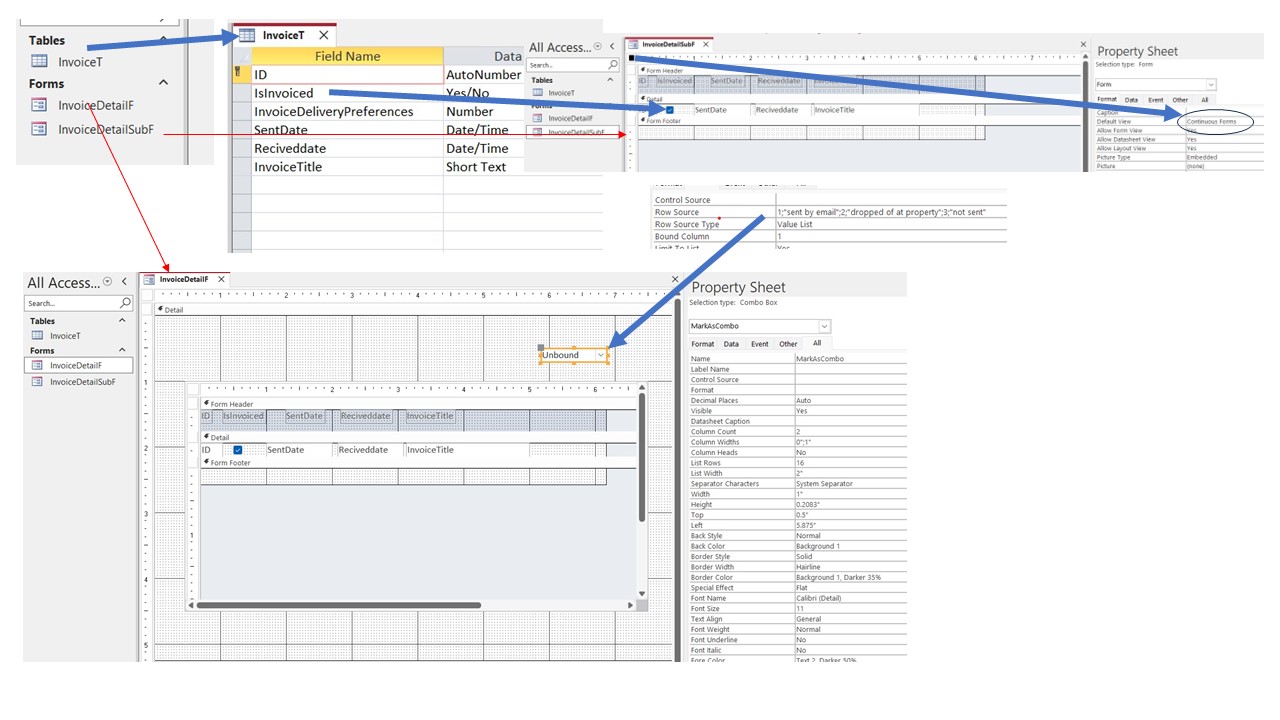
James if you look at my terrible PP slide, I made 1 table and a form with a subform.  with this code you should be able to modify to meet your need.  


if not use this video Understanding Recordsets
If you still have problems let me know we may use an update query, but recordset will be the fastest.

I left the msgbox in there so you can see the results as you move along when you have your databse working correct remove them

Let me know how this works for you.

V/r
Juan
James Hopkins OP  @Reply  
     
2 years ago
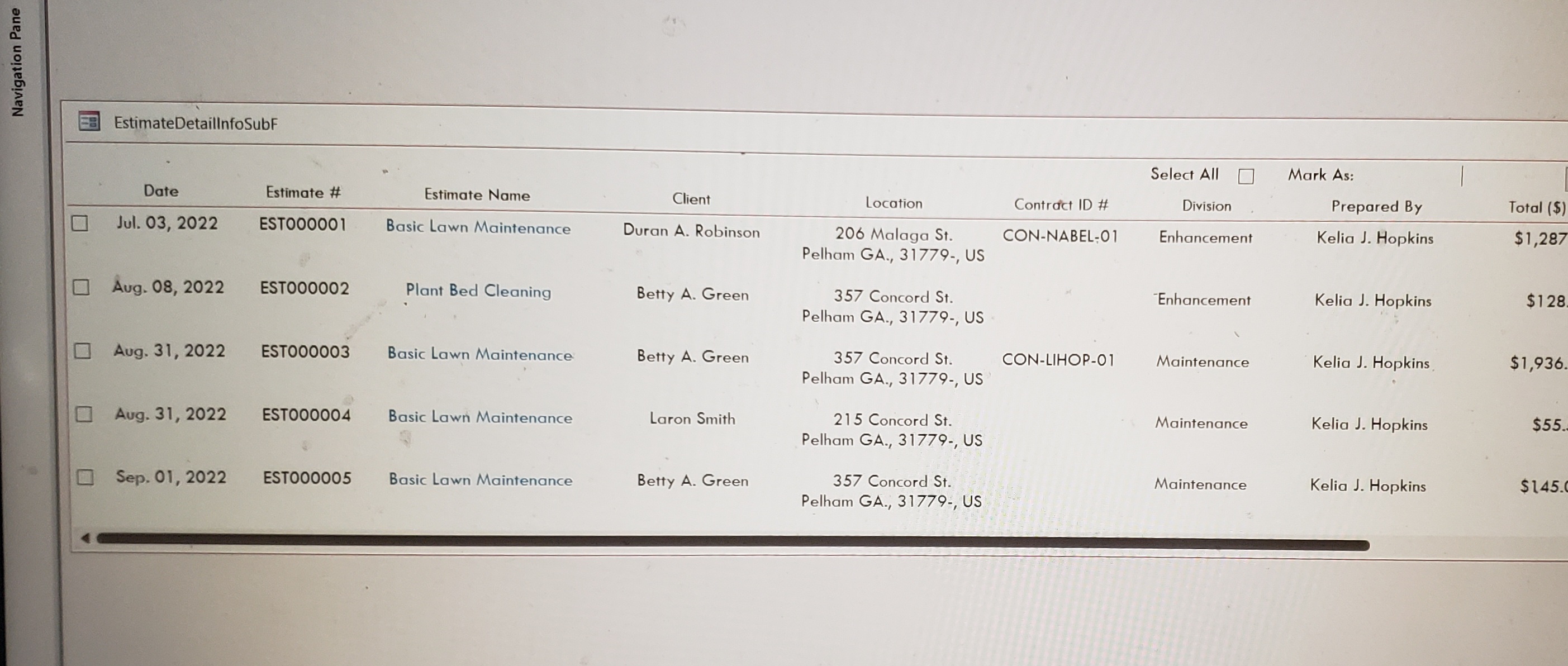
Hey Juan, can  I using the VBA Code to Multi-Select Check Boxes to select the Check Box of the Row. Than I want to change when I select the Data in the Combo Box that I want to updates the "Estimate Sent Preference Fields" in the Table.
Juan C Rivera  @Reply  
            
2 years ago
yes, just go through the code and make sure it has the right table and fields.  but 1st watch the video that Richard made understanding recodset.  

V/r
Juan
James Hopkins OP  @Reply  
     
2 years ago
Ok Juna, I was asking because the Form is based on Multiple Tables and Queries.

Here's the Code I have:

DetailsPrivate Sub CboMarkAs_AfterUpdate()
    
    Dim rs As Recordset
    
    Set rs = CurrentDb.OpenRecordset("SELECT * From EstimateT WHERE Sent = True")
    
    While Not rs.EOF
        rs.Edit
        MsgBox rs!EstimateTitle
        MsgBox Forms!EstimateDetailInfoF!MarkAsCombo
        rs!EstimateSentPreferences = Forms!EstimateDetailInfoF!MarkAsCombo
        rs.Update
        rs.MoveNext
    Wend
    rs.Close
      
    Set rs = Nothing

    CboMarkAs = ""

End Sub

Private Sub ChkSelectAll_Click()

    If Me.lblChkAll.Caption = "Select All" Then
        Me.lblChkAll.Caption = "Clear All"
        CurrentDb.Execute "UPDATE EstimateT SET Select = True;"
    Else
        Me.lblChkAll.Caption = "Select All"
        CurrentDb.Execute "UPDATE EstimateT SET Select = False;"
    End If
    
    Me.Refresh

End Sub

Private Sub Form_Load()
    
    CurrentDb.Execute "UPDATE EstimateT SET Select = False;"

End Sub
Juan C Rivera  @Reply  
            
2 years ago
replace the EsitmateT with your Query and try it.

V/r
Juan
James Hopkins OP  @Reply  
     
2 years ago
Okay Juan, I try it and I notify you if it works. Thanks again...
James Hopkins OP  @Reply  
     
2 years ago
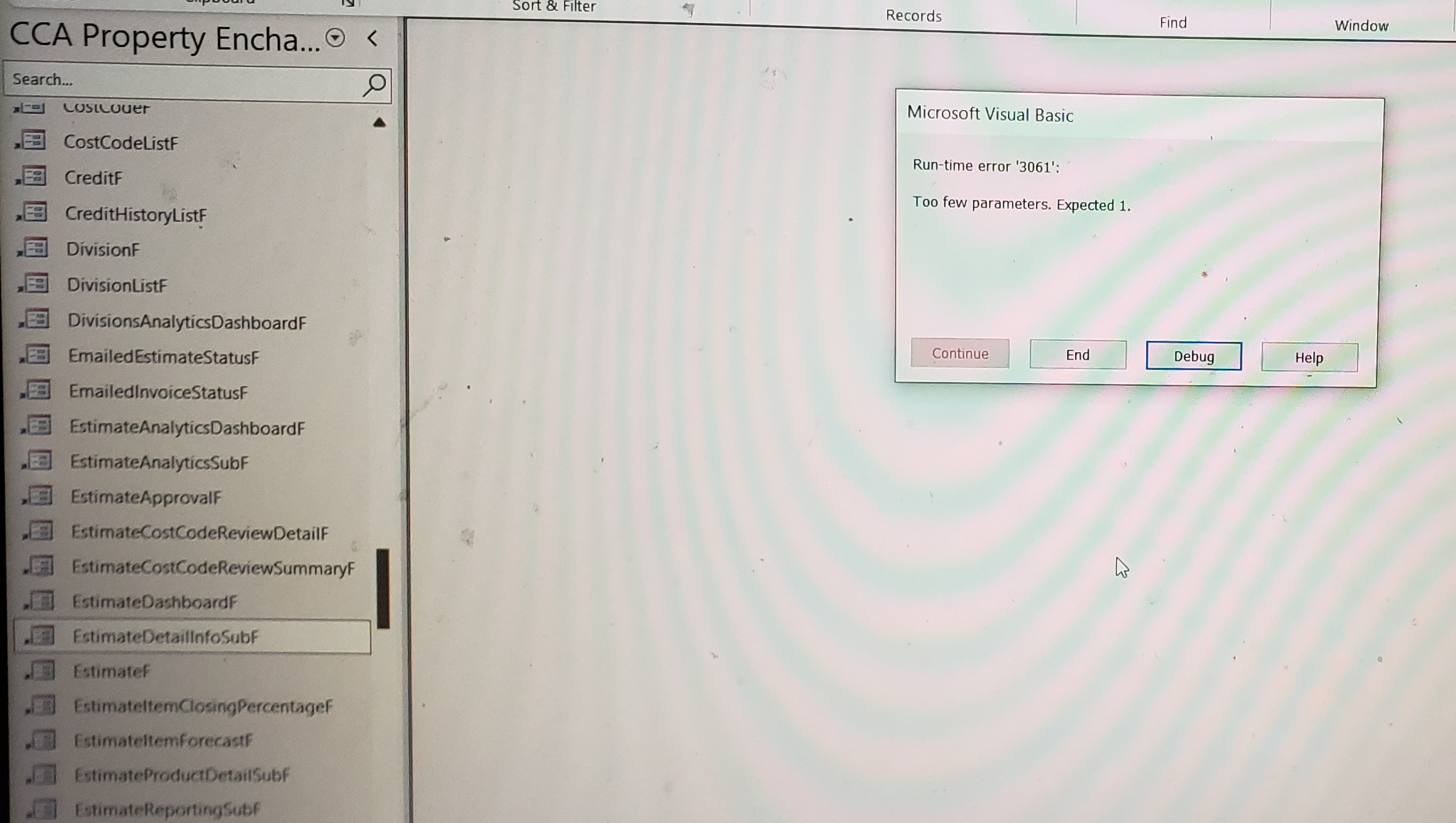
Hey Guys, I made the Changed that Juan asked to charge in the VBA Code but I running into Problems.

Details
DetailsPrivate Sub CboMarkAs_AfterUpdate()
    
    Dim rs As Recordset
    
    Set rs = CurrentDb.OpenRecordset("SELECT * From EstimateInfoQ WHERE Sent = True")
    
    While Not rs.EOF
        rs.Edit
        MsgBox rs!EstimateTitle
        MsgBox Forms!EstimateDetailInfoF!MarkAsCombo
        rs!EstimateSentPreferences = Forms!EstimateDetailInfoF!MarkAsCombo.Column(0)
        rs.Update
        rs.MoveNext
    Wend
    rs.Close
      
    Set rs = Nothing

    CboMarkAs = ""

End Sub

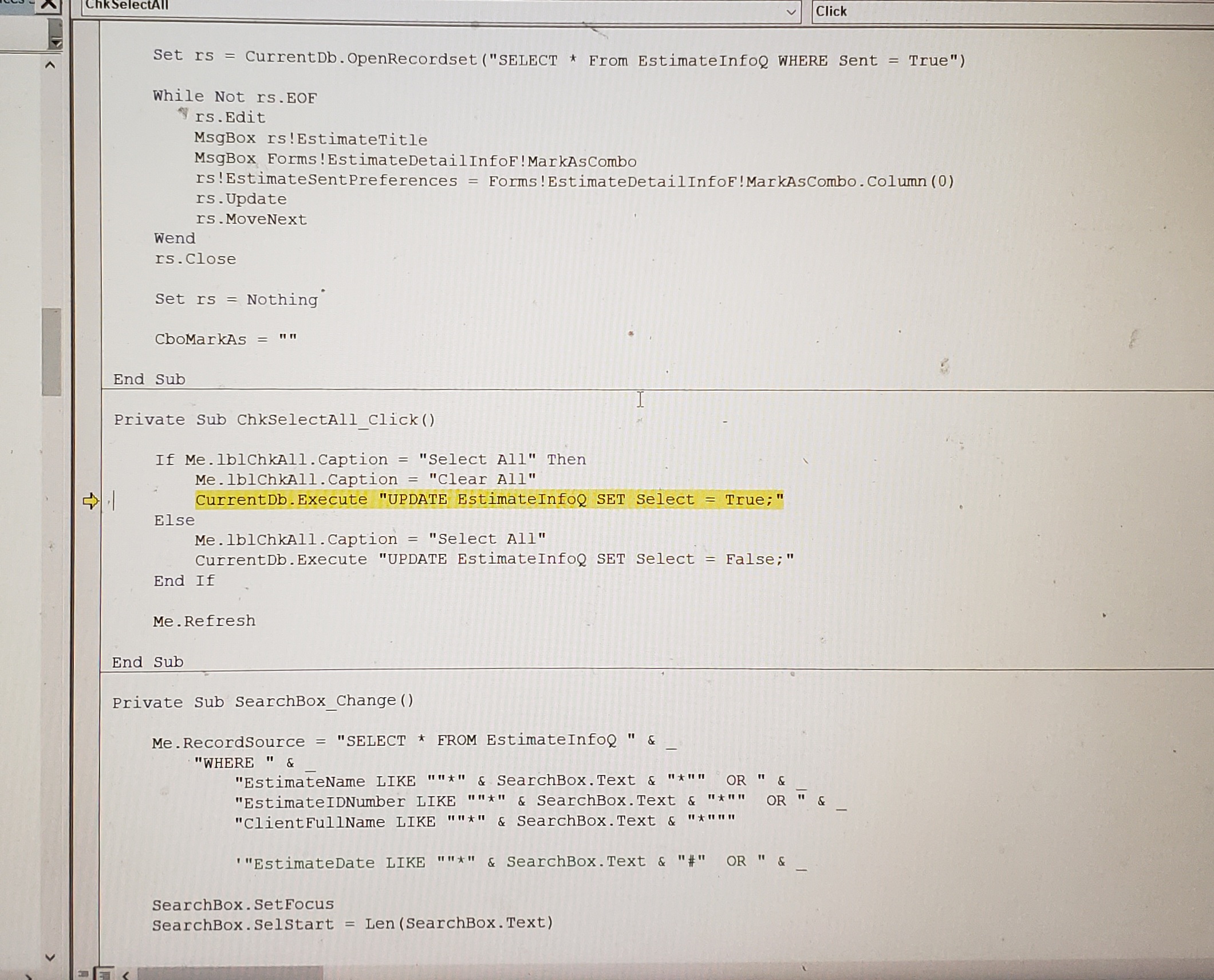
Private Sub ChkSelectAll_Click()

    If Me.lblChkAll.Caption = "Select All" Then
        Me.lblChkAll.Caption = "Clear All"
        CurrentDb.Execute "UPDATE EstimateInfoQ SET Select = True;"
    Else
        Me.lblChkAll.Caption = "Select All"
        CurrentDb.Execute "UPDATE EstimateInfoQ SET Select = False;"
    End If
    
    Me.Refresh

End Sub

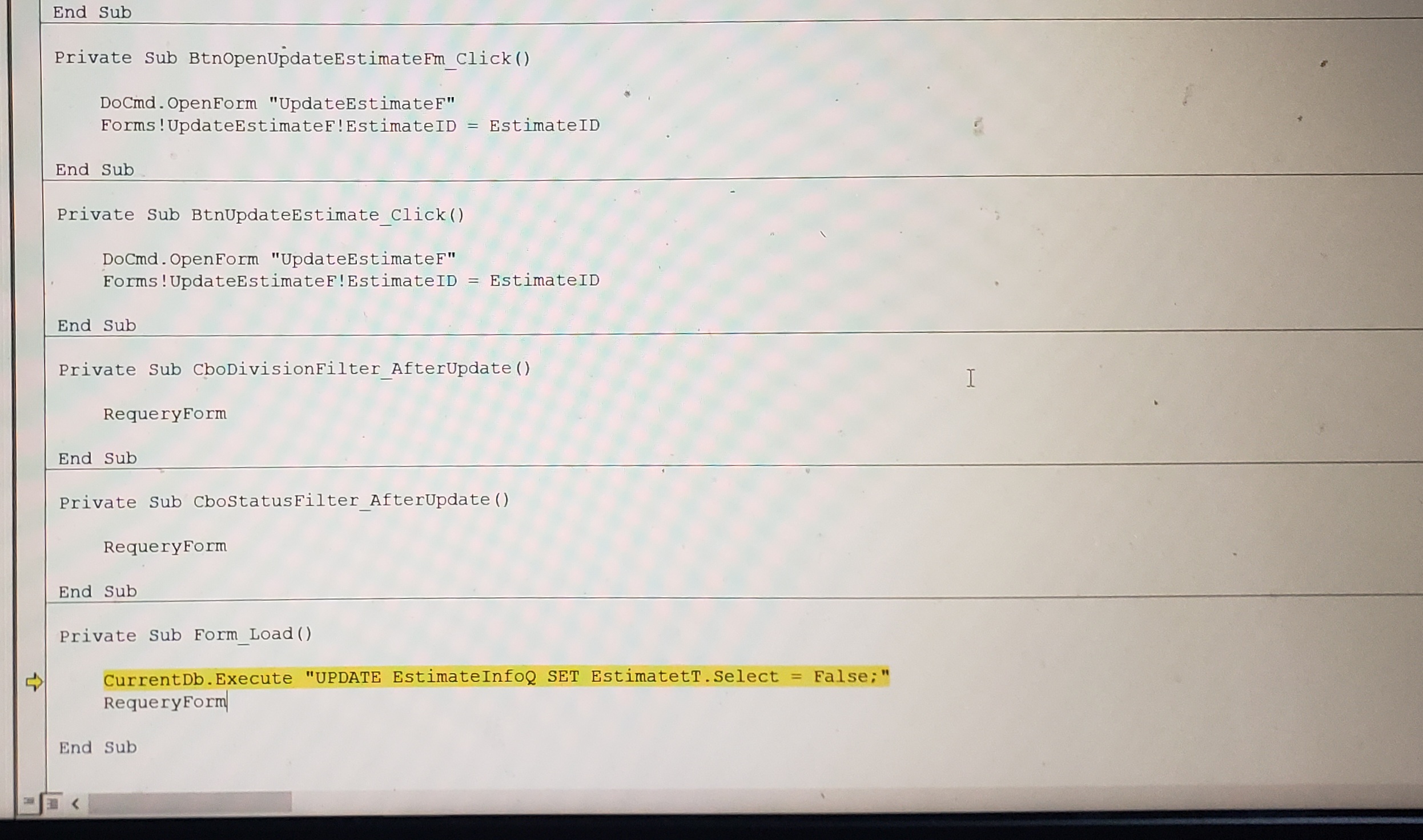
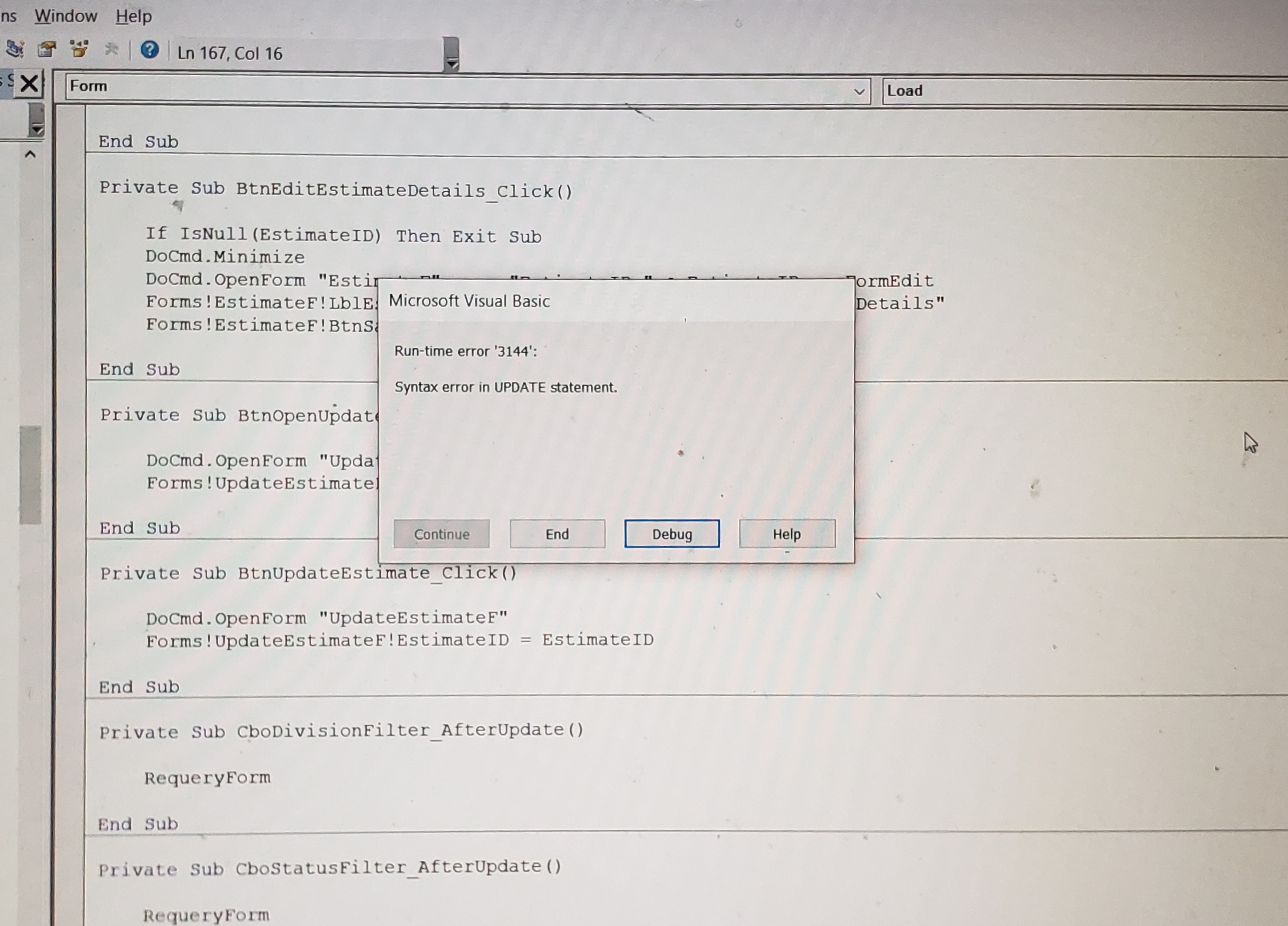
Private Sub Form_Load()
    
    CurrentDb.Execute "UPDATE EstimateInfoQ SET EstimatetT.Select = False;"
    RequeryForm
    
End Sub
James Hopkins OP  @Reply  
     
2 years ago
Here's the ERROR...
James Hopkins OP  @Reply  
     
2 years ago

James Hopkins OP  @Reply  
     
2 years ago

James Hopkins OP  @Reply  
     
2 years ago

James Hopkins OP  @Reply  
     
2 years ago

James Hopkins OP  @Reply  
     
2 years ago

Kevin Robertson  @Reply  
          
2 years ago
Select is a reserved word (SQL) and should not be the name of a field.
Kevin Yip  @Reply  
     
2 years ago
A few thoughts on the overall design:

Addding a Yes/No field to the table itself may not work in a multi-user environment -- one user may trigger actions that were checked by another user.  One way to accommodate multiple users is to create for each user a temporary table with a Yes/No column, to be linked to the main table.

There needs to be a way to uncheck the checkboxes (possibly with VBA) after the actions are performed, so the action won't be performed again until the user checks those boxes again.

A good quality-of-life feature would be a checkbox that can check or uncheck all actions, so the user doesn't need to click too many times.  User interface of this type usually has such a checkbox.  This may require some tricky VBA, however.

Juan C Rivera  @Reply  
            
2 years ago
here is how i did my form after reading Kevins comments.


DetailsWhile Not rs.EOF
        rs.Edit
        MsgBox rs!invoicetitle
        MsgBox Forms!invoiceDetailF!MarkAsCombo
        rs!InvoiceDeliveryPreferences = Forms!invoiceDetailF!MarkAsCombo

       '  this will uncheck the isinvoiced selection
        rs!isInvoiced = False
        
        rs.Update
        rs.MoveNext
    Wend


'this will requery the form
InvoiceDetailSubF.Requery


V/r
Juan
James Hopkins OP  @Reply  
     
2 years ago
Hey Guys, thank you for the Help. The Code worked out correctly but I can not select the 'Check Box' in each Row of the Continuous Form. I think it is because of the Form's Resource Code is a Query. Is their away to select the Check Boxes that I need on the Form?
Juan C Rivera  @Reply  
            
2 years ago
Uncheckable Box

Try this video Richard shows how to get around this problem.

V/r
Juan
James Hopkins OP  @Reply  
     
2 years ago
Thank You Guys for your Help on this Problem. I finally got it to work correctly.
James Hopkins OP  @Reply  
     
2 years ago
Sorry Guys, I was not correct that I got all to work. I have a got the "Selection of the Check Boxes needed" to work, but I can figure out why I haven't got the Combo Box to work. There's the VBA Code in it:

Private Sub CboMarkAs_AfterUpdate()
    
    If Not IsNull(CboMarkAs) Then
        If LnSelect = True Then
            Select Case CboMarkAs
                Case "Sent by Email"
                        DoCmd.RunSQL "UPDATE EstimateT SET EstimateDeliveryPreferenceID = '431', Sent = True , SpentDate = Date(), EmailedDate = Date() WHERE EstimateID=" & EstimateID
                Case "Sent by Regular Mail"
                    DoCmd.RunSQL "UPDATE EstimateT SET EstimateDeliveryPreferenceID = '432', Sent = True , SpentDate = Date(), MailedDate = Date()  WHERE EstimateID=" & EstimateID
                Case "Dropped Off at Property"
                    DoCmd.RunSQL "UPDATE EstimateT SET EstimateDeliveryPreferenceID = '433', Sent = True , SpentDate = Date() WHERE EstimateID=" & EstimateID
                Case "Not Sent"
                    DoCmd.RunSQL "UPDATE EstimateT SET EstimateDeliveryPreferenceID = '434', Sent = False , SpentDate = "" WHERE EstimateID=" & EstimateID
            End Select
        End If
    End If
    
    Me.Requery
    
    CboMarkAs = ""
    LnSelect = ""
    
End Sub
James Hopkins OP  @Reply  
     
2 years ago
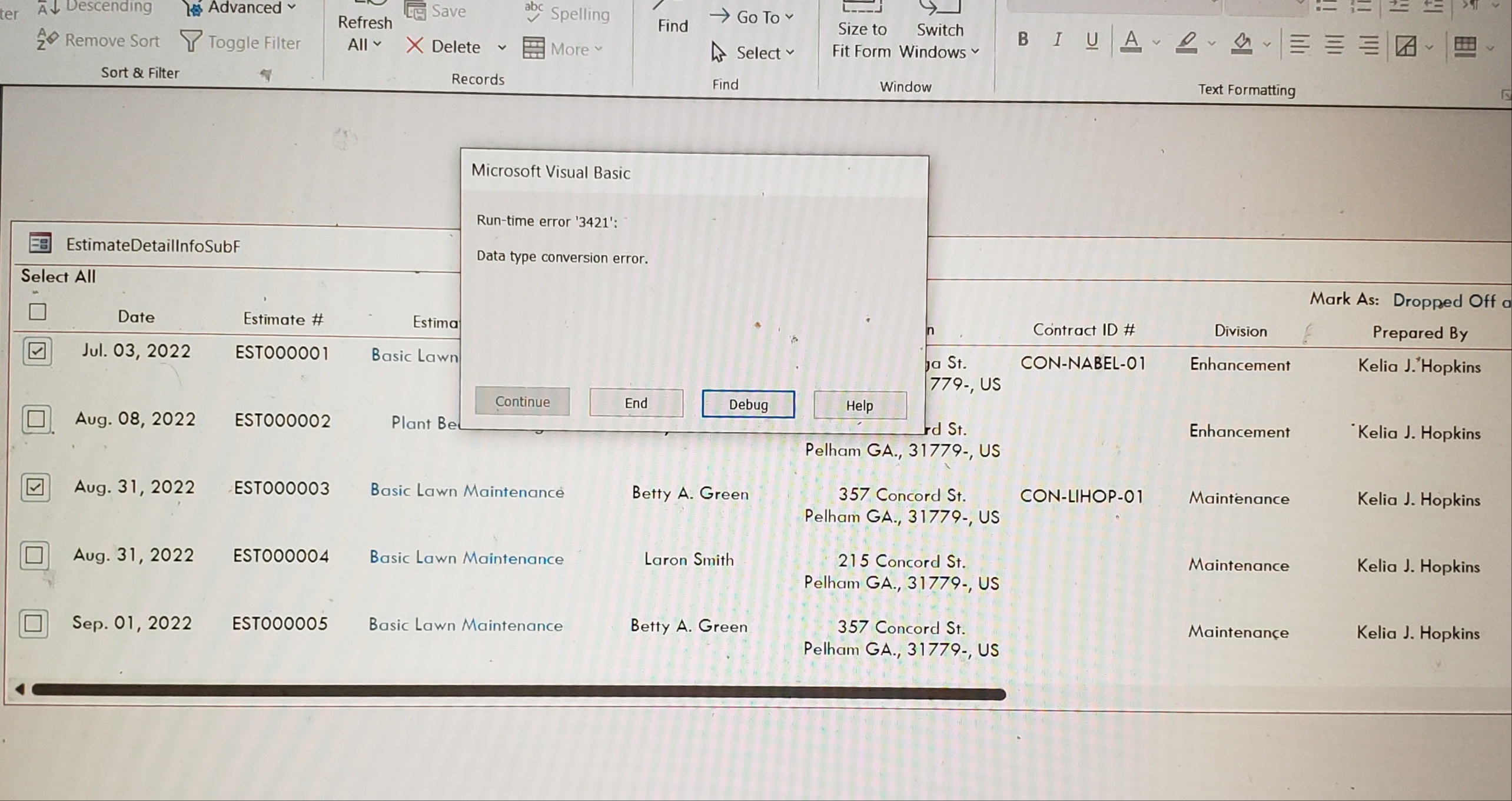
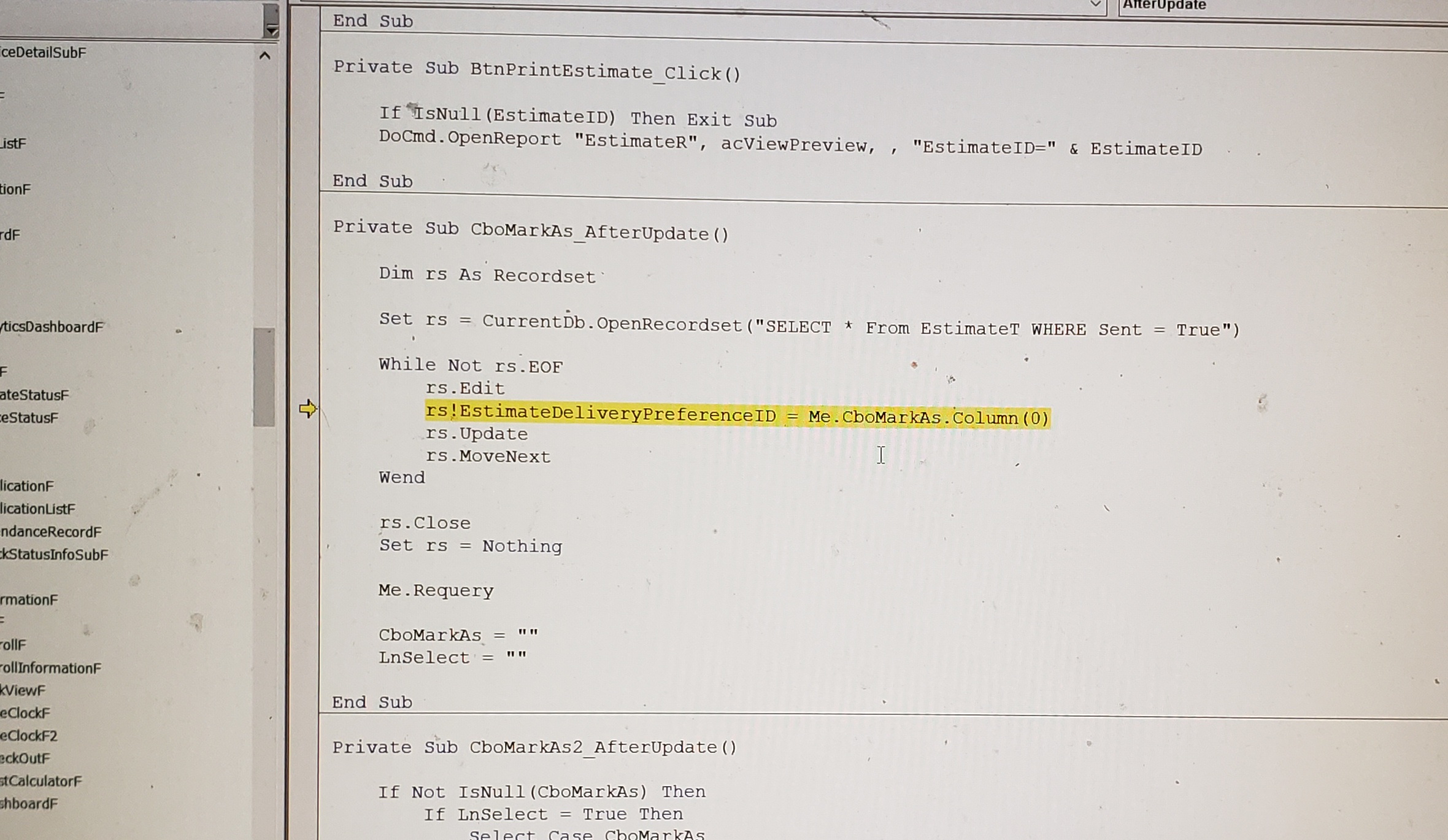
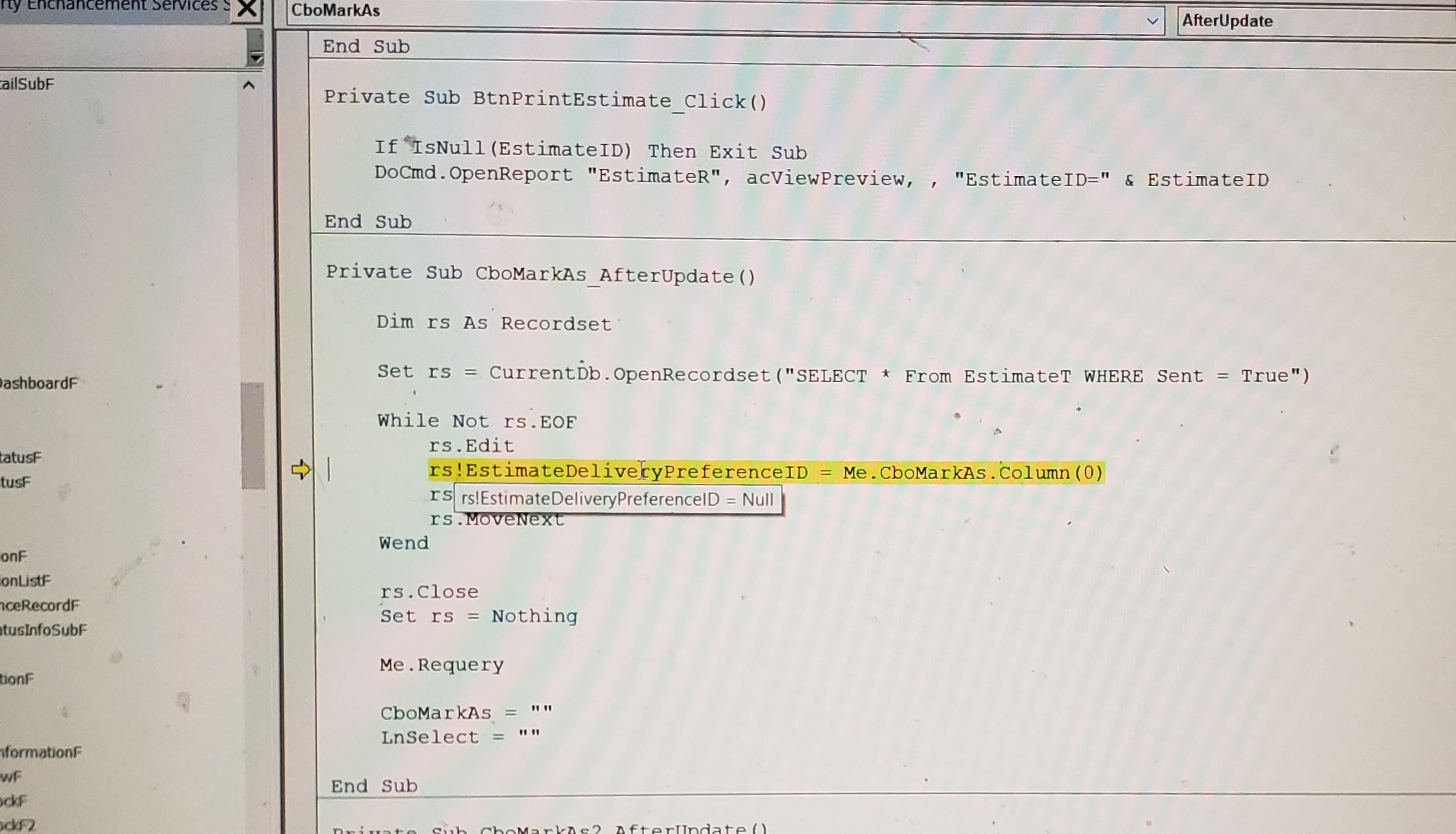
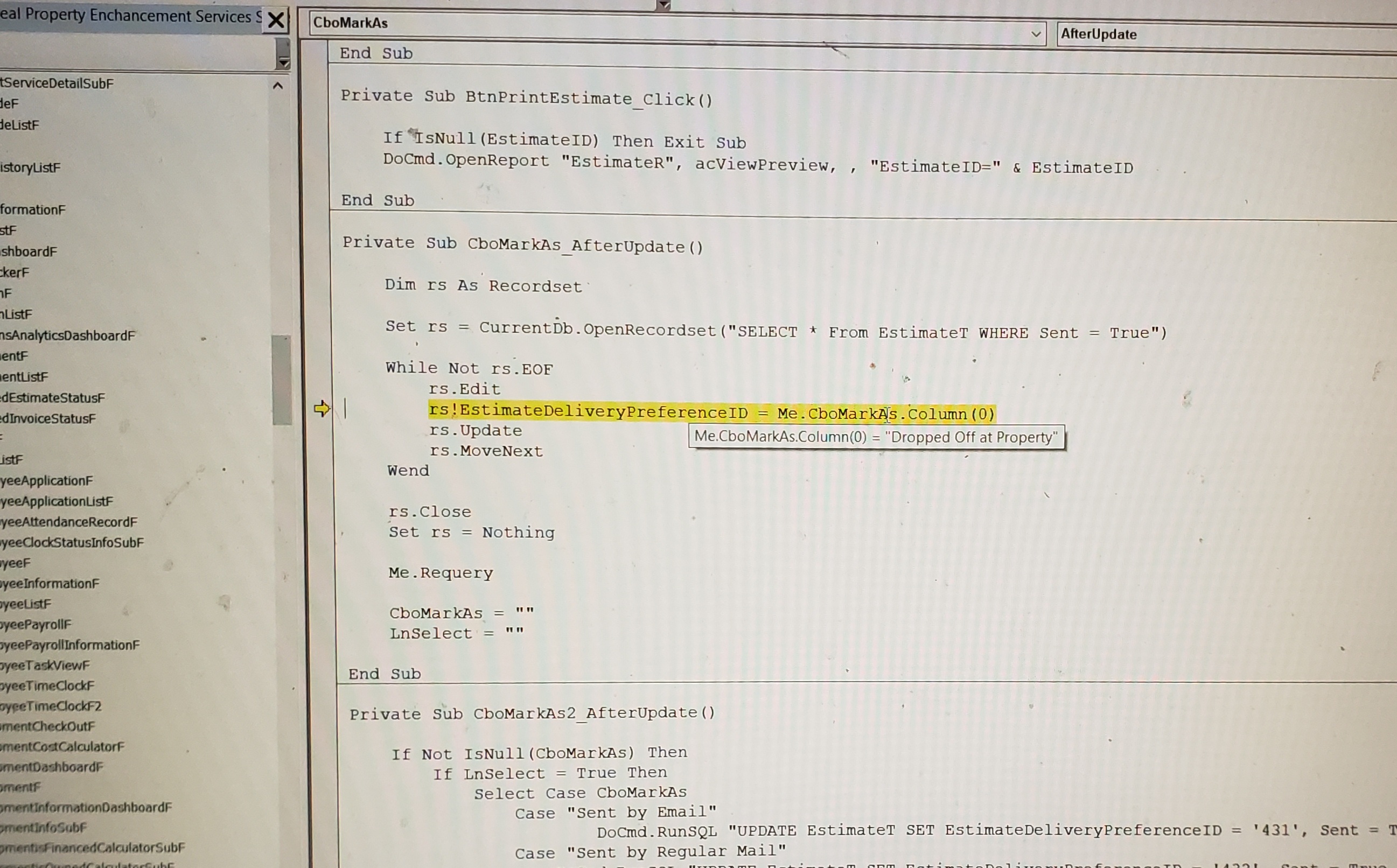
Hey Guys, we went back and Readded Juan Code back to the "CboMarkAs" Combo Box. But now I am getting an ERROR Message:

Here's the Code:

Private Sub CboMarkAs_AfterUpdate()
    
    Dim rs As Recordset
    
    Set rs = CurrentDb.OpenRecordset("SELECT * From EstimateT WHERE Sent = True")
    
    While Not rs.EOF
        rs.Edit
        rs!EstimateDeliveryPreferenceID = Me.CboMarkAs.Column(0)
        rs.Update
        rs.MoveNext
    Wend
    
    rs.Close
    Set rs = Nothing

    Me.Requery
    
    CboMarkAs = ""
    LnSelect = ""
    
End Sub
James Hopkins OP  @Reply  
     
2 years ago
Here's the Error:
James Hopkins OP  @Reply  
     
2 years ago

James Hopkins OP  @Reply  
     
2 years ago

James Hopkins OP  @Reply  
     
2 years ago

James Hopkins OP  @Reply  
     
2 years ago

Juan C Rivera  @Reply  
            
2 years ago
without trying to look deep into this did you try column 1?  or are you trying to insert text into a number field?  

V/r
Juan
James Hopkins OP  @Reply  
     
2 years ago
Hey Juan, I got the Code to work Correctly... But I got to figure out how to Update to Table by the selection of the "CboMarkAs". Should create 'Select Case Function" to handle this?
Juan C Rivera  @Reply  
            
2 years ago
I think a select case will work.

V/r
Juan
James Hopkins OP  @Reply  
     
2 years ago
Okay Juan, here's the Code I came up with:

Private Sub CboMarkAs_AfterUpdate()
    
    Dim rs As Recordset
    
    Set rs = CurrentDb.OpenRecordset("SELECT * From EstimateT WHERE LnSelect = True")
    
    If Not IsNull(CboMarkAs) Then
        If LnSelect = True Then
            Select Case CboMarkAs
                Case "Sent by Email"
                    While Not rs.EOF
                        rs.Edit
                        rs!EstimateDeliveryPreferenceID = Me.CboMarkAs.Column(0)
                        rs!Sent = True
                        rs!SentDate = Date
                        rs!Emailed = True
                        rs!EmailedDate = Date
                        rs!LnSelect = False
                        rs.Update
                        rs.MoveNext
                    Wend
                Case "Sent by Regular Mail"
                    While Not rs.EOF
                        rs.Edit
                        rs!EstimateDeliveryPreferenceID = Me.CboMarkAs.Column(0)
                        rs!Sent = True
                        rs!SentDate = Date
                        rs!Mailed = True
                        rs!MailedDate = Date
                        rs!LnSelect = False
                        rs.Update
                        rs.MoveNext
                    Wend
                Case "Dropped Off at Property"
                    While Not rs.EOF
                        rs.Edit
                        rs!EstimateDeliveryPreferenceID = Me.CboMarkAs.Column(0)
                        rs!Sent = True
                        rs!SentDate = Date
                        rs!LnSelect = False
                        rs.Update
                        rs.MoveNext
                    Wend
                Case "Not Sent"
                    While Not rs.EOF
                        rs.Edit
                        rs!EstimateDeliveryPreferenceID = Me.CboMarkAs.Column(0)
                        rs!Sent = False
                        rs!SentDate = ""
                        rs!LnSelect = False
                        rs.Update
                        rs.MoveNext
                    Wend
            End Select
        End If
    End If
    
    rs.Close
    Set rs = Nothing

    Me.Requery
    
    CboMarkAs = ""
    
End Sub

It works ok, but the "Dates" and "Check Boxes" are not Updating in the Table, Correctly....
Juan C Rivera  @Reply  
            
2 years ago
I think your missin some brackets
=Date() as for the check box im not seeing it.   but try the date with brackets and let me know its hard to help when you dont have all the code to go back and see.
Kevin Robertson  @Reply  
          
2 years ago
I'm not understanding why you need a Date field for each option. Would one SentDate field not suffice?
Also, you have a lot of code duplicated. I would streamline the code so it is easier to read and update in the future.

I would write it something like this:

Private Sub CboMarkAs_AfterUpdate()
    
    Dim rs As Recordset
    
    Set rs = CurrentDb.OpenRecordset("SELECT * From EstimateT WHERE LnSelect = True")
    
    If Not IsNull(CboMarkAs) Then
        If LnSelect Then
            While Not rs.EOF
                rs.Edit
                    rs!EstimateDeliveryPreferenceID = CboMarkAs
                    rs!LnSelect = False
                    rs!Emailed = False
                    rs!Mailed = False
                    rs!Sent = False
                    rs!SentDate = Date
                    Select Case CboMarkAs
                        Case "Sent by Email"
                            rs!Emailed = True
                        Case "Sent by Regular Mail"
                            rs!Mailed = True
                        Case "Dropped Off at Property"
                            rs!Sent = True
                        Case "Not Sent"
                            rs!SentDate = ""
                    End Select
                rs.Update
                rs.MoveNext
            Wend
        End If
    End If
    
    rs.Close
    Set rs = Nothing

    Me.Requery
    CboMarkAs = Null
    
End Sub


Note: I don't know your database so some modifications to the above code may be required.
James Hopkins OP  @Reply  
     
2 years ago
Thanks Guys, I got it. Here's what the Final Results:

Private Sub CboMarkAs_AfterUpdate()
    
    Dim rs As Recordset
    
    Set rs = CurrentDb.OpenRecordset("SELECT * From EstimateT WHERE LnSelect = True")
    
    If Not IsNull(CboMarkAs) Then
        If LnSelect = True Then
            While Not rs.EOF
                rs.Edit
                    rs!EstimateDeliveryPreferenceID = CboMarkAs.Column(0)
                    rs!LnSelect = False
                    rs!Sent = False
                    rs!SentDate = Date
                        Select Case CboMarkAs.Column(1)
                            Case "Sent by Email"
                                rs!Sent = True
                                rs!SentDate = Date
                                rs!Emailed = True
                                rs!EmailedDate = Date
                            Case "Sent by Regular Mail"
                                rs!Sent = True
                                rs!SentDate = Date
                                rs!Mailed = True
                                rs!MailedDate = Date
                            Case "Dropped Off at Property"
                                rs!Sent = True
                            Case "Not Sent"
                                rs!Sent = False
                                rs!SentDate = ""
                        End Select
                    rs.Update
                    rs.MoveNext
                Wend
        End If
    End If
        
        rs.Close
        Set rs = Nothing

    Me.Requery
    
    CboMarkAs = ""
    
End Sub
Juan C Rivera  @Reply  
            
2 years ago
Thank Kevin.
James does it work?

V/r
Juan
James Hopkins OP  @Reply  
     
2 years ago
Hey Guys, I am wonder if there's a way to use the selected individual "Checkbox" on the Subform and then use Another Single Form to Update the Table? I try to do the Same Thing I did with "Combo Box", earlier.

Here's the Code in the "Standalone Form Button":

Private Sub BtnSaveEstimateUpdate_Click()

    If BtnSaveEstimateUpdate.Caption = "Update" Then
        If Not IsNull(CboStatus) Then
            DoCmd.RunSQL "Update EstimateT SET EstimateStatusID = CboStatus WHERE EstimateID=" & EstimateID
        End If
        
        If Not IsNull(CboEstimator) Then
            DoCmd.RunSQL "Update EstimateT SET PreparedBy = CboEstimator WHERE EstimateID=" & EstimateID
        End If
        
        If Not IsNull(CboDivision) Then
            DoCmd.RunSQL "Update EstimateT SET DivisionID = CboDivision WHERE EstimateID=" & EstimateID
        End If
        
     ElseIf BtnSaveEstimateUpdate.Caption = "Update All" Then
        
        Dim rs As Recordset
        
        Set rs = CurrentDb.OpenRecordset("SELECT * From EstimateT WHERE LnSelect = True")
        
        If Not IsNull(CboStatus) Then
            If LnSelect = True Then
                While Not rs.EOF
                    rs.Edit
                        rs!LnSelect = False
                        rs!EstimateStatusID = CboStatus
                        rs.Update
                        rs.MoveNext
                Wend
            End If
        End If
            
        If Not IsNull(CboEstimator) Then
            If LnSelect = True Then
                While Not rs.EOF
                    rs.Edit
                        rs!LnSelect = False
                        rs!PreparedBy = CboEstimator
                        rs.Update
                        rs.MoveNext
                Wend
            End If
        End If
            
        If Not IsNull(CboDivision) Then
            If LnSelect = True Then
                While Not rs.EOF
                    rs.Edit
                        rs!LnSelect = False
                        rs!DivisionID = CboDivision
                        rs.Update
                        rs.MoveNext
                Wend
            End If
        End If
        
        rs.Close
        Set rs = Nothing
              
    End If
        
    Forms!EstimateDetailInfoSubF.Form.Requery
            
    DoCmd.Close acForm, Me.Name, acSaveYes
        
End Sub
James Hopkins OP  @Reply  
     
2 years ago
Hey Guys Sorry for troubling y'all, but I have figured it out.

Here's the Code:

Private Sub BtnSaveEstimateUpdate_Click()

    If BtnSaveEstimateUpdate.Caption = "Update" Then
        If Not IsNull(CboStatus) Then
            DoCmd.RunSQL "Update EstimateT SET EstimateStatusID = CboStatus WHERE EstimateID=" & EstimateID
        End If
        
        If Not IsNull(CboEstimator) Then
            DoCmd.RunSQL "Update EstimateT SET PreparedBy = CboEstimator WHERE EstimateID=" & EstimateID
        End If
        
        If Not IsNull(CboDivision) Then
            DoCmd.RunSQL "Update EstimateT SET DivisionID = CboDivision WHERE EstimateID=" & EstimateID
        End If
        
     ElseIf BtnSaveEstimateUpdate.Caption = "Update All" Then
        
        Dim rs As Recordset
        
        Set rs = CurrentDb.OpenRecordset("SELECT * From EstimateT WHERE LnSelect = True")
        
        While Not rs.EOF
            rs.Edit
            rs!LnSelect = False
                Select Case BtnSaveEstimateUpdate.Caption = "Update All"
                    Case Not IsNull(CboStatus)
                        rs!EstimateStatusID = CboStatus
                    Case Not IsNull(CboEstimator)
                        rs!PreparedBy = CboEstimator
                    Case Not IsNull(CboDivision)
                        rs!DivisionID = CboDivision
                End Select
                
            rs.Update
            rs.MoveNext
            
        Wend
            
        rs.Close
        Set rs = Nothing
              
    End If
        
    Forms!EstimateDetailInfoSubF.Form.Requery
            
    DoCmd.Close acForm, Me.Name, acSaveYes
        
End Sub

This thread is now CLOSED. If you wish to comment, start a NEW discussion in Access Developer Forum.
 

Next Unseen

 
New Feature: Comment Live View


The following is a paid advertisement
Computer Learning Zone is not responsible for any content shown or offers made by these ads.
 

Learn
 
Access - index
Excel - index
Word - index
Windows - index
PowerPoint - index
Photoshop - index
Visual Basic - index
ASP - index
Seminars
More...
Customers
 
Login
My Account
My Courses
Lost Password
Memberships
Student Databases
Change Email
Info
 
Latest News
New Releases
User Forums
Topic Glossary
Tips & Tricks
Search The Site
Code Vault
Collapse Menus
Help
 
Customer Support
Web Site Tour
FAQs
TechHelp
Consulting Services
About
 
Background
Testimonials
Jobs
Affiliate Program
Richard Rost
Free Lessons
Mailing List
PCResale.NET
Order
 
Video Tutorials
Handbooks
Memberships
Learning Connection
Idiot's Guide to Excel
Volume Discounts
Payment Info
Shipping
Terms of Sale
Contact
 
Contact Info
Support Policy
Mailing Address
Phone Number
Fax Number
Course Survey
Email Richard
[email protected]
Blog RSS Feed    YouTube Channel

LinkedIn
Copyright 2026 by Computer Learning Zone, Amicron, and Richard Rost. All Rights Reserved. Current Time: 5/6/2026 3:29:27 AM. PLT: 0s