Variable Default
By Richard Rost

 3 years ago
Get Form Field Default Value from Variable or Const
In this Microsoft Access tutorial I will teach you how to use a global variable or constant as a default value for a form field. We'll also talk about using TempVars for the same task.
Eduardo from Hollywood, Florida (a Gold Member) asks: If I have Global Const MyServer = "10.0.0.10" How do I put it in the Default Value for a field in a form? Apparently you can not put a global constant or variable there.
Prerequisites
Links
Recommended Courses
Usage
- FirstName.DefaultValue = "=""" & MYNAME & """"
- FamilySize.DefaultValue = "=" & MYNUMBER
- CustomerSince.DefaultValue = "=#" & MYDATE & "#"
- TempVars("FirstNameDefault") = "Rick"
Keywords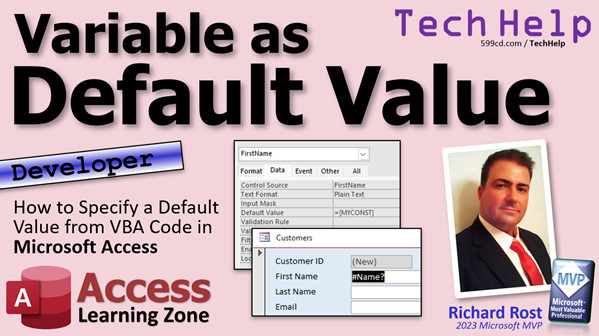
access 2016, access 2019, access 2021, access 365, microsoft access, ms access, ms access tutorial, #msaccess, #microsoftaccess, #help, #howto, #tutorial, #learn, #lesson, #training, #database, form field, default value, vba, const, tempvars
More InformationTranscript In today's video, I'm going to show you how to take a variable or a constant that's in your VBA code and specify that as a default value in a form field, which is not as easy as you might think.
Today's question comes from Eduardo from Hollywood, Florida, one of my Gold members. He posted this in the forums on my website today. He said, "If I have a global constant, my server equals, and then some IP address, how do I put that in the default value field in a form?" Apparently, you cannot put a global constant or a variable there, and that is correct. You can't just directly put that in the default value field. Hence my screenshot here; you'll get a #Name? error, just like that. Let me show you.
This is a developer class, which means you'll need to know some VBA. If you don't know VBA, you can go watch this video. It will teach you all the basics. This particular problem is a little bit beyond the basics. You'll need to know what variables are, so watch this video. Also, go watch this video on variable scope and visibility where I talk about stuff that is public, private, form modules versus public modules, and all that kind of stuff.
Here is what Eduardo is trying to do. We've got a global module out here. In here, you can declare constants and variables that are public so everyone in the database can use them. For example, we can say Public Const, let's call it MyString, and give it a value: equals "x." He is using it for what looks like IP addresses. Now, in your VB code, if you come out here and try to, let's say, in this Hello World button, message box MyString, and hit the button, there's my x.
But what Eduardo wants to do is use that in the default value for a field, like right here. Now, if you just type in here "MyString," Access converts that into an actual string. So we don't want that. If you put MyString in here like that, thinking it is like a form field, let's see what happens. Let's close this, come back in here, go to a new record, and call name. Same thing occurs if you use =MyString, and the same problem. Access at the form level can't read those VBA variables and constants like that.
But what you can do is load those into the default value property when the form loads. For example, let's come back in here and get rid of the default value out of here. Now, let's go to the form's events and go to the OnLoad event like this. This will run when the form opens or loads.
You might be tempted to say, "FirstName.DefaultValue = MyString." That's how you can change the default value property of the FirstName field. You would think that would work. But let's see what happens. I am still getting #Name. Here's what you have to do, and it's tricky.
You have to literally tell DefaultValue what its actual default value is going to be, and since that's a global constant variable, it is not going to change at this point. So you would have to say, watch this, it is crazy: inside of a string, go = "", then your string, then close it up like that. If you're not familiar with the double double quotes, I have a whole separate video on that. Go watch my concatenation double double video.
Essentially, what this is doing is saying that the default value is exactly equal to = "X". That itself is now the default value. So when it loads up, the default value gets set equal to = "X". I know it is weird, but that's the way you have to do it. Now, if you close that and open it up and go to a new record, there is your default value.
I just teach you how to use it. If you're doing it with other variable types, numeric or dates, you have to change them accordingly. If you've got, let's do Public Const MyNumber = 123, and Public Const MyDate = #1/1/1990#, then we'll save that. Come back out here and we'll do the same trick, design view.
We have FamilySize and CustomerSince. In here, go to the form load. For FamilySize, it is going to be DefaultValue = "=123", and for CustomerSince, DefaultValue = "=#1/1/1990#". You always have to have that equals sign in there and, for dates, the pound sign around your date. Save it, close it, open it, and there you go. There are your default values, and they are set when the form loads. That works with constants.
Now, if you have variables that can possibly change elsewhere in your code, you might need to run this in the OnCurrent event or somewhere else. This will work fine for constants because a constant never changes.
This is actually the hard way to do this. I personally would rather use a TempVar. Instead of using constants - constants have their own set of problems. For example, if your database encounters any kind of a VBA error, those constants get reset and you have to restart the database. TempVars will usually survive having the database error out.
So, let's get rid of these constants and the code in here that sets those, or that form load event. A TempVar is something that you have to set in code yourself too, but we're going to do it in our startup form. We'll use the main menu as our startup form. When this guy loads up, we'll initialize our variables in the OnLoad event.
Pay no attention to DoStartup - that's code for me. I put that in there. We'll just get rid of that for now. In the form load event here, I am going to say: TempVars!FirstNameDefault = "Rick". So now when this form loads up, it sets TempVars!FirstNameDefault = "Rick".
Then all we have to do is start that form up. Now the TempVar is initiated. Now we'll go into our customer form here, design view, and then we can put in the default value: =TempVars!FirstNameDefault. You can use those in default value fields, in form fields, in queries, you can use TempVars everywhere.
I've got a more in-depth lesson on TempVars coming out soon. I have been putting it off because there's so much to cover with it. It's probably going to be a TechHelp video and a developer lesson on it.
But now run it. Go to a new record, and there is your default value. It's easier than using constants. I almost never use constants anymore. Use TempVars for pretty much everything. They have their limitations too, but I don't know.
If you enjoy this kind of stuff, check out my developer lessons. I have lots of them. I think we're up to developer 44 or 43. One of those is a lot - lots and tons of stuff. I go over it in the right order. This is the way you should learn it - step one, step two, step three.
You will be a developer just like me in no time. Well, at least 43 hours. Some of them are more. This one's three hours, this one's three hours, so we'll say maybe a hundred hours. I do not know, but there you go.
There's your TechHelp video for today. I hope you learned something. Live long and prosper, my friends. I'll see you next time. Intro In this video, I will show you how to set a default value for a form field in Microsoft Access using variables or constants defined in your VBA code. We'll talk about why you can't simply use a global constant or variable directly in the Default Value property, how to correctly assign these values through VBA events like OnLoad, and the importance of formatting for different data types such as strings, numbers, and dates. I will also explain why using TempVars is often a better solution than using constants for default values, highlighting their advantages and proper usage in your Access applications. Quiz Q1. Why does entering a public constant or variable name directly in the Default Value field of an Access form cause an error?
A. The Default Value field does not recognize references to VBA-level variables or constants.
B. You must use double quotes around the variable or constant name.
C. Form fields can only use numeric values in the Default Value property.
D. Access automatically converts variable names into field names.
Q2. What is the correct method to set a form field's Default Value to a global constant value when the form loads?
A. Set the Default Value property to MyString in the property sheet.
B. Assign the value with FirstName.DefaultValue = "= ""X"" " in the OnLoad event.
C. Enter =MyString directly in the Default Value property.
D. Use FirstName.Value = MyString on the form.
Q3. What is the purpose of the equals sign (=) at the beginning when assigning a Default Value property in code?
A. It tells Access to treat the value as a constant.
B. It signals Access to use a function for the value.
C. It indicates the value is an expression to be evaluated.
D. It has no effect and can be omitted.
Q4. How should a date constant be formatted when assigning it to a form field's Default Value in VBA?
A. DefaultValue = "1-1-1990"
B. DefaultValue = "= #1 1 1990#"
C. DefaultValue = MyDate
D. DefaultValue = "= 1 1 1990"
Q5. Why might you need to use the OnCurrent event instead of only the OnLoad event when setting default values with variables?
A. The OnCurrent event runs every time a new record is loaded and can update changing variables.
B. The OnLoad event only triggers when opening the program for the first time.
C. The DefaultValue property can only be changed after the form loads.
D. The OnCurrent event is required for all field value assignments.
Q6. What are some limitations of using global constants for default values in Microsoft Access?
A. Constants can be changed by users at runtime.
B. Constants survive all database errors.
C. If a VBA error occurs, constants reset and require a database restart.
D. Constants can only be numeric values.
Q7. What is an advantage of using TempVars over global constants for default values?
A. TempVars can be used directly in queries and forms and usually survive VBA errors.
B. TempVars are only accessible inside VBA code.
C. You must restart the database after a TempVar is set.
D. TempVars can only store string values.
Q8. Where should you typically initialize the values for TempVars that are used as default form values?
A. In a query.
B. In the startup form's OnLoad event.
C. In the property sheet for the form field.
D. In the VBA Immediate window.
Q9. Which of the following statements is true regarding TempVars in Access?
A. TempVars must be set using global modules only.
B. TempVars can be referenced in Default Value formulas, queries, and forms.
C. TempVars are automatically set each time a form loads.
D. TempVars only work in macros, not in VBA.
Q10. When setting a field's Default Value property to a TempVar in Access, what is the correct syntax?
A. TempVars!VariableName
B. =TempVars!VariableName
C. "TempVars!VariableName"
D. =MyString
Answers: 1-A; 2-B; 3-C; 4-B; 5-A; 6-C; 7-A; 8-B; 9-B; 10-B
DISCLAIMER: Quiz questions are AI generated. If you find any that are wrong, don't make sense, or aren't related to the video topic at hand, then please post a comment and let me know. Thanks. Summary Today's TechHelp tutorial from Access Learning Zone focuses on how you can set the default value of a form field using a variable or constant from your VBA code in Microsoft Access. While it might seem like a simple task, the process actually has some complications that catch many developers off guard.
A common question I receive is how to take a global constant, such as an IP address stored in your VBA code, and use it as the default value for a field on an Access form. If you try to assign a variable or constant directly to a form field's default value, Access simply does not allow it. If you attempt it, you will encounter a Name? error when you use the form, because Access does not recognize VBA variables or constants in this context.
If you are new to VBA or need a refresher on variable types, scope, and visibility, I strongly recommend reviewing my introductory lessons on VBA fundamentals and variable scope. Understanding the difference between items declared in form modules versus public modules is essential for this tutorial.
Let me explain the scenario. In a public module, you can declare global constants and variables that are accessible throughout your database. For example, if you declare a public constant called MyString and assign it a value, such as 'x', you can reference it anywhere in your VBA code. Demonstrating with a message box inside a button click event, calling MyString will display its value correctly.
However, using MyString in the default value property of a form field does not work the same way. Typing MyString, with or without an equals sign, into the field's default value will not retrieve the value from your code. Access does not evaluate VBA variables or constants in the default value context. Instead, it either sees it as literal text or throws a Name? error.
To achieve what you want, you need to set the field's DefaultValue property using VBA when the form loads. You do this in the form's OnLoad event. However, it is not as straightforward as simply assigning the constant or variable to DefaultValue. Instead, you need to set DefaultValue to a string that contains the appropriate expression. For a string value, this means setting it to something that looks like = "X", where X is your constant's value. You must construct this string carefully, including the necessary quotes. If you are not familiar with how double quotes work inside strings in VBA, I recommend reviewing my lesson on string concatenation and the use of double double quotes.
If you want to work with other data types, such as numbers or dates, you adjust the expression accordingly. For numbers, set DefaultValue to something like =123, and for dates, use the pound signs around your date, such as =#1/1/1990#. Again, you do this assignment in the form's Load event so it happens every time the form is opened and a new record is added.
This approach works well with constants since their values do not change. However, if you are working with variables that might get updated while the application is running, you may also need to set the DefaultValue in other form events, like OnCurrent, to ensure the right value is displayed.
That being said, this method can be cumbersome, especially since global constants in Access VBA can be reset to their initial values if your database encounters any VBA errors, requiring you to restart Access. For this reason, I prefer to use TempVars for most situations that require global, accessible values. TempVars are more robust in that they usually persist even after certain errors, making them more reliable when storing default values for form fields.
To use TempVars, you set the variable in code at the appropriate place, for example in the OnLoad event of your startup form. Then, you can refer to TempVars in your field's DefaultValue property by using the syntax =TempVars!FirstNameDefault. TempVars integrate seamlessly in form fields, queries, and other parts of Access, making them highly flexible. This is now my preferred approach, and I rarely use constants for this purpose anymore.
I am working on a more comprehensive lesson on TempVars, since they are so useful and have many applications in Access databases.
If you are interested in learning more about Access development, I offer a whole series of developer lessons that break down these and many other advanced techniques, in a sequence designed to help you build your skills step by step.
You can find a complete video tutorial with step-by-step instructions on everything discussed here on my website at the link below. Live long and prosper, my friends. Topic List Using VBA variables as default values in form fields
Using VBA constants as default values in form fields
Setting form field DefaultValue property in VBA
Explaining why Access cannot read VBA variables directly in Default Value
Using the OnLoad event to assign default values
Formatting DefaultValue assignment with string concatenation
Assigning number and date constants as default values
Properly formatting date values in DefaultValue with pound signs
Using TempVars to store and assign default values for forms
Setting TempVars in a startup form's OnLoad event
Using TempVars in form default value properties
Advantages of TempVars over VBA constants for default values Primary Topics Access forms, DefaultValue property, VBA variables, VBA constants, TempVars, OnLoad event, form design, variable scope Secondary Topics Variable visibility, error handling, initializing variables, OnCurrent event, best practices |





