How Did You Find Access?
By Richard Rost

 5 months ago
How Did You Get Introduced to Microsoft Access?
In this video, I share the story of how I was first introduced to Microsoft Access by accident while installing Microsoft Office in the early 1990s.
I explain how I learned to use Access on my own with books and by exploring the Northwind database, describe my early work as an Access developer, and discuss how I transitioned into teaching and recording videos for students.
I invite you to share your story of how you first discovered Access.
Keywords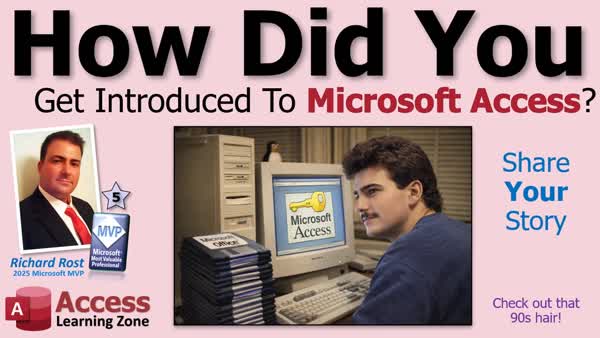
, contract programmer, database system C++, Northwind database, self taught programming, building databases small business, Access developer, training center, recording live classes, VCR recording, VHS tapes, online training, YouTube training, AI image generation
More InformationTranscript How did you get introduced to Microsoft Access? My story: I discovered it completely by accident.
Back in the early 90s, I was installing Microsoft Office 2.0 from what felt like a mountain of floppy disks. I used Word and Excel all the time, maybe PowerPoint once in a while, so I just did a full install and checked every box. After sitting there swapping disks forever, I finally fired this thing up to make sure it worked.
Word, good. Excel, working. Then I saw this thing called Microsoft Access and I thought, what the heck is this?
At the time, I was working as a contract programmer, building a database system in C++ for a small business. It was DOS-based, and I was coding everything by hand - all the tools, input screens, logic, all of it. It worked, but it was slow to build and a lot of effort.
So I figured I would poke around this Access thing just to see what it could do. I knew a lot about programming, but I knew very little about databases. No training, nothing, completely self-taught since I was like 8 years old. But even with my limited skill set, in an afternoon I had figured out how to build tables and some basic forms. I got a basic system working that did the same thing in C++ that had taken me weeks, but here I did this thing in just a few hours with Access.
That was my light bulb moment. This thing was pretty cool. So that same day I drove over to Barnes & Noble. I picked up a book on Access - I think it was the Access 2 Bible, but I am not sure. I had a bunch of them eventually, and I started teaching myself. Between that book, and tearing apart the original Northwind database, that is how I learned Access. We did not have YouTube back in those days.
So I discovered Access completely by accident, then taught myself how to use it from books. I did not go looking for it, I just accidentally clicked on the install everything box in Microsoft Office, and I stumbled onto the thing that ended up shaping my entire career.
After that, I spent the next few years working as a contract Access developer, building databases for small businesses and learning more with every project. Eventually, I took that experience and opened my own training center, where I started teaching Access, along with Word and Excel and lots of other stuff, in person in small groups.
In fact, my first experience with recording videos came from those live classes. I actually had a VCR that I hooked up to a TV, much like you see here. I would record each session as I taught it. Students who attended the class had the option to purchase a VHS tape, remember those, with their session on it, so they could go back and review everything at their own pace later. It turned out to be really popular, and I decided to move from the classroom to just recording videos, shipping out on CDs at first, and then once YouTube hit the scene, I moved to online training, and I am still doing that today.
So that is my story. Now I am curious to hear your story. How did you get introduced to Microsoft Access? Did you stumble into it like I did? Or did someone hand it to you and say, "Here, use this?"
So leave a comment down below and tell me how it all started for you. I would love to read through them, and I might even feature some of the best ones in an upcoming video.
Live long and prosper, my friends. I will see you next time.
Oh, and I just have to add as a PS: I gave the AI a picture of me from when I was like 20 years old, and it got the hair perfectly, and the little faded not-quite-there-yet mustache. That is exactly how I looked when I was like 18 or 19, so it is perfect. I love how AI is coming along with image generation. And this one, spot on. I just described the TV and the AV cart that I used to have in the corner, and that is almost exactly what it looked like.
And this one, yeah, okay. It originally put me in a suit and tie because I gave it this picture to work with as a template. Then I had to say, no, no, no, no, no, I do not wear a suit and tie at home. This is a picture I took when I was going to a wedding once about 10 years ago. So, first time in a long time, I wore a suit and tie. But I am like, no, put me in a Rush t-shirt or something.
Okay, bye-bye. Let me hear your story. Post it down below. I am curious. Intro In this video, I share the story of how I was first introduced to Microsoft Access by accident while installing Microsoft Office in the early 1990s. I explain how I learned to use Access on my own with books and by exploring the Northwind database, describe my early work as an Access developer, and discuss how I transitioned into teaching and recording videos for students. I invite you to <B>share your story</B> of how you first discovered Access. Quiz No quiz available. Summary Today's video from Access Learning Zone is all about how I first encountered Microsoft Access, and I have to say, it was not something I went searching for.
Back in the early 90s, I was installing Microsoft Office 2.0 from a whole stack of floppy disks. I used Word and Excel frequently, and occasionally dabbled with PowerPoint, so for convenience, I just performed a full installation, making sure every component was included. After what felt like ages swapping out disks, I finished the installation and started checking that each program worked properly.
Word launched just fine, so did Excel, but then I noticed an unfamiliar application: Microsoft Access. Naturally, I was curious.
At that time, I was working as a contract developer, building a custom database system for a small business using C++. It was a DOS-based program, requiring me to program every detail by hand - input screens, logic, everything. It worked in the end, but it was a slow, tedious process.
Since Access had appeared as part of my Office installation, I thought I would explore exactly what it could do. Although I had a strong programming background, I did not know much about databases. I was entirely self-taught, starting with computers when I was a kid, but I had no formal instruction when it came to database development. Even so, in just an afternoon, I had figured out how to build tables and some basic forms within Access. I managed to recreate a basic version of the C++ system I had labored over for weeks - but this time using Access, I did it in just a few hours.
That moment was a game changer for me. I immediately realized how versatile and powerful Access was. That same evening, I drove out to Barnes & Noble and picked up a book on Access. I believe it was the Access 2 Bible, though I read quite a few of them over the years. Using that book along with studying the original Northwind sample database, I taught myself how to use Access. This was well before YouTube or any of the online resources we have now, so it was all good old-fashioned self-study.
My introduction to Access was a total accident. I did not intentionally seek it out - it was the result of doing a full install of Office and discovering this hidden gem, which ended up completely transforming my career path.
For the next few years, I worked as a contract Access developer, building databases for small business clients and increasing my skills one project at a time. Eventually, I used everything I had learned to open my own training center. There, I began teaching Access, as well as Word, Excel, and a variety of other topics, instructing small groups in person.
Recording videos actually started as a way to enhance these classes. I had a VCR and connected it to a TV, recording each live session. Students could buy a VHS tape with their class session, giving them the chance to review the material on their own time. It turned out to be quite popular. This experience inspired me to step away from the classroom and focus on recording tutorial videos, first distributing them on CDs, and later moving online to platforms like YouTube as they became available. To this day, I continue providing online training.
So, that's how I discovered Access, quite by accident, and eventually built a career around it.
I am interested in hearing about your own journey. How did you first come across Microsoft Access? Was it a happy accident for you as well, or did someone introduce you to it? Please share your story in the comment section below. I look forward to reading them and may even feature the most interesting stories in a future video.
Live long and prosper, my friends.
As a little side note, I wanted to share something fun. I experimented with an AI image generator, feeding it an old photo of myself from when I was about twenty. The AI really nailed the details, matching my hair and even the hesitant mustache I had back then. The background, with a TV and AV cart, ended up looking almost exactly like my setup from those early training days. Initially, the AI put me in a suit and tie, based off another reference photo from a wedding, but I corrected it and asked for something more authentic to my everyday style, like a Rush t-shirt. The results were spot on and made me smile.
That wraps up my story. Please share yours below - I am looking forward to hearing from you.
You can find a complete video tutorial with step-by-step instructions on everything discussed here on my website at the link below.
Live long and prosper, my friends. Topic List This is a personal story, not a tutorial or technical lesson. It is a narrative recounting how the speaker accidentally discovered Microsoft Access while installing Office in the early 1990s, taught themselves the software through books and experimentation, and eventually built a career teaching Access and recording training videos. Article My introduction to Microsoft Access happened completely by accident. Back in the early 1990s, I was installing Microsoft Office 2.0 from a stack of floppy disks that seemed like it would never end. At that time, I was already using Word and Excel regularly, and occasionally PowerPoint, so when it came time to install Office, I just chose to install everything. After what felt like hours of swapping disk after disk, the installation finally finished, and I decided to run the programs to make sure they all worked.
Word opened just fine, as did Excel. But then I noticed an application in the menu called Microsoft Access. I had never heard of it and had no idea what it was supposed to do. Out of curiosity, I launched Access to see what it was all about.
At that point in my career, I was working as a contract programmer. I was building database systems for a small business using C++, working entirely in DOS. Every piece of the software - from data storage to input screens to the logic behind everything - had to be coded by hand. It was working, but every new feature was slow and required a lot of work with little room for error.
Given that context, Access immediately caught my attention as something that might make my life easier. I knew a lot about general programming, but when it came to databases, I hardly had any formal training - I was largely self-taught. Still, within just a few hours playing around with Access, I had figured out how to create tables, design forms, and put together a basic system that did the same work as my earlier C++ project. What had taken me weeks to do before was now possible in just a single afternoon with Access.
That was a real light bulb moment for me. I realized that Access had tremendous potential to simplify the kind of work I was doing. That same day, I drove to a bookstore and picked up a book on Access, which I think might have been the Access 2 Bible, although I ended up owning several titles over the years. I started teaching myself everything I could, relying on those books and pulling apart the Northwind database that came with Access to learn from real examples. This was before YouTube or online video tutorials, so teaching myself by reading and experimenting was the only way to go.
What started as a happy accident grew into something that shaped my whole career. I spent the following years developing Access databases for small businesses as a contractor, learning more with every project. Eventually, I decided to share that knowledge more broadly and opened my own training center, offering in-person classes for Access as well as Word, Excel, and other Office programs.
My first attempts at recording lessons were surprisingly low-tech by today's standards. I had a VCR hooked up to a TV and recorded each class session as I taught it. After class, students could purchase a VHS tape with the recording to review later on their own time. That idea was a hit, so I eventually transitioned from live training to recording lessons for distribution, first on CDs, and later, when the internet allowed, via online video. Once YouTube arrived on the scene, it became the natural platform for sharing my knowledge, and I have continued teaching there to this day.
So my journey with Access began by chance, from simply checking every box during an Office installation. But accidentally stumbling onto the program turned into discovering a new passion, which led me down a path of self-directed learning, real-world development, and eventually, into teaching others how to use Microsoft Access. It has been a constant companion and a foundation of my career ever since.
If you are new to Access, or curious how others discovered it, know that many people first encounter it by accident or out of curiosity, just like I did. Sometimes the tools that end up being most valuable in our careers aren't the ones we were seeking, but the ones we discover by exploring what is right in front of us. Primary Topics discovery of Microsoft Access, self-teaching, career development, database building, early database programming, instructional methods
Secondary Topics AV technology, AI image generation, community engagement
|





